




Aten CS84U CubiQ 4-Port KVM Switch - QXGA 2048 x 1536 - Dual PS/2 & USB Console - VGA

Business volume discounts
Technical guidance
Preparation & staging
QC · ON · AB · BC
Product Features
Technical Overview
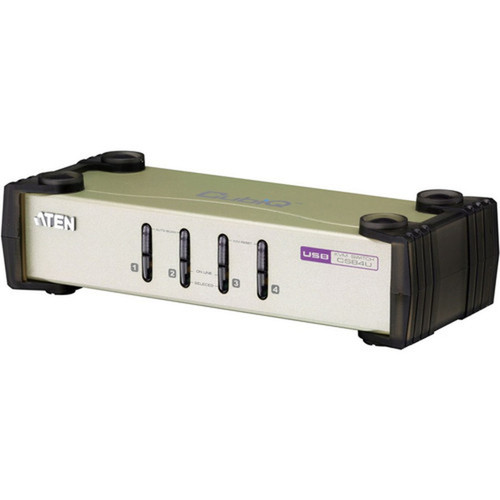
This KVM switch connects to computers via VGA interfaces, with one VGA port allocated per computer. The console side offers dual PS/2 and dual USB ports, allowing simultaneous connection of legacy and contemporary input devices. Computer selection can be performed through front panel pushbuttons, keyboard hotkeys, or mouse movements for intuitive operation.
Video performance is enhanced with DDC2B support and ATEN's exclusive Video DynaSync™ technology, which eliminates bootup display problems and optimizes resolution when switching between ports. The console mouse port includes emulation and bypass features to support most mouse drivers and multifunction mice without compatibility issues.
Relevant factors for this section include Number of Computers Supported, Graphic Mode, Maximum Video Resolution. When those points are considered together, they give buyers a clearer picture of how the product is equipped, how it fits into deployment, and what kind of day-to-day role it is meant to support.
Key Product Advantages
The CS84U provides complete keyboard emulation that ensures error-free booting of connected systems, along with Mac and Sun keyboard support and emulation for cross-platform compatibility. Multilingual keyboard mapping accommodates English, Japanese, and French layouts, making it suitable for international deployments.
Dual Interface Console
Simultaneously connect PS/2 and USB keyboards and mice to the console, eliminating the need for separate adapters or peripheral swaps in mixed environments.
- 2 PS/2 ports
- 2 USB ports
- Flexible peripheral management
Superior Video Quality
Delivers QXGA resolution up to 2048 x 1536 with DDC2B and Video DynaSync™ technology for stable, high-quality video across all connected computers.
- QXGA 2048x1536
- DDC2B compliant
- Video DynaSync™ optimization
Deployment / Use Cases
The compact dimensions and lightweight design make this KVM switch suitable for embedded applications, control panels, and educational computer labs where multiple systems need centralized management. Its environmentally friendly construction and straightforward installation process support sustainable IT operations.
Relevant factors for this section include Number of Computers Supported, Graphic Mode, Maximum Video Resolution. When those points are considered together, they give buyers a clearer picture of how the product is equipped, how it fits into deployment, and what kind of day-to-day role it is meant to support.
Server Room Management
Ideal for controlling multiple servers in data centers or server rooms where space is limited and efficient access to multiple systems is required.
- Rack-mountable design
- Four-system control
- Hotkey switching
Multi-Platform Workstations
Perfect for development labs, testing environments, or creative studios that use Windows, Linux, Mac, and Sun systems simultaneously.
- Cross-OS compatibility
- Keyboard mapping
- Mouse driver support
Physical Profile
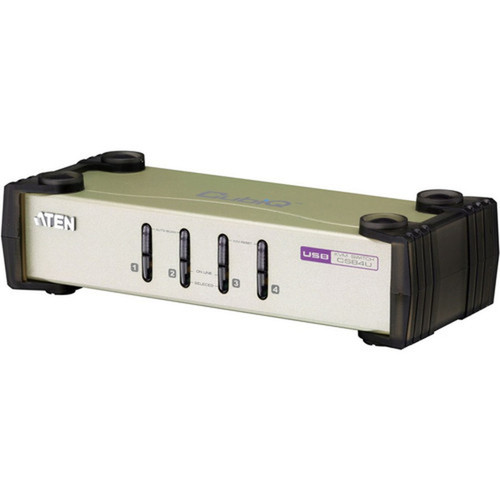
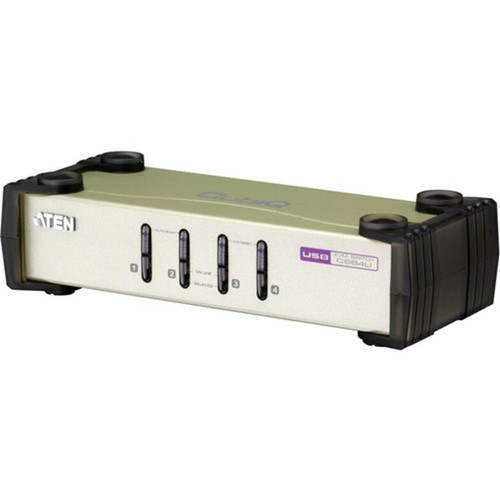
Measuring 8.70 inches wide, 21 inches deep, and 2.17 inches high (220.98 x 533.40 x 55 mm), the CS84U has a slim profile that fits standard rack configurations or sits discreetly on desktops. Weighing approximately 540 grams, it's lightweight yet durable for permanent installations or mobile setups. The front panel features intuitive pushbuttons for computer selection, with clear labeling for straightforward operation.
- Width
- 8.70" (220.98 mm)
- Depth
- 21" (533.40 mm)
- Height
- 2.17" (55 mm)
- Weight
- 540 g
What's in the Box
The package includes everything needed for immediate deployment of the KVM switch system.
Highlights
- Controls four VGA computers from a single PS/2-USB console
- Dual interface console with 2 PS/2 and 2 USB ports
- QXGA maximum resolution of 2048 x 1536
- Video DynaSync™ technology eliminates bootup display problems
- Multiplatform support for Windows, Linux, Mac, and Sun
- Complete keyboard emulation for error-free booting
- Mac and Sun keyboard support and emulation
- Multilingual keyboard mapping for English, Japanese, French
- Front panel, hotkey, and mouse computer selection
- Console mouse port emulation supports most mouse drivers
Specifications
| Specifications | |
|---|---|
| Manufacturer | ATEN Technology, Inc |
| Manufacturer Part Number | CS84U |
| Brand Name | ATEN |
| Product Line | CubiQ |
| Product Model | CS84U |
| Product Name | CubiQ KVM Switch |
| Product Type | KVM Switchbox |
| Technical Information | |
| Number of Computers Supported | 4 |
| Video | |
| Graphic Mode | QXGA |
| Maximum Video Resolution | 2048 x 1536 |
| Interfaces/Ports | |
| PS/2 Port | Yes |
| USB | Yes |
| VGA | Yes |
| Number of PS/2 Ports | 2 |
| Number of USB Ports | 2 |
| Number of VGA Ports | 1 |
| Physical Characteristics | |
| Height | 2.17" (55 mm) |
| Width | 8.70" (220.98 mm) |
| Depth | 21" (533.40 mm) |
| Weight (Approximate) | 540 g |
| Miscellaneous | |
| Package Contents | CubiQ KVM Switch 4 x Custom KVM Cable Sets 1 x User Guide |
| Environmentally Friendly | Yes |
| Country of Origin | China |
User Manual
FAQ
How many computers can the ATEN CS84U KVM switch control?
The ATEN CS84U CubiQ KVM switch controls up to four computers simultaneously. Each computer connects via VGA interface, and the switch allows seamless control of all four systems from a single console with keyboard, mouse, and monitor.
What video resolution does this KVM switch support?
This switch supports QXGA resolution up to 2048 x 1536 pixels. It includes DDC2B compliance and ATEN's exclusive Video DynaSync™ technology, which optimizes resolution when switching between ports and eliminates bootup display problems for consistent video quality.
What types of keyboard and mouse interfaces are supported at the console?
The console provides dual interface support with two PS/2 ports and two USB ports. This allows simultaneous connection of both legacy PS/2 and modern USB keyboards and mice, offering flexibility for mixed peripheral environments without requiring adapters.
How do I switch between connected computers?
Computer selection can be performed through three methods: front panel pushbuttons for direct port selection, keyboard hotkeys for quick switching, or mouse movements for intuitive control. This flexibility allows users to choose the most convenient method for their workflow.
What is included in the package with the KVM switch?
The package includes the CubiQ KVM switch unit, four custom KVM cable sets for connecting computers, and a user guide. The cable sets are specifically designed for this switch model, ensuring proper connectivity and performance.
What connectivity or interface options are available?
Connectivity support is listed in the product specifications, including the relevant wireless or port options when available.
| Qty | Price | Available |
|---|