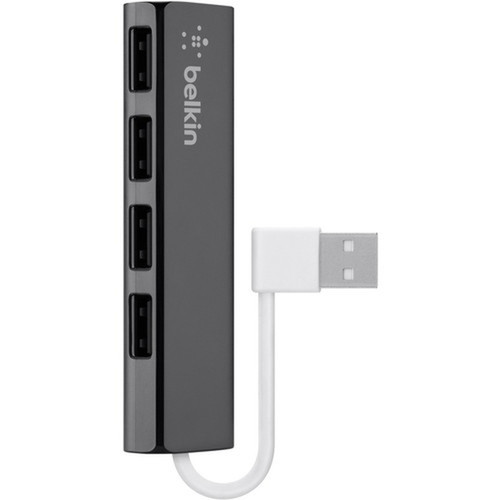
Belkin F4U042bt 4-Port Ultra-Slim Travel Hub - External USB 2.0 Hub - Black - PC/Mac

Business volume discounts
Technical guidance
Preparation & staging
QC · ON · AB · BC
Product Features
Technical Overview
This USB hub features a straightforward technical design centered on reliable USB 2.0 connectivity. The host interface is standard USB, connecting to a computer's USB port to provide four downstream USB 2.0 Type-A ports. Each port supports data transfer speeds up to 480 Mbps, suitable for peripherals like input devices, flash drives, and audio interfaces.
The hub operates without external power, drawing power directly from the host computer, which simplifies deployment and reduces cable clutter. Its plug-and-play functionality ensures compatibility with most operating systems that support USB hubs, requiring no additional software installation for basic peripheral connections.
Relevant factors for this section include Host Interface, Total Number of USB Ports, Number of USB 2.0 Ports, USB Connector Type. When those points are considered together, they give buyers a clearer picture of how the product is equipped, how it fits into deployment, and what kind of day-to-day role it is meant to support.
Key Product Advantages
The Belkin Ultra-Slim Travel Hub offers practical advantages for users needing expanded USB connectivity in a portable format. Its ultra-slim design minimizes bulk, making it easy to carry in laptop bags or briefcases, while the durable construction ensures reliable performance during travel.
Expanded Connectivity
Adds four USB 2.0 ports to computers with limited built-in USB ports, enabling connections for multiple peripherals simultaneously.
- Supports keyboards, mice, and storage devices
- Ideal for laptops with minimal port options
Travel-Optimized Design
The slim, lightweight form factor is tailored for mobility, fitting easily into travel accessories without adding significant weight or space.
- Compact footprint
- Durable build for on-the-go use
Deployment / Use Cases
This hub is versatile for various deployment scenarios where additional USB ports are needed. It is commonly used in home offices to connect peripherals like printers, scanners, and external hard drives to a single computer, reducing the need to constantly swap cables.
For business travelers and remote workers, the hub provides a reliable way to expand connectivity on laptops during meetings, conferences, or co-working spaces. Educational environments also benefit from its simplicity, allowing students to connect multiple devices for projects or presentations without technical complexity.
Mobile Workstations
Enhance laptop connectivity in temporary setups such as hotel rooms, client sites, or coffee shops, supporting peripherals like mice, keyboards, and presentation clickers.
Home Office Setup
Create a organized workspace by connecting all essential USB devices to a central hub, streamlining cable management and improving accessibility.
Highlights
- Adds four USB 2.0 ports to expand connectivity for PCs and Macs
- Ultra-slim, travel-friendly design ideal for mobile professionals
- Plug-and-play setup requires no drivers for most peripherals
- Black finish matches common computer accessories
- External form factor for easy plug-and-play deployment
- Bus-powered operation eliminates need for external power adapter
- Supports USB 2.0 data transfer speeds up to 480 Mbps
- Lifetime limited warranty for long-term reliability
Specifications
| Specifications | |
|---|---|
| Manufacturer | Belkin International, Inc |
| Manufacturer Part Number | F4U042BT |
| Brand Name | Belkin |
| Product Line | Ultra-Slim |
| Product Name | 4-Port Ultra-Slim Travel Hub |
| Product Type | USB Hub |
| Technical Information | |
| Host Interface | USB |
| Interfaces/Ports | |
| Total Number of USB Ports | 4 |
| Number of USB 2.0 Ports | 4 |
| USB Connector Type | Type-A |
| Physical Characteristics | |
| Color Family | Black |
| Product Color | Black |
| Form Factor | External |
| Miscellaneous | |
| Platform Supported | PC,Mac |
| Country of Origin | China |
| Warranty | |
| Limited Warranty | Lifetime |
FAQ
How many USB ports does the Belkin F4U042bt hub provide?
The Belkin F4U042bt hub provides four USB 2.0 ports, all using Type-A connectors. This allows simultaneous connections for multiple peripherals like keyboards, mice, printers, or external storage devices, expanding the connectivity options of computers with limited built-in USB ports.
Is this USB hub compatible with both Windows and Mac computers?
Yes, the hub is compatible with both PC and Mac platforms. It supports plug-and-play functionality on operating systems that recognize USB hubs, typically requiring no additional drivers for basic peripherals. This cross-platform compatibility makes it suitable for mixed-environment deployments.
Does the hub require an external power adapter to operate?
No, the hub is bus-powered, meaning it draws power directly from the host computer's USB port. This eliminates the need for an external power adapter, simplifying setup and reducing cable clutter. It is designed to support standard USB peripherals without exceeding the power limits of the host port.
What is the data transfer speed of the USB ports on this hub?
The USB ports on this hub support USB 2.0 specifications, with data transfer speeds up to 480 Mbps. This speed is sufficient for peripherals like keyboards, mice, and most external storage devices, though it may not be ideal for high-bandwidth applications requiring faster interfaces like USB 3.0.
Is the Belkin F4U042bt hub suitable for travel use?
Yes, the hub is designed with an ultra-slim, travel-friendly form factor. Its compact size and lightweight construction make it easy to carry in laptop bags or briefcases, and the durable build ensures reliable performance during mobile use. It is ideal for professionals, students, or anyone needing extra USB ports on the go.
What warranty coverage does Belkin offer for this USB hub?
Belkin provides a lifetime limited warranty for the F4U042bt hub. This warranty covers defects in materials and workmanship under normal use, offering long-term assurance of product reliability. For specific terms and conditions, refer to Belkin's official warranty documentation.
| Qty | Price | Available |
|---|