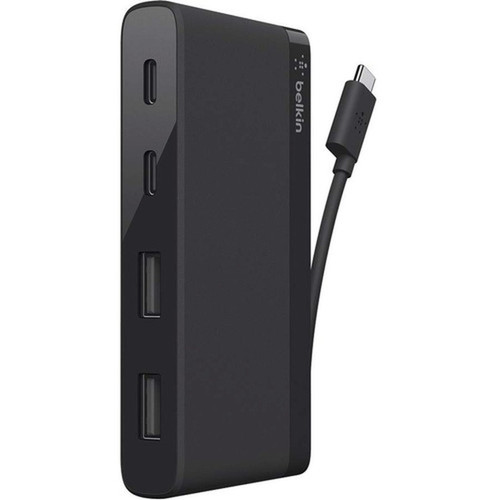
Belkin F4U090btBLK USB-C 4-Port Mini Hub - USB 3.0 Type-C & Type-A - 640 MB/s - Black

Business volume discounts
Technical guidance
Preparation & staging
QC · ON · AB · BC
Product Features
Technical Overview
This hub leverages USB 3.0 technology across all four downstream ports, delivering consistent 5 Gbps bandwidth per port. The host connection uses a USB Type-C connector that supports the USB 3.1 Gen 1 standard, enabling backward compatibility with USB 2.0 and 1.1 devices while maximizing performance for modern peripherals. Each port supplies standard USB power for bus-powered devices without requiring an external power adapter.
The internal design prioritizes signal integrity and stable data flow, minimizing latency during simultaneous multi-device use. The hub operates as a plug-and-play device, requiring no drivers for basic functionality on supported operating systems. Its external form factor and passive cooling ensure silent operation in office, home, or mobile environments.
Relevant factors for this section include Host Interface, Data Transfer Rate. When those points are considered together, they give buyers a clearer picture of how the product is equipped, how it fits into deployment, and what kind of day-to-day role it is meant to support.
Key Product Advantages
This mini hub combines practical port expansion with user-friendly design, addressing common connectivity gaps in today's streamlined notebooks. Its reversible Type-C connector ensures hassle-free connection every time, while the four USB 3.0 ports maintain high-speed data transfer across all connected devices.
Simultaneous Multi-Device Support
Connect up to four USB peripherals at once—such as a keyboard, mouse, external hard drive, and flash drive—without swapping cables or compromising performance.
- Maintains 640 MB/s transfer rate per port
- Supports mixed device types concurrently
Platform-Optimized Compatibility
Designed and tested for seamless operation with Mac and ChromeOS systems, providing reliable expansion for Apple notebooks, Chromebooks, and other USB-C enabled devices.
- No drivers required for basic functionality
- Officially validated for platform stability
Deployment / Use Cases
The Belkin USB-C 4-Port Mini Hub serves as a versatile connectivity solution for users who need to expand the limited USB ports on modern notebooks. Its compact size and plug-and-play operation make it ideal for desktop setups, temporary workstations, and mobile professionals who require reliable peripheral access without carrying multiple adapters.
Common deployment scenarios include connecting a full-sized keyboard and mouse to a notebook while maintaining access to external storage for backups or large file transfers. The hub also supports printers, card readers, and other legacy USB devices that lack native USB-C connectivity, extending the lifespan of existing peripherals.
Notebook Docking Station Alternative
Transform a minimal-port notebook into a fully equipped workstation by adding essential peripherals through a single USB-C connection.
- Ideal for MacBook and Chromebook users
- Reduces cable clutter on desks
Mobile Productivity Hub
Carry this lightweight hub in a laptop bag to quickly set up a productive environment in conference rooms, coworking spaces, or hotel rooms.
- Weighs just ounces for easy portability
- Instant connectivity without configuration
Physical Profile
The hub features a sleek black exterior with a minimalist footprint that occupies minimal desk space. Its dimensions of 0.64 inches high by 3.86 inches wide by 3.46 inches deep allow it to fit neatly beside a notebook or under a monitor stand. The external form factor requires no internal installation, making it suitable for temporary or permanent setups without hardware modifications.
- Width
- 3.86" (98 mm)
- Depth
- 3.46" (88 mm)
- Height
- 0.64" (16.30 mm)
Highlights
- Four USB 3.0 ports for simultaneous peripheral connections
- Reversible USB Type-C host connector for foolproof plug orientation
- 640 MB/s data transfer rate for fast file operations
- Compact black design measuring just 0.64" H x 3.86" W x 3.46" D
- Plug-and-play operation with no external power required
- Officially compatible with Mac and ChromeOS platforms
- Supports keyboards, mice, storage drives, printers, and other USB devices
- External form factor for easy desktop or travel use
Specifications
| Specifications | |
|---|---|
| Manufacturer | Belkin International, Inc |
| Manufacturer Part Number | F4U090BTBLK |
| Brand Name | Belkin |
| Product Name | USB-C 4-Port Mini Hub (USB Type-C) |
| Product Type | USB Hub |
| Technical Information | |
| Host Interface | USB Type C |
| Media & Performance | |
| Data Transfer Rate | 640 MB/s |
| Interfaces/Ports | |
| Total Number of USB Ports | 4 |
| Number of USB 3.0 Ports | 4 |
| USB Connector Type | Type-C,Type-A |
| Physical Characteristics | |
| Color Family | Black |
| Product Color | Black |
| Form Factor | External |
| Height | 0.64" (16.30 mm) |
| Width | 3.86" (98 mm) |
| Depth | 3.46" (88 mm) |
| Miscellaneous | |
| Application/Usage | Notebook,Keyboard,Mouse,Flash Drive,Hard Drive,Printer |
| Platform Supported | Mac,ChromeOS |
| Country of Origin | China |
| Warranty | |
| Limited Warranty | 12 Month |
FAQ
What devices can I connect to this USB-C hub?
You can connect up to four standard USB peripherals simultaneously, including keyboards, mice, flash drives, external hard drives, printers, card readers, and other USB 2.0/3.0 devices. The hub provides sufficient power for bus-powered devices like flash drives and external SSDs, while self-powered devices like printers will require their own power sources.
Is this hub compatible with Windows laptops that have USB-C ports?
While the hub is officially validated for Mac and ChromeOS platforms, it should work with Windows laptops featuring USB-C ports that support USB 3.1 Gen 1 standards. Windows users may need to ensure their system's USB-C port provides data functionality (not just charging) and that appropriate drivers are installed for optimal performance with certain peripheral types.
Does the hub require external power or drivers to operate?
No external power adapter is required—the hub draws power directly from the host computer's USB-C port. For basic functionality with standard peripherals like keyboards, mice, and storage devices, no additional drivers are needed on supported platforms. Some specialized devices like certain printers or security dongles may require their own drivers regardless of the hub.
What is the actual data transfer speed I can expect from this hub?
The hub supports data transfer rates up to 640 MB/s (megabytes per second), which corresponds to the 5 Gbps (gigabits per second) bandwidth of USB 3.0. Real-world speeds will depend on the connected devices—a fast SSD may approach this limit, while older USB 2.0 devices will operate at their native slower speeds. All four ports share the host connection bandwidth when used simultaneously.
Can I use this hub to charge my phone or tablet?
This hub is designed primarily for data transfer and peripheral connectivity, not for charging devices. While it may provide some power to connected devices, it does not support fast charging protocols or deliver the higher current required for efficient phone or tablet charging. For charging, use your device's dedicated charger or a hub specifically designed for power delivery.
What warranty coverage does Belkin provide for this USB hub?
Belkin backs this USB-C 4-Port Mini Hub with a 12-month limited warranty from the date of purchase. This warranty covers defects in materials and workmanship under normal use. Warranty service typically involves repair or replacement at Belkin's discretion. Keep your original receipt as proof of purchase date for warranty claims.
| Qty | Price | Available |
|---|