


Shipping included*
Exclusions
Additional shipping fees may apply in rare circumstances for deliveries outside standard service areas. In most cases, this only potentially affects shipments to the Northwest Territories and Yukon, as well as certain heavy or oversized items.
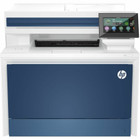
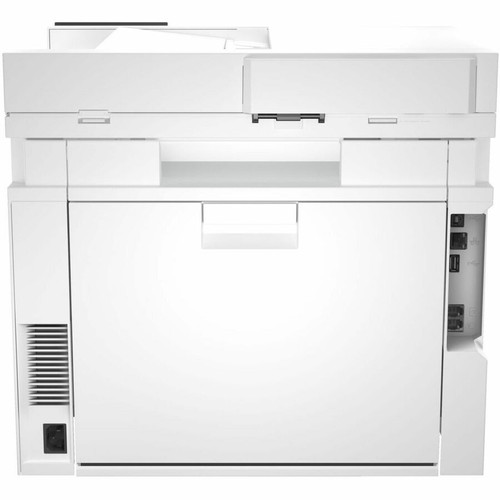
HP 4RA81F#BGJ Color LaserJet Pro MFP 4301fdn - Color Multifunction Printer - Copier/Fax/Printer/Scanner - 35 ppm - 600 x 600 dpi - Duplex - White

Business volume discounts
Technical guidance
Preparation & staging
QC · ON · AB · BC
Product Features
Technical Overview
The HP 4301fdn utilizes laser print technology to deliver consistent, fast color output for everyday office documents. Its automatic duplexing capability enables two-sided printing in a single pass, improving productivity and reducing paper consumption. The printer supports plain paper media, ensuring compatibility with standard office supplies.
The 250-sheet standard input tray provides ample capacity for continuous printing without frequent refills. With a maximum color print speed of 35 pages per minute, the printer keeps pace with demanding office workflows. The 600 x 600 dpi print resolution delivers sharp text and clear graphics suitable for internal reports, presentations, and marketing materials.
Connectivity and user interface details include a 4.3-inch LCD touchscreen for easy access to printer settings, job status, and maintenance functions. The flatbed/ADF scanner supports single-pass duplex scanning for efficient document digitization. The desktop form factor (16.6 x 17.1 x 15.1 inches) fits comfortably on a desk or stand, making it suitable for space-constrained environments.
Key Product Advantages
The HP 4301fdn offers several operational benefits that enhance office productivity and reduce total cost of ownership. Its automatic duplex printing cuts paper usage by up to 50%, lowering supply costs and supporting sustainability goals. The fast 35 ppm color print speed minimizes wait times for time-sensitive documents.
The flatbed/ADF scanner and copier provide flexible document handling, allowing users to quickly scan or copy multi-page sets or single sheets, including bound materials. The 4.3-inch LCD touchscreen with intuitive menus simplifies workflow management, from job queuing to maintenance alerts. Designed for up to 10 users, this MFP is ideal for small workgroups that require reliable, high-quality color output without the complexity of larger production printers.
Deployment / Use Cases
The HP 4301fdn is well-suited for small to medium offices, departmental workgroups, or remote offices where space is limited but color printing demand is consistent. Its compact desktop footprint allows placement on a desk or cabinet, while the 250-sheet input tray supports daily print volumes without constant attention.
Common use cases include printing color marketing collateral, internal reports, and client-facing documents; scanning receipts, contracts, or multi-page forms via the ADF or flatbed; copying single or double-sided documents quickly; and faxing important paperwork when digital transmission is not preferred. The printer's ability to handle plain paper and automatic duplexing makes it a practical all-in-one solution for general office tasks.
Workgroup Printer
Ideal for teams of up to 10 users needing shared access to fast color printing, scanning, copying, and faxing. The 250-sheet capacity and 35 ppm speed keep workflows moving.
Space-Saving MFP
Desktop design fits easily on a stand or credenza, consolidating four functions into one device to reduce clutter and equipment costs.
Physical Profile
Designed as a desktop workstation, the HP 4301fdn is finished in white with a compact footprint that fits into standard office layouts. Its dimensions are 16.60 inches wide by 17.10 inches deep by 15.10 inches high (421.64 x 434.34 x 383.54 mm). The clean, modern appearance complements office decor, and the front-access configuration simplifies media loading and maintenance tasks.
The physical profile is practical for deployment planning because the dimensions and weight are clearly defined: 15.10" (383.54 mm), 16.60" (421.64 mm), 17.10" (434.34 mm). This helps confirm rack, shelf, desk, or cabinet fit before installation.
- Width
- 16.60" (421.64 mm)
- Depth
- 17.10" (434.34 mm)
- Height
- 15.10" (383.54 mm)
Highlights
- Color laser multifunction printer with print, copy, scan, and fax capabilities
- Maximum color print speed of 35 pages per minute for efficient output
- 600 x 600 dpi print resolution for sharp text and graphics
- Automatic duplex printing saves paper and reduces waste
- 250-sheet standard input tray supports continuous printing
- 4.3-inch LCD touchscreen for easy navigation and settings management
- Flatbed scanner and ADF for flexible document handling
- Desktop form factor in white fits standard office environments
- Designed for up to 10 users in small workgroups
- Recommended for plain paper media
Specifications
| Specifications | |
|---|---|
| Manufacturer | HP Inc. |
| Manufacturer Part Number | 4RA81F#BGJ |
| Brand Name | HP |
| Product Model | 4301fdn |
| Product Name | Color LaserJet Pro MFP 4301fdn Printer |
| Product Type | Laser Multifunction Printer |
| Technical Information | |
| Multifunction Devices | Copier/Fax/Printer/Scanner |
| Recommended Use | Plain Paper Print |
| Print Color Capability | Color |
| Maximum Color Print Speed (ppm) | 35 |
| Maximum Print Resolution (dpi) | 600 x 600 |
| Duplex Printing | Automatic |
| Number of Users | 10 |
| Display & Graphics | |
| Screen Size | 4.30" |
| Display Screen Type | LCD |
| Scanner | |
| Scanner Type | Flatbed/ADF |
| Copier | |
| Copier Type | Flatbed |
| Media Types & Handling | |
| Media Type | Plain Paper |
| Standard Input Media Capacity | 250 sheets |
| Physical Characteristics | |
| Form Factor | Desktop |
| Product Color | White |
| Height | 15.10" (383.54 mm) |
| Width | 16.60" (421.64 mm) |
| Depth | 17.10" (434.34 mm) |
| Miscellaneous | |
| Country of Origin | Vietnam |
User Manual
FAQ
What is the maximum print speed of the HP 4301fdn?
The HP 4301fdn delivers a maximum color print speed of 35 pages per minute (ppm). This high-speed output is ideal for busy office environments where quick turnaround on color documents is essential, helping to keep workflows efficient and reduce wait times.
Does the HP 4301fdn support automatic duplex printing?
Yes, the HP 4301fdn features automatic duplex printing, allowing it to print on both sides of the paper in a single pass. This built-in capability helps reduce paper consumption by up to 50% and lowers overall printing costs, while also supporting environmentally friendly office practices.
What is the paper input capacity of the HP 4301fdn?
The standard input media capacity is 250 sheets. This main tray can hold a ream of plain paper, reducing the frequency of reloading during high-volume print jobs. The printer is designed to work with plain paper media, ensuring reliable feeding and consistent output quality.
What multifunction capabilities does the HP 4301fdn offer?
The HP 4301fdn combines four functions in one device: printing, copying, scanning, and faxing. It features a flatbed copier and scanner, plus an automatic document feeder (ADF) for scanning multi-page documents. This versatility makes it a complete document management solution for small offices.
What type of scanner does the HP 4301fdn have?
The HP 4301fdn includes both a flatbed scanner and an automatic document feeder (ADF). The flatbed is ideal for scanning bound documents, photos, or single pages, while the ADF can scan multi-page sets efficiently. This dual-scanning capability provides flexibility for various document types.
What is the physical size of the HP 4301fdn?
The HP 4301fdn has a desktop form factor with dimensions of 16.60 inches (421.64 mm) wide, 17.10 inches (434.34 mm) deep, and 15.10 inches (383.54 mm) high. Its compact white design fits easily on a desk or stand, making it suitable for space-constrained office environments.
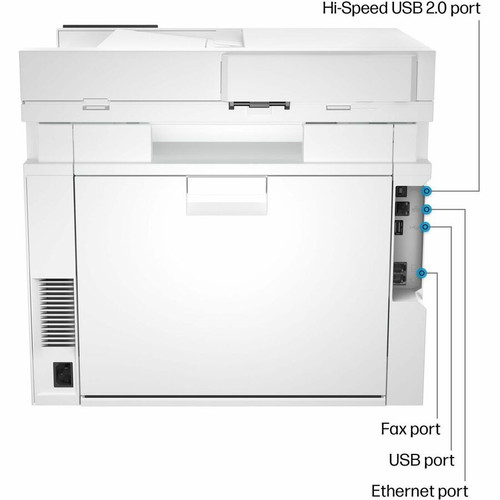
What connectivity options are listed?
Connectivity details help confirm how the product integrates with your network, accessories, and surrounding peripherals before rollout or replacement planning. They are often the difference between a technically compatible device and one that is genuinely easy to deploy.
What label, receipt, or business-print workflow detail is listed?
the specifications are intended to help buyers confirm fit, compatibility, and expected day-to-day operation. In practical terms, the best reading of this product comes from how its hardware, connectivity, and deployment details work together.
| Qty | Price | Available |
|---|