IOGEAR GCS1102 DVI KVM Switch - 2 x 1 for 2 Computers - DVI-I Video - USB - Audio - Microphone - 1920 x 1200 Resolution

Business volume discounts
Technical guidance
Preparation & staging
QC · ON · AB · BC
Product Features
Technical Overview
This KVM switch employs DVI-I connectors that carry both digital and analog video signals, supporting resolutions up to 1920x1200 at 60Hz with DDC2B compatibility. The six USB ports include a dedicated 2-port hub for peripheral sharing, allowing devices like printers, scanners, or storage to be accessed from either connected computer without physical reconnection.
IOGEAR's DynaSync™ Display Emulation Technology reads and stores monitor EDID parameters, preventing resolution changes or delays when switching between computers or during system boot. The switch operates asynchronously, enabling independent hotkey control of KVM focus, USB peripherals, and audio ports without interrupting active sessions.
Relevant factors for this section include Number of Computers Supported, Graphic Mode, Maximum Video Resolution. When those points are considered together, they give buyers a clearer picture of how the product is equipped, how it fits into deployment, and what kind of day-to-day role it is meant to support.
Key Product Advantages
The GCS1102 provides professional-grade KVM functionality with features tailored for demanding work environments. Its independent audio and microphone switching allows separate control of voice communications from the main KVM session, ideal for help desk or broadcast applications where audio sources need isolation. The auto-scan mode continuously cycles through connected computers for monitoring purposes, while the hotkey system supports rapid context switching during multitasking sessions.
Enhanced Security Management
Physically separate internet-connected and intranet-connected PCs while maintaining single-console control, reducing cross-network exposure risks.
- Isolates network segments
- Maintains access control
- Reduces attack surface
Intelligent Switching Options
Choose between front-panel button selection, programmable hotkeys, or auto-scan mode for flexible operation based on workflow requirements.
- Multiple control methods
- LED status indicators
- Customizable switching
Deployment / Use Cases
This DVI KVM switch excels in environments where equipment consolidation and access control intersect. Financial trading floors can use it to switch between analysis systems and transaction platforms. Broadcast studios benefit from separate audio control during video switching. Educational computer labs reduce peripheral costs while maintaining instructor oversight capabilities.
The switch's compact dimensions make it suitable for space-constrained installations like network closets, broadcast trucks, or mobile command centers. Its 2.1 stereo audio support handles multimedia production workflows, while the microphone channels accommodate voice-over-IP or recording applications alongside primary computing tasks.
IT Support and Help Desk Stations
Manage multiple troubleshooting or testing systems from one workstation, switching between reference machines and client devices while maintaining audio communication channels.
- Multi-system diagnostics
- Client device testing
- Support call handling
Security Operations Centers
Control separate internet-facing and secure internal networks from a single console, maintaining physical isolation between network segments for compliance and protection.
- Network segmentation
- Access control enforcement
- Monitoring station consolidation
Physical Profile
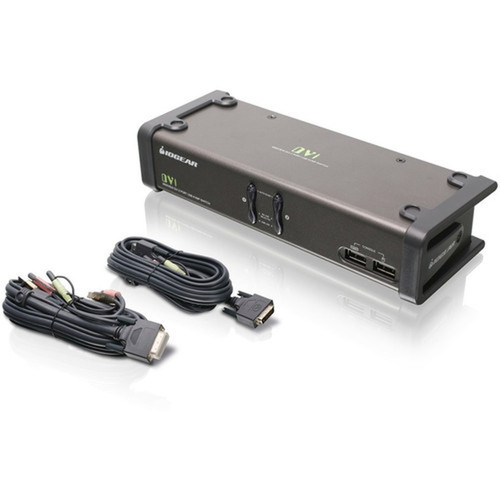
Measuring 8.50 inches wide, 3.25 inches deep, and 2 inches tall, the GCS1102 presents a low-profile desktop footprint that integrates discreetly into workstation arrangements. The 1.68-pound weight provides stability without bulk, while the black finish maintains professional aesthetics. Front-panel controls include computer selection buttons with LED indicators, offering immediate visual status confirmation during operation.
- Width
- 8.50" (215.90 mm)
- Depth
- 3.25" (82.55 mm)
- Height
- 2" (50.80 mm)
- Weight
- 1.68 lb (762.04 g)
What's in the Box
The package includes all necessary components for immediate deployment, with four specialized KVM cables ensuring proper signal transmission between computers and the switch unit.
Highlights
- Controls 2 USB DVI computers from one console
- DVI-I video support up to 1920x1200 resolution
- 6 USB ports with 2-port hub for peripheral sharing
- DynaSync™ Display Emulation prevents resolution changes
- Independent hotkey switching for KVM, USB, and audio
- 2.1 stereo audio and microphone support
- Front-panel buttons and LED status indicators
- Auto-scan mode for monitoring all computers
- Compact desktop form factor
- 3-year limited warranty
Specifications
| Specifications | |
|---|---|
| Manufacturer | IOGEAR, Inc |
| Manufacturer Part Number | GCS1102 |
| Brand Name | IOGEAR |
| Product Name | GCS1102 DVI KVM Switch |
| Product Type | KVM Switchbox |
| Technical Information | |
| Number of Computers Supported | 2 |
| Video | |
| Graphic Mode | WUXGA |
| Maximum Video Resolution | 1920 x 1200 |
| Interfaces/Ports | |
| USB | Yes |
| DVI | Yes |
| Number of USB Ports | 6 |
| Number of DVI Ports | 3 |
| Physical Characteristics | |
| Height | 2" (50.80 mm) |
| Width | 8.50" (215.90 mm) |
| Depth | 3.25" (82.55 mm) |
| Weight (Approximate) | 1.68 lb (762.04 g) |
| Miscellaneous | |
| Package Contents | GCS1102 DVI KVM Switch 4 x USB DVI-D KVM Cables 1 x Power Adapter 1 x Installation Guide 1 x Warranty Card |
| Environmentally Friendly | Yes |
| Country of Origin | Taiwan |
| Warranty | |
| Limited Warranty | 3 Year |
FAQ
How many computers can I connect to this KVM switch?
The IOGEAR GCS1102 supports two computers simultaneously. It functions as a 2x1 KVM switch, meaning two computer sources can be managed through one console consisting of a single keyboard, video monitor, and mouse setup. This configuration is ideal for dual-system workstations or environments where equipment consolidation is necessary.
What video resolution does this switch support?
This KVM switch supports single-link DVI resolution up to 1920 x 1200 at 60Hz with DDC2B compatibility. The WUXGA graphic mode ensures wide-ultra-extended graphics array display quality. The DynaSync™ technology maintains consistent resolution settings when switching between connected computers or during boot sequences.
Can I share USB peripherals between connected computers?
Yes, the switch includes six USB ports with a dedicated 2-port USB 2.0 hub for peripheral sharing. Devices connected to these hub ports can be accessed from either computer without physical cable changes. This allows printers, scanners, external storage, or other USB devices to be shared between the two systems seamlessly.
How do I switch between computers?
Multiple switching methods are available: front-panel push buttons with LED indicators, programmable hotkeys from your keyboard, or auto-scan mode that cycles through computers automatically. The independent asynchronous switching allows separate control of KVM focus, USB peripherals, and audio ports without interrupting active sessions.
Does this switch support audio and microphone?
Yes, the GCS1102 provides 2.1 stereo audio support along with dedicated microphone channels. The audio and microphone switching operates independently from the main KVM function, allowing separate control of voice communications. This is particularly useful for help desk, broadcast, or multimedia production applications.
What cables and accessories are included?
The package contains the GCS1102 DVI KVM Switch, four USB DVI-D KVM cables for connecting computers, one power adapter, an installation guide, and a warranty card. These components provide everything needed for immediate deployment without requiring additional purchases for basic connectivity.
| Qty | Price | Available |
|---|