








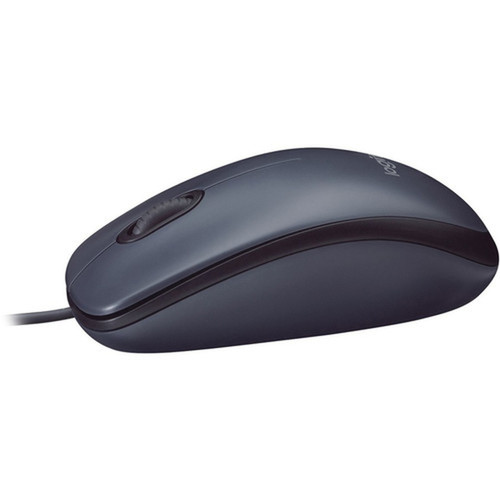
Logitech 910-001439 B100 Optical USB Mouse - Wired - 800 DPI - 3-Button - Symmetrical - Black

Business volume discounts
Technical guidance
Preparation & staging
QC · ON · AB · BC
Product Features
Technical Overview
The B100 operates with an 800 DPI optical sensor, providing precise movement detection for accurate cursor control in general applications like web browsing, document editing, and basic graphic tasks. This resolution balances responsiveness with ease of use, avoiding the oversensitivity that can occur with higher DPI settings in non-gaming contexts.
Connectivity is handled via a USB interface with a fixed cable, ensuring a plug-and-play setup without wireless pairing or battery concerns. The mouse includes three buttons: left-click, right-click, and a central scroll wheel that supports vertical scrolling for navigating long documents or web pages efficiently.
Relevant factors for this section include Pointing Device Connectivity Technology, Movement Detection, Movement Resolution (dpi), Pointing Device Host Interface. When those points are considered together, they give buyers a clearer picture of how the product is equipped, how it fits into deployment, and what kind of day-to-day role it is meant to support.
Key Product Advantages
The Logitech B100 stands out for its ambidextrous symmetrical design, which makes it versatile for shared workspaces or users who switch hands. This ergonomic approach reduces strain by allowing natural hand positioning regardless of handedness, unlike contoured mice that cater exclusively to right or left hands.
Scroll Wheel Efficiency
The integrated scroll wheel enables quick zooming, tab management, and document navigation, streamlining repetitive tasks without relying on keyboard shortcuts or on-screen controls.
- Smooth vertical scrolling
- Quick zoom adjustments
- Easy tab navigation
Reliable Wired Connection
With a USB cable connection, this mouse offers consistent performance without latency, interference, or battery maintenance, ensuring it's always ready for use with desktops, laptops, or workstations.
- No pairing required
- Stable signal transmission
- Eliminates battery costs
Deployment / Use Cases
This mouse is ideal for standard office setups, educational institutions, and home offices where basic pointing functionality is sufficient. Its plug-and-play nature makes it easy to deploy across multiple systems, reducing setup time and technical support needs compared to configurable or wireless alternatives.
In corporate environments, the B100 supports productivity applications like spreadsheets, presentation software, and email clients, with the scroll wheel enhancing workflow efficiency. For shared or public computers in libraries, labs, or kiosks, its symmetrical design and durable construction accommodate diverse users without requiring device-specific adjustments.
Office Productivity
Supports daily tasks such as data entry, report editing, and presentation navigation, with the scroll wheel speeding through lengthy documents or web pages.
Educational and Training
Suitable for computer labs or training rooms where simplicity and durability are prioritized over advanced features, minimizing distractions for learners.
Physical Profile
The mouse has a compact, symmetrical form factor with a matte black finish that resists fingerprints and blends into most workspace aesthetics. Weighing approximately 3.84 ounces, it feels substantial without being cumbersome, promoting comfortable gliding across desks or mouse pads. No assembly is required, allowing immediate use out of the box.
The physical profile is practical for deployment planning because the dimensions and weight are clearly defined: 3.84 oz (108.86 g). This helps confirm rack, shelf, desk, or cabinet fit before installation.
- Weight
- 3.84 oz (108.86 g)
Highlights
- Symmetrical design for ambidextrous use by right or left-handed users
- 800 DPI optical sensor for smooth and precise cursor movement
- Wired USB connectivity for reliable plug-and-play operation
- Three-button layout with a central scroll wheel for efficient navigation
- Black color with a durable finish suitable for professional environments
- Lightweight construction at 3.84 oz for comfortable extended use
- No assembly required, ready to use immediately upon unboxing
- Ideal for office, educational, and general computing applications
Specifications
| Specifications | |
|---|---|
| Manufacturer | Logitech |
| Manufacturer Part Number | 910-001439 |
| Brand Name | Logitech |
| Product Model | B100 |
| Product Name | B100 Optical USB Mouse |
| Packaged Quantity | 1 Each |
| Package Type | OEM |
| Product Type | Mouse |
| Pointing Device | |
| Pointing Device Connectivity Technology | Cable |
| Movement Detection | Optical |
| Movement Resolution (dpi) | 800 |
| Total Number of Buttons | 3 |
| Scroller Type | Scroll Wheel |
| Ergonomic Fit | Symmetrical |
| Interfaces/Ports | |
| Pointing Device Host Interface | USB |
| Physical Characteristics | |
| Color Family | Black |
| Product Color | Black |
| Weight (Approximate) | 3.84 oz (108.86 g) |
| Miscellaneous | |
| Assembly Required | No |
| Country of Origin | China |
FAQ
Is the Logitech B100 mouse suitable for left-handed users?
Yes, the Logitech B100 features a symmetrical design that works equally well for both right-handed and left-handed users. Unlike ergonomic mice molded for a specific hand, its ambidextrous shape allows comfortable use regardless of handedness, making it versatile for shared workspaces or individual preferences.
What is the DPI resolution of this mouse, and is it adjustable?
The Logitech B100 has a fixed 800 DPI optical resolution. This setting provides precise cursor control for everyday tasks like web browsing, document editing, and general navigation without the oversensitivity of higher DPI mice. It is not adjustable, which simplifies use for non-gaming applications where consistency is key.
Does this mouse require batteries or charging?
No, the Logitech B100 is a wired mouse that draws power directly through its USB connection. This eliminates the need for batteries or recharging, ensuring uninterrupted use and reducing long-term maintenance costs compared to wireless models.
How many buttons does the Logitech B100 have, and what is the scroll wheel used for?
This mouse includes three buttons: left-click, right-click, and a central scroll wheel. The scroll wheel supports vertical scrolling for navigating documents, web pages, and spreadsheets, and it can be used for zooming in on images or text, enhancing productivity in various software applications.
What type of surface is required for the optical sensor to work effectively?
The optical sensor in the Logitech B100 works on most non-glossy surfaces, including wood desks, plastic mouse pads, and fabric. It does not require a special mouse pad, though using one can improve tracking consistency and reduce wear on the mouse feet over time.
Is the Logitech B100 compatible with all operating systems?
The Logitech B100 uses standard USB HID protocols, making it compatible with major operating systems like Windows, macOS, and Linux without additional drivers. It functions as a plug-and-play device, automatically recognized by most systems for immediate use in office or home computing environments.
| Qty | Price | Available |
|---|


