








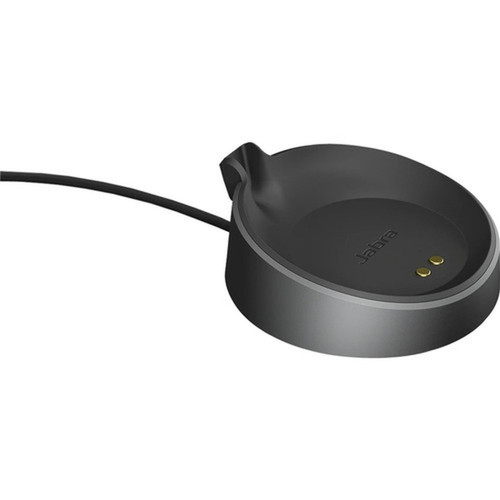

Jabra 14207-73 Cradle - Wired USB Type A for Evolve2 75 Bluetooth Headset - Black

Business volume discounts
Technical guidance
Preparation & staging
QC · ON · AB · BC
Product Features
Technical Overview
This cradle utilizes a wired connectivity technology to establish a direct physical link between your headset and host device. The USB Type A host interface is a universal standard, ensuring broad compatibility and reliable data and power transfer without the latency or interference concerns sometimes associated with wireless connections.
The product is designed exclusively for use with the Jabra Evolve2 75 Bluetooth headset, providing a tailored fit and optimal charging performance. Its construction focuses on durability and consistent operation, supporting the headset's role in critical communication tasks.
This section brings together practical product details such as Connectivity Technology, Device Supported, Host Interface, so buyers can judge configuration, deployment fit, and day-to-day suitability with less guesswork.
Key Product Advantages
The Jabra cradle enhances headset usability by offering a dedicated, reliable docking solution. It eliminates the need to manage separate charging cables directly on the headset, reducing wear on the headset's ports and keeping your workspace organized.
Reliable Wired Connection
A wired connection via USB Type A ensures consistent signal quality and power delivery, free from wireless dropouts or battery anxiety during extended use.
Simplified Workflow
The cradle provides a predictable place to store and charge your headset, making it easy to grab and go or dock after use, which is ideal for hot-desking or shared office spaces.
Tailored Compatibility
Designed specifically for the Jabra Evolve2 75, it ensures perfect physical alignment for charging contacts and a secure fit, protecting your investment in the headset system.
Deployment / Use Cases
This cradle is ideal for environments where the Jabra Evolve2 75 headset is used as a primary communication tool. In call centers, corporate offices, or remote work setups, it serves as a central charging station that keeps headsets operational and ready for meetings, customer support, or collaborative sessions.
It is particularly valuable in shared workspaces or for users who frequently switch between multiple devices, as the wired connection to a computer via USB ensures the headset is always synced and charged without needing to re-pair Bluetooth connections. The cradle supports a tidy desk environment, reducing cable clutter associated with loose charging cables.
Highlights
- Wired connectivity for reliable, interference-free signal quality
- USB Type A interface ensures broad compatibility with computers and laptops
- Designed exclusively for the Jabra Evolve2 75 Bluetooth headset
- Black color matches modern office equipment aesthetics
- Provides a dedicated charging and docking station for your headset
- Simplifies headset management and reduces desk clutter
- Plug-and-play setup with no drivers or software required
- Supports consistent power delivery for headset battery maintenance
Specifications
| Specifications | |
|---|---|
| Manufacturer | Jabra |
| Manufacturer Part Number | 14207-73 |
| Brand Name | Jabra |
| Product Name | Cradle |
| Product Type | Cradle |
| Technical Information | |
| Connectivity Technology | Wired |
| Device Supported | Bluetooth Headset |
| Interfaces/Ports | |
| Host Interface | USB Type A |
| Physical Characteristics | |
| Product Color | Black |
| Miscellaneous | |
| Compatibility | Jabra Evolve2 75 Bluetooth Headset |
| Country of Origin | China |
FAQ
What headset models is this Jabra cradle compatible with?
This Jabra 14207-73 Cradle is specifically designed for use with the Jabra Evolve2 75 Bluetooth headset. It is not compatible with other Jabra models or headsets from different brands, as it provides a tailored fit and charging interface for the Evolve2 75.
How does the cradle connect to my computer?
The cradle connects via a wired USB Type A interface. You plug the cradle's USB Type A connector directly into an available USB port on your computer, laptop, or compatible USB power adapter. This establishes both power for charging and a stable data connection for the headset when docked.
Does this cradle support wireless or Bluetooth connectivity?
No, this cradle uses wired connectivity technology. It physically connects to your host device via USB Type A. The headset itself (Jabra Evolve2 75) is Bluetooth-enabled for audio, but the cradle acts as a wired docking station for charging and potentially syncing, ensuring reliable power and connection without relying on wireless signals for docking functions.
What are the benefits of using a wired cradle over charging the headset directly?
A wired cradle offers several advantages: it provides a dedicated, organized spot to store and charge your headset, reducing wear on the headset's own charging port from frequent plugging/unplugging. It ensures consistent power delivery and can keep the headset synced with your computer via USB, eliminating Bluetooth pairing issues. This setup is ideal for maintaining headset readiness in professional environments.
What color is the Jabra cradle, and does it come with any cables?
The Jabra 14207-73 Cradle is black, matching the common aesthetic of Jabra headsets and office gear. the package contents are not listed, so it typically includes just the cradle unit. You may need to use a standard USB Type A to Type A cable (if required) or connect it directly if it has an integrated cable, but check product details for exact inclusions as accessories can vary.
Can I use this cradle with a USB-C port using an adapter?
Yes, you can use this cradle with a USB-C port by employing a USB Type A to USB-C adapter. Since the cradle has a USB Type A interface, an adapter will allow connection to modern laptops or devices with only USB-C ports. Ensure the adapter supports data and power transfer to maintain full functionality for charging and connectivity.
| Qty | Price | Available |
|---|


