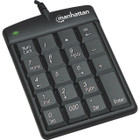
Manhattan 176354 Numeric Keypad - Wired USB-A - 16 Full-Size Keys - Membrane Switches - English UK - Black

Business volume discounts
Technical guidance
Preparation & staging
QC · ON · AB · BC
Product Features
Technical Overview
This numeric keypad features 16 full-size keys arranged in a standard calculator layout, including arithmetic operators, Enter, and Num Lock. The membrane switch technology ensures durability and a consistent keystroke feel, making it suitable for high-volume data entry environments.
Connectivity is handled through a fixed USB 1.1 cable, providing reliable data transmission and power directly from the host device. The keypad is recognized as a standard HID (Human Interface Device), ensuring broad compatibility across multiple operating systems without configuration overhead.
Relevant factors for this section include Keyswitch Technology, Keyboard/Keypad Connectivity Technology, Number of Keys, Keyboard/Keypad Host Interface. When those points are considered together, they give buyers a clearer picture of how the product is equipped, how it fits into deployment, and what kind of day-to-day role it is meant to support.
A strong technical summary explains how the product's interfaces, hardware profile, and operating characteristics work together in real deployment. Buyers often need this context to confirm compatibility with existing devices, expected performance in daily use, and whether installation will be straightforward for IT staff or end users.
Key Product Advantages
The Manhattan 176354 stands out with its straightforward, reliable design that prioritizes functionality and longevity. The membrane switches offer a longer operational lifespan compared to some mechanical alternatives, reducing maintenance needs in demanding settings.
Broad Platform Support
Compatible with Windows, macOS, Linux, and other PC-based systems, this keypad works seamlessly across diverse IT environments, from corporate workstations to home offices.
- No drivers required
- Recognized as standard HID
- Ideal for multi-OS setups
Compact and Portable
With dimensions of 5.51" x 3.35" x 0.91" and a weight under 3.2 ounces, the keypad is easy to transport and store, making it a practical accessory for mobile professionals or shared workspaces.
- Minimal desk space
- Lightweight construction
- Slim profile
Deployment / Use Cases
This numeric keypad is ideal for users who perform frequent numerical data entry, such as accountants, financial analysts, data clerks, or retail cashiers. Its dedicated layout speeds up input tasks compared to using a keyboard's number row, reducing errors and improving productivity.
In industrial or telecommunications control rooms, the membrane switches provide reliable performance in environments where dust or debris might affect other switch types. The keypad's simplicity also makes it a cost-effective solution for kiosks, point-of-sale stations, or training labs where basic numeric input is required.
Office and Financial Work
Enhance spreadsheet navigation, accounting software use, or database management with quick access to numeric keys and calculator functions.
- Accelerates data entry
- Reduces finger travel
- Improves accuracy
Mobile and Compact Setups
Pair with notebooks or compact keyboards that lack dedicated numeric pads, restoring full numeric functionality without sacrificing portability.
- Ideal for small desks
- Easy to pack and carry
- Complements minimalist gear
Localization and Operating System
The keypad uses an English (UK) localization, with key legends and layout optimized for users in regions that follow British standards. This includes appropriate currency symbols and punctuation placements that align with local software conventions.
Operating system support spans Windows, macOS, Linux, and other PC platforms, ensuring the keypad functions as a standard input device across most modern computing environments. No additional localization settings or driver installations are needed for basic operation.
Relevant factors for this section include Keyswitch Technology, Keyboard/Keypad Connectivity Technology, Number of Keys, Keyboard/Keypad Host Interface. When those points are considered together, they give buyers a clearer picture of how the product is equipped, how it fits into deployment, and what kind of day-to-day role it is meant to support.
Physical Profile
Finished in a classic black color, the keypad features a low-profile, slim chassis that blends with most office peripherals. The compact dimensions allow it to fit neatly beside a keyboard or mouse, while the lightweight build makes it easy to reposition as needed.
The fixed USB cable exits from the top rear of the unit, keeping the desk surface tidy and reducing cable clutter. The keypad's matte finish resists fingerprints and smudges, maintaining a professional appearance over time.
- Width
- 3.35" (85 mm)
- Depth
- 0.91" (23 mm)
- Height
- 5.51" (140 mm)
- Weight
- 3.17 oz (90 g)
What's in the Box
The package includes the numeric keypad and a user manual, providing everything needed for immediate setup and operation.
Package contents include Numeric Keypad User Manual, Numeric Keypad. These included items support setup, installation, and immediate deployment without needing to source the core bundled accessories separately.
Highlights
- Wired USB-A connectivity for reliable plug-and-play operation
- 16 full-size keys with membrane switches for durable, responsive typing
- English (UK) localization with standard calculator layout
- Slim, compact black design minimizes desk footprint
- Compatible with Windows, macOS, Linux, and PC platforms
- Lightweight at 3.17 oz (90 g) for easy portability
- Environmentally friendly construction
- Lifetime limited warranty for long-term peace of mind
Specifications
| Specifications | |
|---|---|
| Manufacturer | IC INTRACOM |
| Manufacturer Part Number | 176354 |
| Brand Name | Manhattan |
| Product Model | 176354 |
| Product Name | Numeric Keypad |
| Product Type | Keypad |
| Keyboard/Keypad | |
| Keyswitch Technology | Membrane |
| Keyboard/Keypad Connectivity Technology | Cable |
| Number of Keys | 16 |
| Localization | English (UK) |
| Keyboard/Keypad Features | Slim |
| Interfaces/Ports | |
| Keyboard/Keypad Host Interface | USB 1.1 |
| Physical Characteristics | |
| Product Color | Black |
| Keyboard/Keypad Height | 5.51" (140 mm) |
| Keyboard/Keypad Width | 3.35" (85 mm) |
| Keyboard/Keypad Depth | 0.91" (23 mm) |
| Weight (Approximate) | 3.17 oz (90 g) |
| Miscellaneous | |
| Package Contents | Numeric Keypad User Manual |
| Platform Supported | PC,Windows,Linux,Mac |
| Device Supported | Notebook |
| Environmentally Friendly | Yes |
| Warranty | |
| Limited Warranty | Lifetime |
User Manual
FAQ
What type of key switches does this numeric keypad use?
The Manhattan 176354 uses membrane key switches, which provide a low-profile, quiet typing experience with good tactile feedback. Membrane switches are known for their durability and resistance to environmental factors like dust, making them suitable for high-use environments such as offices or industrial settings.
Is this keypad compatible with Mac computers?
Yes, the keypad is fully compatible with macOS, as well as Windows, Linux, and other PC-based systems. It operates as a standard HID (Human Interface Device), so no additional drivers are required—simply plug it into a USB-A port, and it should be recognized immediately.
How many keys are on this numeric keypad?
This keypad features 16 full-size keys, arranged in a standard calculator layout. This includes the digits 0-9, arithmetic operators (+, -, *, /), Enter, Num Lock, and decimal point, providing complete numeric input functionality for data entry or calculations.
What is the warranty coverage for this product?
The Manhattan 176354 comes with a lifetime limited warranty, which covers defects in materials and workmanship for the duration of the product's life. This warranty provides long-term assurance and reflects the manufacturer's confidence in the keypad's build quality and reliability.
Can this keypad be used with a notebook computer?
Absolutely. The keypad is specifically noted as supporting notebook devices, making it an ideal accessory for laptops that lack a built-in numeric pad. Its compact size and lightweight design make it easy to carry alongside a notebook for mobile productivity.
What localization does the keypad use?
The keypad uses an English (UK) localization, with key legends and layout tailored for users in regions following British standards. This includes appropriate symbols and punctuation placements, ensuring compatibility with local software and input expectations without requiring configuration changes.
| Qty | Price | Available |
|---|