








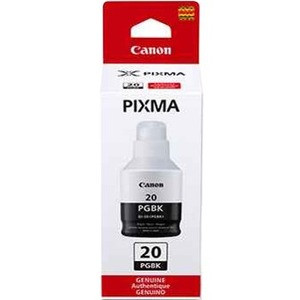

Genuine Canon 3383C001 GI-20 Pigment Black Ink Bottle - Inkjet Refill Kit - 1 Pack

Business volume discounts
Technical guidance
Preparation & staging
QC · ON · AB · BC
Product Features
Technical Overview
This ink refill kit utilizes pigment black ink technology optimized for Canon's MegaTank printing system. The formulation is designed to work seamlessly with the printer's internal components to maintain print head health and ensure consistent droplet placement.
The product carries manufacturer part number 3383C001 and is produced in Japan under Canon's quality control standards. As a genuine Canon consumable, it maintains warranty coverage and printer performance specifications when used as directed.
Relevant factors for this section include Print Technology, Print Color, Compatibility, Country of Origin. When those points are considered together, they give buyers a clearer picture of how the product is equipped, how it fits into deployment, and what kind of day-to-day role it is meant to support.
A strong technical summary explains how the product's interfaces, hardware profile, and operating characteristics work together in real deployment. Buyers often need this context to confirm compatibility with existing devices, expected performance in daily use, and whether installation will be straightforward for IT staff or end users.
Key Product Advantages
This genuine Canon ink refill delivers several practical benefits for business and high-volume printing applications.
Compatibility Assurance
Designed specifically for Canon PIXMA Wireless MegaTank printers including models G7020, G5020, and G6020. Using manufacturer-approved ink maintains optimal printer performance and prevents potential damage from third-party alternatives.
Pigment Ink Benefits
Pigment black ink provides superior water resistance and fade resistance compared to dye-based inks. This makes printed documents more durable for archival purposes and less susceptible to smudging in handling.
Cost-Effective Refill
The bottle format allows for economical refilling of the printer's integrated ink tanks. This 1-pack configuration provides a straightforward replacement option without excess packaging or complicated installation procedures.
Deployment / Use Cases
This Canon GI-20 ink bottle is ideal for environments where reliable black-and-white document production is essential. The pigment black formulation makes it particularly suitable for business documents, contracts, reports, and archival materials that require longevity.
Educational institutions, small offices, and home offices using Canon PIXMA Wireless MegaTank printers will find this refill solution provides consistent performance for everyday printing needs. The compatibility with specific MegaTank models ensures proper ink flow and prevents clogging issues that can occur with non-genuine alternatives.
Relevant factors for this section include Print Technology, Print Color, Compatibility, Country of Origin. When those points are considered together, they give buyers a clearer picture of how the product is equipped, how it fits into deployment, and what kind of day-to-day role it is meant to support.
Highlights
- Genuine Canon pigment black ink bottle
- Compatible with Canon PIXMA Wireless MegaTank printers G7020, G5020, G6020
- 1-pack refill kit configuration
- Inkjet printing technology
- Pigment-based black ink for enhanced durability
- Manufacturer part number: 3383C001
- Produced in Japan under Canon quality standards
- Maintains printer warranty when used as directed
Specifications
| Specifications | |
|---|---|
| Manufacturer | Canon, Inc |
| Manufacturer Part Number | 3383C001 |
| Brand Name | Canon |
| Product Model | GI-20 |
| Product Name | GI-20 Pigment Black Ink Bottle |
| Packaged Quantity | 1 Pack |
| Product Type | Ink Refill Kit |
| Technical Information | |
| Print Technology | Inkjet |
| Print Color | Pigment Black |
| Miscellaneous | |
| Compatibility | Canon PIXMA Wireless MegaTank Printers: G7020 G5020 G6020 |
| Country of Origin | Japan |
FAQ
Which Canon printer models are compatible with this GI-20 ink bottle?
This GI-20 Pigment Black Ink Bottle is specifically designed for Canon PIXMA Wireless MegaTank printers, including models G7020, G5020, and G6020. These printers feature integrated ink tanks that can be refilled directly from the bottle. Using this genuine Canon ink ensures optimal performance and prevents potential issues with print quality or printer damage.
What is the difference between pigment black ink and regular black ink?
Pigment black ink contains solid pigment particles suspended in liquid, while dye-based inks use soluble colorants. Pigment inks offer superior water resistance, fade resistance, and durability on paper. Documents printed with pigment black ink are less likely to smudge when wet and maintain their appearance longer, making them ideal for business documents, contracts, and archival materials.
How many pages can I print with one GI-20 ink bottle?
While exact page yield depends on printing density, coverage percentage, and paper type, Canon's MegaTank system with genuine GI-20 ink is designed for high-volume printing. The bottle format provides substantial ink capacity compared to traditional cartridges. For specific yield estimates, consult your printer's documentation or Canon's official specifications for the compatible G7020, G5020, or G6020 models.
Is this ink suitable for photo printing?
This GI-20 ink contains pigment black formulation optimized for document printing rather than photo applications. While it produces crisp text and line graphics, pigment black ink may not provide the tonal range preferred for photographic prints. For photo printing with Canon MegaTank printers, consider using Canon's photo-specific ink formulations designed for color accuracy and smooth gradients.
Can I use this ink with non-Canon printers or older Canon models?
No, this GI-20 Pigment Black Ink Bottle is specifically formulated for Canon PIXMA Wireless MegaTank printers G7020, G5020, and G6020. Using it with incompatible printers may cause print quality issues, damage to print heads, or void warranties. Always verify your printer's compatible ink specifications before purchasing any refill products.
How do I properly refill my Canon MegaTank printer with this ink bottle?
Refill your Canon PIXMA Wireless MegaTank printer by following the manufacturer's instructions in your printer manual. Typically, this involves opening the designated ink tank compartment, removing the cap from the GI-20 bottle, and carefully pouring ink into the corresponding black ink tank until it reaches the maximum fill line. Avoid overfilling and wipe any spills immediately. The bottle design allows for controlled pouring to minimize mess.
| Qty | Price | Available |
|---|


