













StarTech.com 5G7AIBS-USB-HUB-NA 7-Port USB 3.2 Gen 1 Hub with Individual On/Off Switches - Self-Powered Desktop/Laptop USB-C to USB-A Hub

Business volume discounts
Technical guidance
Preparation & staging
QC · ON · AB · BC
Product Features
Technical Overview
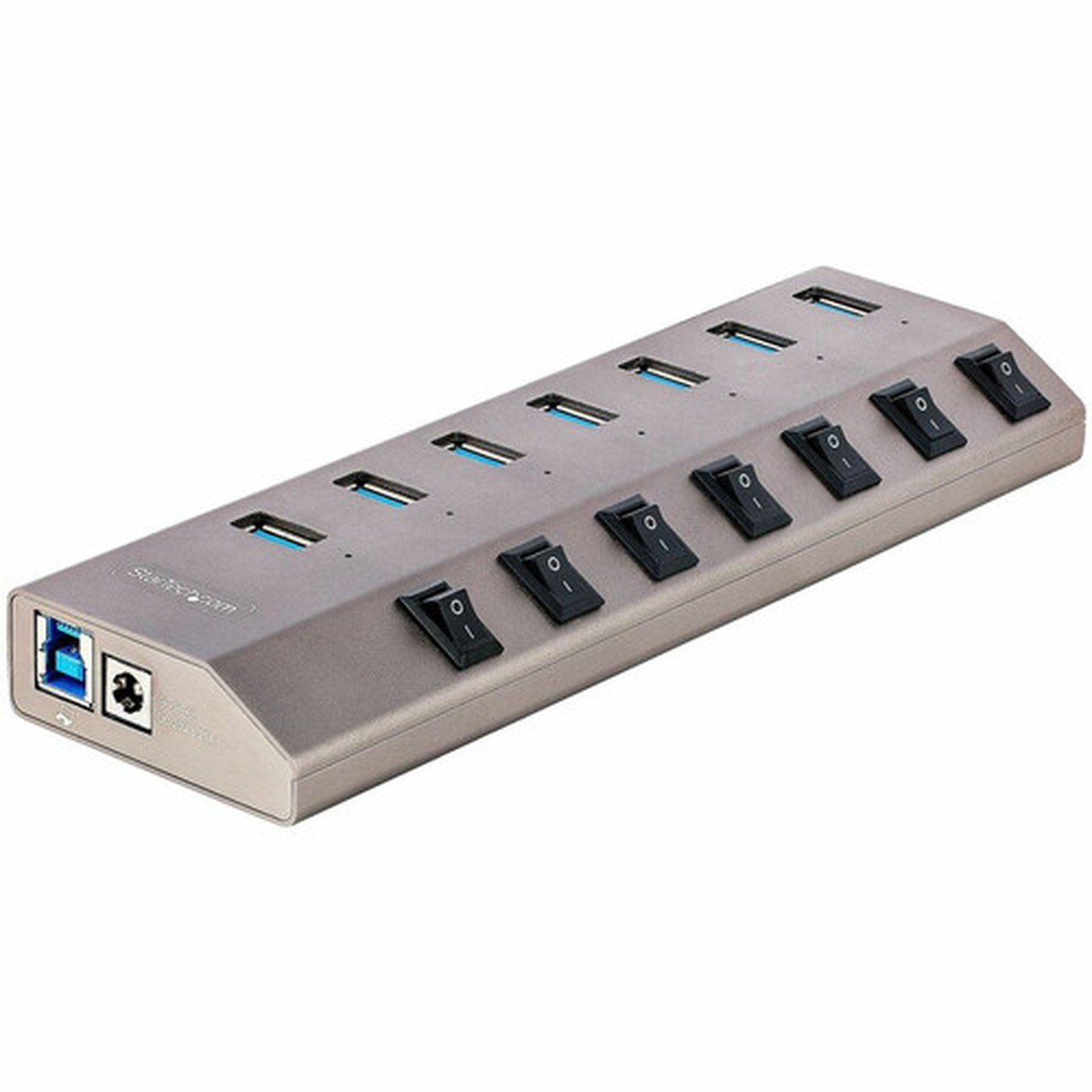
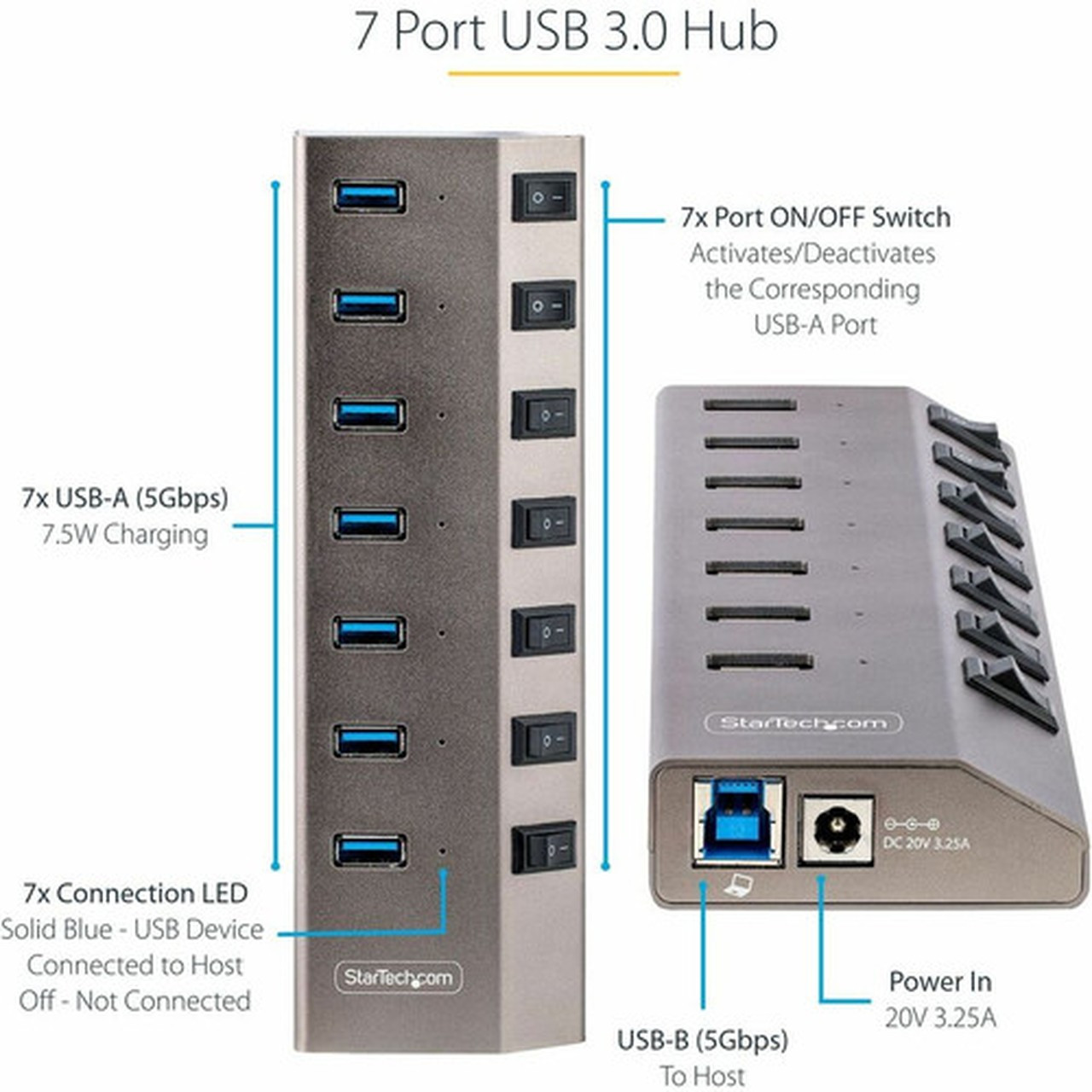
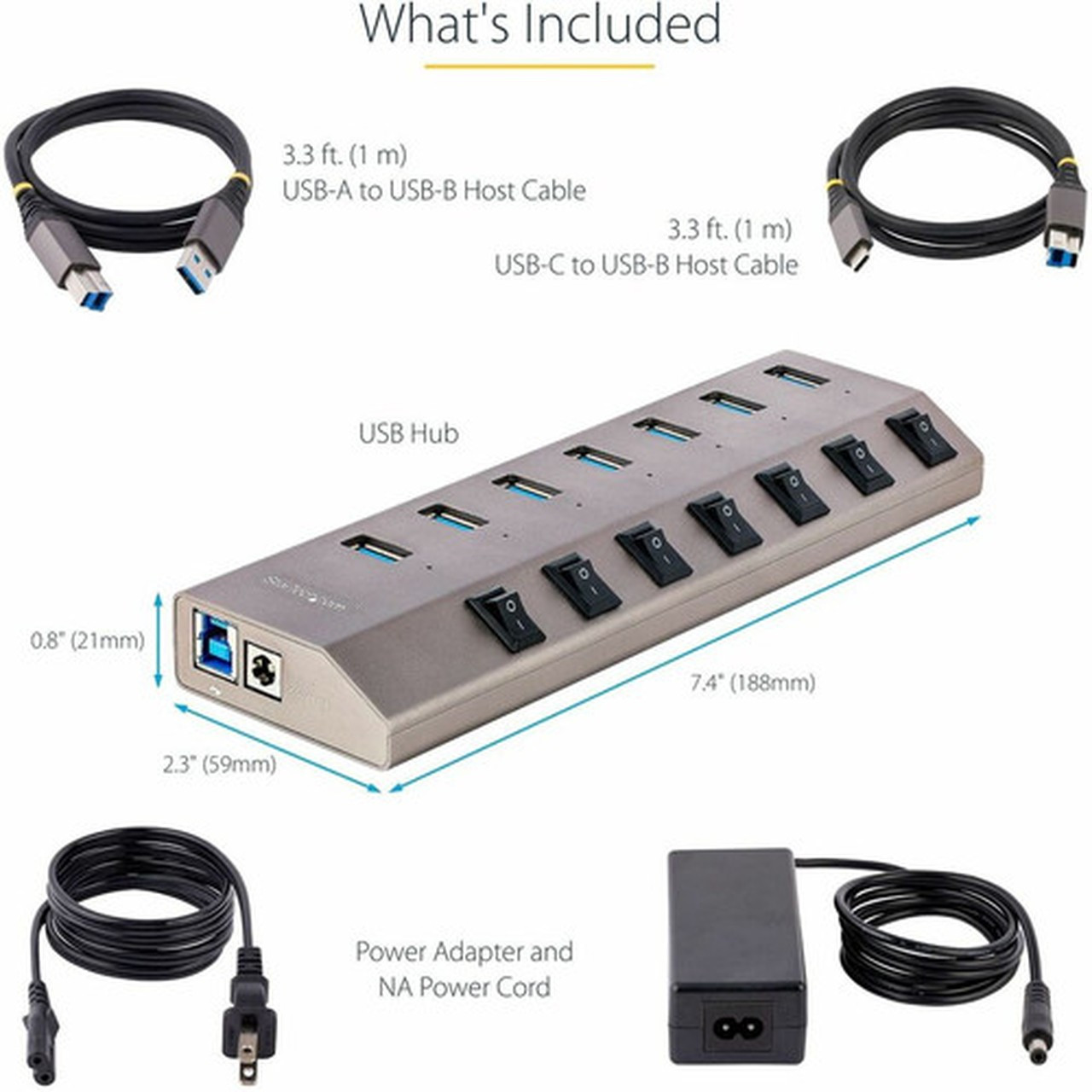
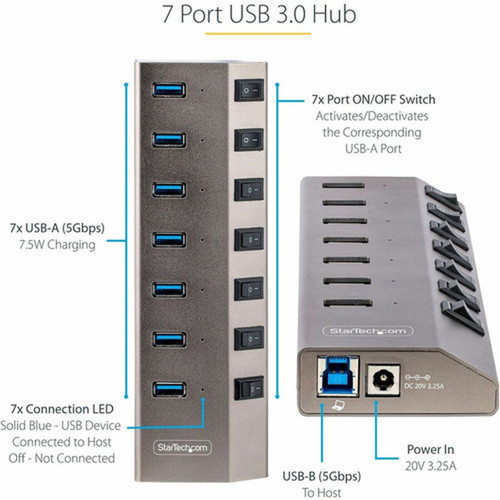
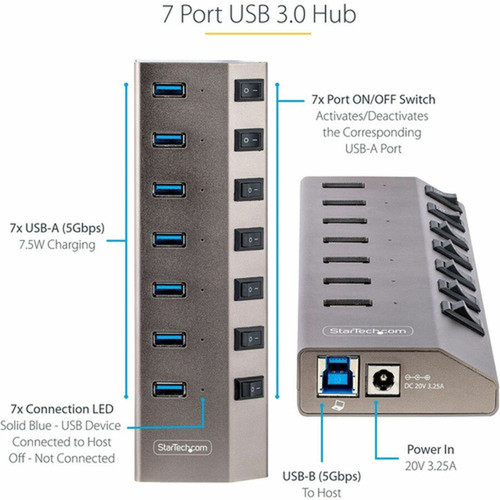
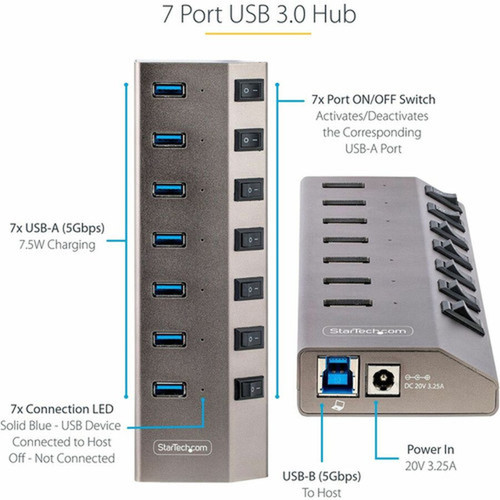
This hub operates on the USB 3.2 Gen 1 standard (also known as USB 3.1 Gen 1), delivering consistent 5Gbps bandwidth across all seven Type-A ports. The host connection uses a USB Type-B interface, with both USB-C to USB-B and USB-A to USB-B cables included for flexible connectivity to computers with either port type.
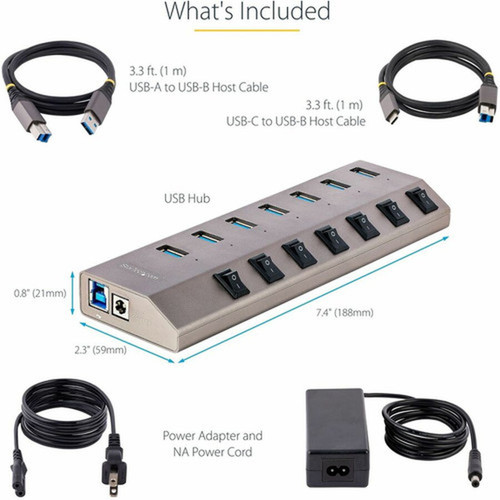
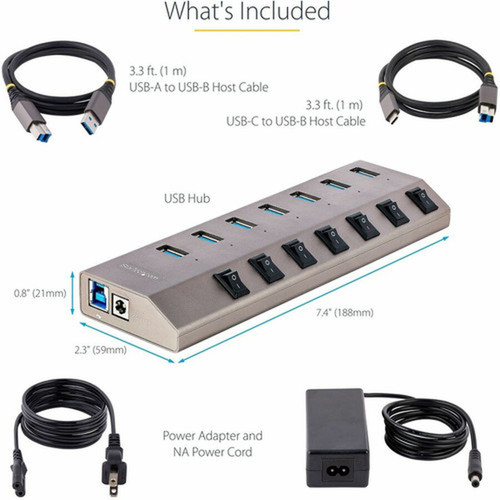
The external form factor measures 7.40 inches wide by 2.30 inches deep by 0.80 inches tall, providing a compact footprint that fits easily on desktops or in workspace setups. Each port's independent switch allows you to power cycle specific devices without affecting others, a valuable feature for troubleshooting or managing power consumption.
Relevant factors for this section include Host Interface, Total Number of USB Ports, Number of USB 3.2 Ports. When those points are considered together, they give buyers a clearer picture of how the product is equipped, how it fits into deployment, and what kind of day-to-day role it is meant to support.
Key Product Advantages
This hub stands out with its combination of port density, control features, and broad compatibility. The individual port switches provide unmatched flexibility for managing connected devices, while the self-powered design ensures consistent performance across all ports regardless of device load.
Port Management Control
Each of the seven USB ports features its own physical on/off switch, allowing you to enable or disable specific devices without unplugging cables. This is particularly useful for peripherals that don't have their own power switches or when you need to reset a device without disrupting others.
- Individual control per port
- No software required
- Physical toggle switches
Universal Platform Support
The hub works with virtually any modern computing platform including Windows PCs, macOS systems, Android devices, ChromeOS laptops, iPadOS tablets, and Linux machines. This cross-platform compatibility makes it an excellent choice for mixed-environment offices, educational settings, or home offices with diverse devices.
- PC and Mac compatible
- Mobile device support
- No driver installation needed
Deployment / Use Cases
This 7-port USB hub is particularly valuable in environments where USB port availability is limited but peripheral needs are growing. Desktop workstations with limited built-in USB ports benefit from the additional connectivity, while laptop users gain desktop-like expansion capabilities through a single connection.
Creative professionals can connect multiple storage devices, input peripherals, and charging cables simultaneously. IT departments appreciate the individual port switches for managing lab equipment or troubleshooting workstations. Educational institutions find the broad platform support valuable for computer labs serving diverse student devices.
Desktop Expansion Solution
Transform limited desktop USB ports into a comprehensive connectivity center with seven available ports. Connect your keyboard, mouse, external drive, printer, webcam, and still have ports available for charging mobile devices or connecting additional peripherals.
Laptop Docking Alternative
Create a simplified docking station experience by connecting the hub to your laptop's USB-C or USB-A port. When moving between locations, disconnect the single hub cable rather than multiple individual peripherals, then reconnect everything with one plug at your destination.
Physical Profile
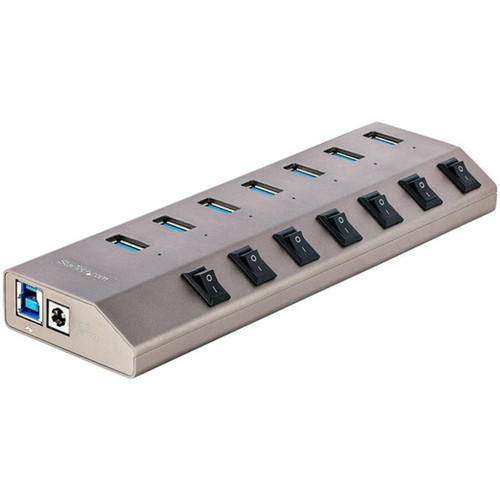
The hub features a sleek Space Gray finish that complements modern computer setups. With dimensions of 7.40 inches wide, 2.30 inches deep, and 0.80 inches tall, it maintains a low profile on desktops while providing ample space for port labeling and switch access. The compact design fits easily under monitors or between other desktop equipment without occupying excessive workspace.
The physical profile is practical for deployment planning because the dimensions and weight are clearly defined: 0.80" (20.32 mm), 7.40" (187.96 mm). This helps confirm rack, shelf, desk, or cabinet fit before installation.
- Width
- 7.40" (187.96 mm)
- Height
- 0.80" (20.32 mm)
- Length
- 2.30" (58.42 mm)
What's in the Box
The package includes everything needed for immediate deployment. Along with the hub itself, you receive both USB-C and USB-A host cables for maximum compatibility, plus a North American power adapter to ensure stable operation.
Highlights
- 7 USB 3.2 Gen 1 ports delivering 5Gbps transfer speeds
- Individual on/off switches for each port for precise device control
- Self-powered design with included North American power adapter
- USB-C to USB-B and USB-A to USB-B host cables included
- Compatible with PC, Mac, Android, ChromeOS, iPadOS, and Linux
- Space Gray exterior with compact desktop footprint
- 2-year limited warranty for peace of mind
- WEEE compliant environmentally friendly design
Specifications
| Specifications | |
|---|---|
| Manufacturer | StarTech.com |
| Manufacturer Part Number | 5G7AIBS-USB-HUB-NA |
| Brand Name | StarTech.com |
| Product Name | 7-Port USB 3.2 Gen 1 (5Gbps) Hub with On/Off Port Switches |
| Packaged Quantity | 1 |
| Product Type | Thunderbolt/USB Hub |
| Technical Information | |
| Host Interface | USB 3.2 Gen 1 (3.1 Gen 1) Type-B |
| Interfaces/Ports | |
| Total Number of USB Ports | 7 |
| Number of USB 3.2 Ports | 7 |
| Physical Characteristics | |
| Product Color | Space Gray |
| Form Factor | External |
| Height | 0.80" (20.32 mm) |
| Width | 7.40" (187.96 mm) |
| Length | 2.30" (58.42 mm) |
| Miscellaneous | |
| Package Contents | 7-Port USB 3.2 Gen 1 (5Gbps) Hub with On/Off Port Switches 1 x 3.3 ft. [1 m] USB-C to USB-B Host Cable 1 x 3.3 ft. [1 m] USB-A to USB-B Host Cable 1 x Power Adapter (North America) |
| Platform Supported | PC,Mac,Android,ChromeOS,iPadOS,Linux |
| Country of Origin | China |
| Environmentally Friendly | Yes |
| Environmental Compliance | Waste Electrical and Electronic Equipment Directive (WEEE) |
| Warranty | |
| Limited Warranty | 2 Year |
User Manual
FAQ
What is the data transfer speed of this USB hub?
This hub supports USB 3.2 Gen 1 (also known as USB 3.1 Gen 1) with a maximum data transfer rate of 5 gigabits per second (5Gbps). This speed is sufficient for most peripherals including external hard drives, SSDs, cameras, and other high-speed devices while maintaining backward compatibility with USB 2.0 and USB 1.1 devices at their native speeds.
Can I use this hub with my laptop that only has USB-C ports?
Yes, the hub includes a 3.3-foot USB-C to USB-B cable specifically for connecting to computers with USB-C ports. The hub also comes with a USB-A to USB-B cable for systems with traditional USB-A ports, providing flexibility for different computer configurations without requiring additional adapters.
Do all seven ports work simultaneously at full speed?
All seven ports share the 5Gbps bandwidth from the host connection. While individual devices can operate at their maximum supported speeds, simultaneous heavy usage across multiple ports may result in bandwidth sharing. The self-powered design ensures stable power delivery to all ports even when multiple devices are connected and active.
What devices are compatible with this USB hub?
The hub supports a wide range of USB-compatible devices including external storage drives, keyboards, mice, printers, scanners, webcams, audio interfaces, and charging cables for mobile devices. It's compatible with Windows PCs, macOS computers, Android devices, ChromeOS laptops, iPadOS tablets, and Linux systems, making it suitable for virtually any modern computing environment.
Why does this hub include a power adapter?
The included power adapter provides external power to the hub, ensuring stable operation even when connecting multiple power-hungry devices like external hard drives or charging multiple smartphones simultaneously. This self-powered design prevents voltage drops that can occur with bus-powered hubs, maintaining consistent performance across all connected devices regardless of power demands.
How do the individual port switches work?
Each of the seven USB ports has a physical toggle switch located next to it. These switches allow you to independently enable or disable power and data to specific ports without unplugging devices. This feature is useful for power cycling problematic devices, managing power consumption, or temporarily disabling peripherals without affecting other connected equipment.
| Qty | Price | Available |
|---|


