









Shipping included*
Exclusions
Additional shipping fees may apply in rare circumstances for deliveries outside standard service areas. In most cases, this only potentially affects shipments to the Northwest Territories and Yukon, as well as certain heavy or oversized items.
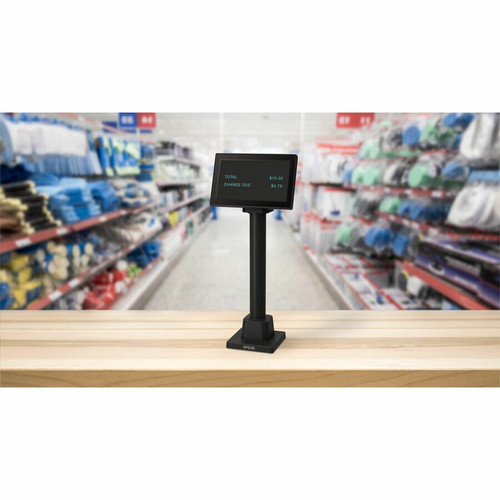
Epson A61CH62111 DM-D70 (111) USB Customer Display - 7" Black Pole Display with USB Connectivity

Business volume discounts
Technical guidance
Preparation & staging
QC · ON · AB · BC
Product Features
Technical Overview
This Epson customer display features a 7-inch screen that delivers clear text and basic graphics for transaction information. The USB interface ensures plug-and-play compatibility with most modern POS systems, eliminating the need for additional power adapters or complex setup procedures.
Weighing just 2.05 pounds (930 grams), the display maintains a portable profile that doesn't add significant bulk to counter spaces. The all-black finish provides a professional appearance that blends with standard POS equipment aesthetics.
This section brings together practical product details such as Screen Size, USB, so buyers can judge configuration, deployment fit, and day-to-day suitability with less guesswork.
A strong technical summary explains how the product's interfaces, hardware profile, and operating characteristics work together in real deployment. Buyers often need this context to confirm compatibility with existing devices, expected performance in daily use, and whether installation will be straightforward for IT staff or end users.
Key Product Advantages
The DM-D70 (111) enhances the checkout experience by providing customers with their own view of transaction details, reducing confusion and increasing transparency. This dedicated display solution improves service efficiency while maintaining a clean, organized counter space.
Enhanced Customer Experience
Customers can verify items, prices, and totals on their own screen during transactions, reducing questions and improving satisfaction.
- Clear transaction visibility
- Reduced customer inquiries
- Improved service transparency
Streamlined POS Integration
USB connectivity provides straightforward compatibility with existing POS systems without requiring additional hardware or complex configuration.
- Plug-and-play setup
- Single-cable connection
- Wide system compatibility
Deployment / Use Cases
This customer display excels in retail environments where transaction clarity and customer engagement are priorities. Its compact size and USB-powered design make it particularly suitable for space-constrained counters in convenience stores, specialty retailers, and quick-service restaurants.
Hospitality businesses benefit from displaying order details to customers during payment processing, reducing errors and improving service speed. The display also supports promotional messaging capabilities that can be utilized during slower transaction periods to highlight special offers or loyalty programs.
Retail Checkout Counters
Provide customers with itemized receipts on a dedicated screen while maintaining efficient cashier workflows and counter organization.
Hospitality Order Verification
Display meal orders and totals to customers during payment processing in restaurants, cafes, and food service establishments.
Physical Profile
The DM-D70 (111) features a sleek black design that complements standard POS equipment aesthetics. Weighing just over 2 pounds, it offers easy installation and repositioning flexibility for various counter configurations. The compact footprint minimizes space requirements while providing adequate screen real estate for transaction information display.
- Weight
- 2.05 lb (930 g)
Highlights
- 7-inch customer display for clear transaction visibility
- USB connectivity for straightforward POS integration
- Black finish complements standard POS equipment
- Lightweight design at 2.05 lb (930 g) for easy installation
- Pole display format suitable for countertop mounting
- Enhances customer service during checkout processes
- Reduces transaction inquiries and improves accuracy
- Supports promotional messaging capabilities
Specifications
| Specifications | |
|---|---|
| Manufacturer | Epson Corporation |
| Manufacturer Part Number | A61CH62111 |
| Brand Name | Epson |
| Product Model | DM-D70 (111) |
| Product Name | DM-D70 (111): USB Customer Display, Black |
| Product Type | Pole Display |
| Display & Graphics | |
| Screen Size | 7" |
| Interfaces/Ports | |
| USB | Yes |
| Physical Characteristics | |
| Color Family | Black |
| Product Color | Black |
| Weight (Approximate) | 2.05 lb (930 g) |
FAQ
What is the screen size of the Epson DM-D70 (111) customer display?
The Epson DM-D70 (111) features a 7-inch display screen. This size provides adequate space to show transaction details, itemized lists, and totals clearly to customers during checkout while maintaining a compact footprint that doesn't overwhelm counter space.
How does the DM-D70 (111) connect to my POS system?
This customer display connects via USB interface. The USB connection provides both data transmission and power, eliminating the need for separate power adapters. This single-cable solution ensures straightforward integration with most modern point-of-sale systems that support USB peripheral devices.
What color is the Epson DM-D70 (111) display?
The DM-D70 (111) comes in black finish. This color choice provides a professional appearance that blends seamlessly with standard POS equipment and retail counter aesthetics, maintaining a cohesive look in business environments.
How much does the DM-D70 (111) customer display weigh?
The display weighs 2.05 pounds (930 grams). This lightweight design facilitates easy installation and repositioning on countertops or poles, and minimizes the structural requirements for mounting in various retail and hospitality environments.
What type of display is the Epson DM-D70 (111)?
The DM-D70 (111) is classified as a pole display. This format is specifically designed for customer-facing applications in point-of-sale environments, typically mounted on countertops or poles to provide transaction visibility directly to customers during checkout processes.
What are the primary benefits of using a customer display like the DM-D70 (111)?
Customer displays enhance the checkout experience by providing transaction transparency, reducing customer inquiries about prices and totals, and improving service efficiency. They can also display promotional messages, support loyalty programs, and help minimize transaction errors through clear customer verification of purchase details.
| Qty | Price | Available |
|---|


