







Shipping included*
Exclusions
Additional shipping fees may apply in rare circumstances for deliveries outside standard service areas. In most cases, this only potentially affects shipments to the Northwest Territories and Yukon, as well as certain heavy or oversized items.
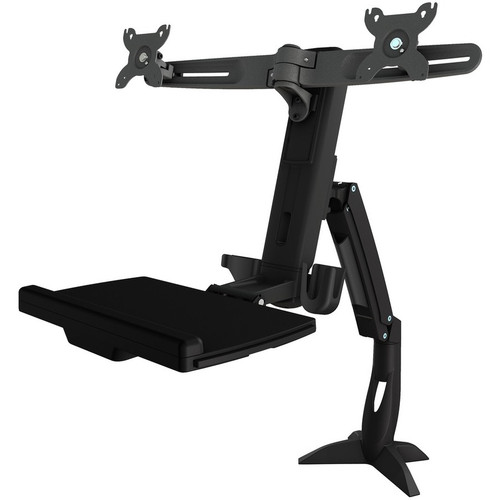
Amer AMR2ACWS Dual Sit-Stand Workstation Clamp Mount - Supports 2 Displays - 24" Screens - 18. 74 lb Load Capacity

Business volume discounts
Technical guidance
Preparation & staging
QC · ON · AB · BC
Product Features
Technical Overview
The AMR2ACWS features a maximum load capacity of 18.74 pounds (8500 grams), distributed across its dual-arm structure. This capacity supports combined display and peripheral weight while maintaining structural integrity. The mount accommodates standard VESA mounting patterns of 75x75mm and 100x100mm, compatible with most modern flat panel displays.
Constructed from durable materials, this clamp mount withstands daily workstation adjustments and maintains positioning stability. The dimensions measure 37.80 inches in height, 37 inches in width, and 35.28 inches in depth, providing substantial workspace coverage without excessive footprint.
This section brings together practical product details such as Device Supported, Number of Displays Supported, Maximum Load Capacity, Mounting Pattern, so buyers can judge configuration, deployment fit, and day-to-day suitability with less guesswork.
A strong technical summary explains how the product's interfaces, hardware profile, and operating characteristics work together in real deployment. Buyers often need this context to confirm compatibility with existing devices, expected performance in daily use, and whether installation will be straightforward for IT staff or end users.
Key Product Advantages
This workstation mount combines substantial load capacity with versatile device support, creating a comprehensive solution for organized workspaces. The dual-display configuration enhances productivity by providing expanded screen real estate without requiring separate mounting hardware.
Peripheral Integration
Beyond display support, the mount accommodates keyboards, scanners, and mice, reducing desk clutter and creating a consolidated workstation layout.
- Keyboard tray compatibility
- Scanner mounting options
- Mouse platform integration
Ergonomic Flexibility
The sit-stand design allows height adjustment to match user preferences, promoting better posture and reducing strain during extended work sessions.
- Height adjustable arms
- Tilt and swivel capabilities
- Clamp-based stability
Installation Simplicity
The clamp mounting system requires no permanent desk modifications, making installation straightforward and reversible for workspace changes.
- Tool-assisted setup
- Desk-edge clamping
- No drilling required
Deployment / Use Cases
The AMR2ACWS excels in office environments where dual displays enhance productivity for tasks like financial analysis, software development, or customer service monitoring. The peripheral support makes it ideal for reception areas, help desks, or administrative stations where multiple input devices are regularly used.
Creative professionals benefit from the dual-display setup for video editing, graphic design, or photography workflows. Technical environments including security monitoring, network operations centers, or manufacturing control rooms utilize the robust mounting for continuous display visibility. Educational institutions deploy these mounts in computer labs or library workstations to maximize space efficiency.
Office Workstations
Support dual monitors for spreadsheet analysis, document comparison, or communication platforms while keeping keyboards and scanners within reach.
- Dual-screen productivity
- Peripheral organization
- Space optimization
Technical Monitoring
Maintain constant visibility across multiple data streams or surveillance feeds with stable dual-display mounting that withstands adjustment.
- 24/7 operation capable
- Vibration resistant
- Consistent viewing angles
Physical Profile
The mount presents a substantial footprint measuring 37 inches wide by 35.28 inches deep, providing stable base support for the extended arms. Height reaches 37.80 inches to accommodate both seated and standing viewing positions. The clamp mechanism secures firmly to desk edges up to 2.4 inches thick, distributing weight evenly to prevent desk damage. Finished in professional dark tones, the mount blends with office decor while highlighting its structural elements.
- Width
- 37" (939.80 mm)
- Depth
- 35.28" (896.11 mm)
- Height
- 37.80" (960.12 mm)
Highlights
- Supports two displays simultaneously for enhanced productivity
- Accommodates flat panel displays up to 24 inches in size
- Maximum load capacity of 18.74 pounds (8500 grams)
- Compatible with 75x75mm and 100x100mm VESA mounting patterns
- Clamp design requires no permanent desk modifications
- Includes support for keyboards, scanners, and mice
- Dimensions: 37.80" H × 37" W × 35.28" D
- 3-year limited warranty for long-term reliability
- Manufactured in Taiwan with quality construction
- Ideal for office, creative, and technical workstation environments
Specifications
| Specifications | |
|---|---|
| Manufacturer | Amer Networks, Inc |
| Manufacturer Part Number | AMR2ACWS |
| Brand Name | Amer Mounts |
| Product Name | Dual Sit Stand Workstation Clamp Mount |
| Product Type | Clamp Mount |
| Product Information | |
| Device Supported | Flat Panel Display,Keyboard,Scanner,Mouse |
| Number of Displays Supported | 2 |
| Maximum Load Capacity | 18.74 lb (8500 g) |
| Maximum Screen Size Supported | 24" |
| Physical Characteristics | |
| Mounting Pattern | 75 x 75,100 x 100 |
| Height | 37.80" (960.12 mm) |
| Width | 37" (939.80 mm) |
| Depth | 35.28" (896.11 mm) |
| Miscellaneous | |
| Country of Origin | Taiwan |
| Warranty | |
| Limited Warranty | 3 Year |
User Manual
FAQ
What devices does this clamp mount support?
The Amer AMR2ACWS supports flat panel displays, keyboards, scanners, and mice. It is specifically designed to accommodate two displays alongside peripheral devices, creating a comprehensive workstation solution that reduces desk clutter and organizes multiple components in a single mounting system.
How many displays can this mount hold?
This mount supports two displays simultaneously. The dual-arm configuration allows for side-by-side monitor placement, enabling multitasking workflows, extended screen real estate, or mirrored display setups depending on your specific workstation requirements and productivity needs.
What is the maximum screen size supported?
The mount accommodates displays up to 24 inches diagonally. This size covers most standard office monitors, creative professional displays, and technical monitoring screens. The VESA compatibility ensures proper mounting for displays within this size range that feature 75x75mm or 100x100mm mounting patterns.
What is the weight capacity of this mount?
The maximum load capacity is 18.74 pounds (8500 grams). This capacity supports the combined weight of two displays, peripheral devices, and mounting hardware. The robust construction distributes this weight across the clamp base and arm structure to maintain stability during adjustments and daily use.
What VESA mounting patterns are compatible?
The mount is compatible with 75x75mm and 100x100mm VESA mounting patterns. These are the most common standards for flat panel displays, ensuring broad compatibility with monitors from various manufacturers. The mounting hardware accommodates both pattern sizes for flexible display selection.
What warranty comes with this product?
The Amer AMR2ACWS includes a 3-year limited warranty. This warranty covers manufacturing defects and material failures under normal use conditions. The substantial warranty period reflects the product's durable construction and reliability for continuous workstation applications in professional environments.
What power capacity is listed for this UPS?
The listed power specification is 18.74 lb (8500 g), which helps position the unit for the right load level and installation role.
Is this unit designed for rack or tower deployment?
For power-protection products, the most useful FAQ topics are usually capacity, outlet arrangement, runtime characteristics, and installation format. Those details do more to explain real deployment fit than generic marketing language.
| Qty | Price | Available |
|---|


