












Shipping included*
Exclusions
Additional shipping fees may apply in rare circumstances for deliveries outside standard service areas. In most cases, this only potentially affects shipments to the Northwest Territories and Yukon, as well as certain heavy or oversized items.
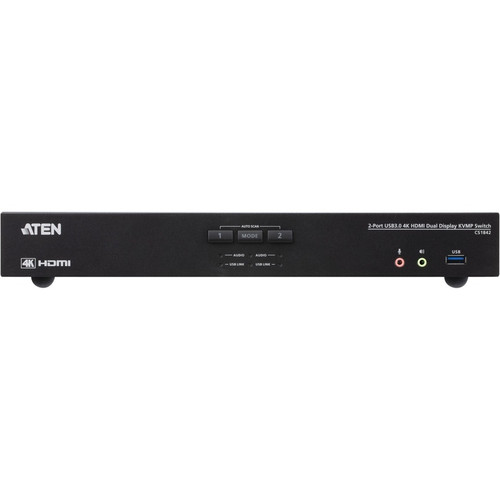
Aten CS1842 2-Port USB 3.0 4K HDMI Dual Display KVMP Switch - 2 Computers - 2 Users - 4096 x 2160 Resolution

Business volume discounts
Technical guidance
Preparation & staging
QC · ON · AB · BC
Product Features
Technical Overview
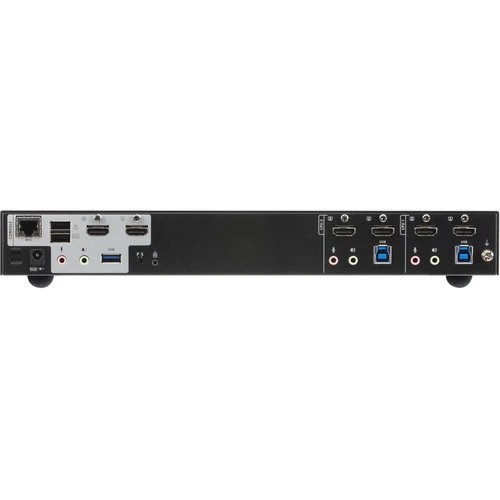
The CS1842 features a built-in 2-port USB 3.1 Gen 1 hub with SuperSpeed 5 Gbps data transfer rates for high-performance peripheral connectivity. With six HDMI ports and six USB ports, this switch provides comprehensive connectivity options for modern workstation setups.
Computer selection can be accomplished through multiple methods including front-panel pushbuttons, keyboard hotkeys, mouse gestures, remote port selector, or RS-232 commands for flexible control in various deployment scenarios. The switch supports independent switching of KVM, USB peripheral, and stereo audio focus for granular control over connected resources.
Relevant factors for this section include Number of Computers Supported, Number of Local Users Supported, Maximum Video Resolution. When those points are considered together, they give buyers a clearer picture of how the product is equipped, how it fits into deployment, and what kind of day-to-day role it is meant to support.
Key Product Advantages
These strengths make the product easier to deploy and manage in real environments, especially where reliability, usability, and day-to-day operational continuity matter. Notable benefits include Video DynaSync™ Technology, Flexible Control Options, Enhanced Compatibility Features.
Video DynaSync™ Technology
ATEN's exclusive Video DynaSync™ eliminates boot-up display problems and automatically optimizes resolution when switching between different computer sources, ensuring consistent video quality across all connected systems.
Flexible Control Options
Choose from five different computer selection methods: front-panel pushbuttons, keyboard hotkeys, mouse gestures, remote port selector, or RS-232 commands to match your preferred workflow and environment requirements.
Enhanced Compatibility Features
Console keyboard and mouse emulation/ bypass features ensure compatibility with various systems during boot sequences, while multilingual keyboard mapping supports English, French, Japanese, and German keyboard layouts.
Deployment / Use Cases
The ATEN CS1842 is ideal for professional environments where multiple users need simultaneous access to multiple computers with high-resolution dual display requirements. Common deployment scenarios include financial trading floors, video editing suites, CAD/CAM workstations, and security operations centers where operators monitor multiple systems concurrently.
For expanded display configurations, the CS1842 supports Quad Display functionality by connecting two Dual Display KVM switches together. This capability makes the switch suitable for complex multi-monitor setups in command centers, broadcast control rooms, and data visualization environments where operators need comprehensive system oversight across multiple displays.
Multi-User Trading Desks
Two traders can simultaneously access different trading platforms on separate computers while sharing market data feeds and analysis tools through the switch's peripheral sharing capabilities.
Video Production Workflows
Editors can switch between editing workstations and playback systems while maintaining 4K video quality across dual reference monitors for efficient content creation and review processes.
Physical Profile
The CS1842 features a compact desktop form factor measuring 13.19 inches wide by 6.32 inches deep by 1.73 inches high (335 x 160.5 x 44 mm), with a weight of approximately 3.53 pounds (1600 grams). This streamlined design allows for flexible placement on desktops, under monitors, or in standard equipment racks with optional mounting accessories.
The physical profile is practical for deployment planning because the dimensions and weight are clearly defined: 1.73" (44 mm), 13.19" (335 mm), 6.32" (160.50 mm), 3.53 lb (1600 g). This helps confirm rack, shelf, desk, or cabinet fit before installation.
- Width
- 13.19" (335 mm)
- Depth
- 6.32" (160.50 mm)
- Height
- 1.73" (44 mm)
- Weight
- 3.53 lb (1600 g)
What's in the Box
The CS1842 comes complete with all necessary components for immediate deployment in your workstation environment.
Highlights
- Controls 2 computers with 2 local users using one USB keyboard, mouse and dual HDMI monitors
- Supports 4K UHD (3840x2160 @ 60Hz) and 4K DCI (4096x2160 @ 60Hz) resolutions
- Video DynaSync™ technology eliminates boot-up display problems and optimizes resolution switching
- Built-in 2-port USB 3.1 Gen 1 hub with SuperSpeed 5 Gbps data transfer rates
- Six HDMI ports and six USB ports for comprehensive connectivity
- Five computer selection methods: pushbuttons, hotkeys, mouse, remote selector, RS-232
- Supports Quad Display by connecting two Dual Display KVM switches
- Console keyboard and mouse emulation/ bypass features for enhanced compatibility
- Multilingual keyboard mapping supports English, French, Japanese, and German layouts
- Independent switching of KVM, USB peripheral, and stereo audio focus
Specifications
| Specifications | |
|---|---|
| Manufacturer | ATEN Technology, Inc |
| Manufacturer Part Number | CS1842 |
| Brand Name | ATEN |
| Product Model | CS1842 |
| Product Name | 2-Port USB 3.0 4K HDMI Dual Display KVMP Switch |
| Packaged Quantity | 1 |
| Product Type | KVM Switchbox |
| Technical Information | |
| Number of Computers Supported | 2 |
| Number of Local Users Supported | 2 |
| Video | |
| Maximum Video Resolution | 4096 x 2160 |
| Interfaces/Ports | |
| Network (RJ-45) | Yes |
| USB | Yes |
| HDMI | Yes |
| Number of Network (RJ-45) Ports | 1 |
| Number of USB Ports | 6 |
| Number of HDMI Ports | 6 |
| Physical Characteristics | |
| Height | 1.73" (44 mm) |
| Width | 13.19" (335 mm) |
| Depth | 6.32" (160.50 mm) |
| Weight (Approximate) | 3.53 lb (1600 g) |
| Miscellaneous | |
| Package Contents | 2-Port USB 3.0 4K HDMI Dual Display KVMP Switch 4 x HDMI 2.0 Cables 2 x USB 3.0 Cables 2 x Speaker Cables 2 x Microphone Cables 1 x Power Adapter 1 x Remote Port Selector 1 x User Instructions |
| Country of Origin | Taiwan |
User Manual
FAQ
How many computers can the ATEN CS1842 switch control simultaneously?
The ATEN CS1842 supports two computers simultaneously. Two local users can control these two computers using a single USB keyboard, mouse, and dual HDMI monitors, making it ideal for shared workstation environments where multiple operators need access to different systems.
What video resolutions does this KVMP switch support?
The CS1842 supports superior 4K video quality including both 4K UHD at 3840x2160 resolution (60Hz) and 4K DCI at 4096x2160 resolution (60Hz). This high-resolution support ensures crisp, detailed visuals for professional applications like video editing, CAD design, and financial trading displays.
What connectivity options are available on the CS1842?
The switch features six HDMI ports for display connections, six USB ports (including a built-in 2-port USB 3.1 Gen 1 hub with 5 Gbps transfer rates), and one RJ-45 network port. This comprehensive connectivity allows for simultaneous connection of multiple displays, peripherals, and network devices.
How can I switch between computers with this KVMP switch?
The CS1842 offers five different computer selection methods: front-panel pushbuttons, keyboard hotkeys, mouse gestures, remote port selector, or RS-232 commands. This flexibility allows users to choose the control method that best fits their workflow, whether operating locally at the workstation or remotely from another location.
What is Video DynaSync™ technology and how does it benefit users?
Video DynaSync™ is ATEN's exclusive technology that eliminates boot-up display problems and automatically optimizes resolution when switching between different computer sources. This ensures consistent video quality across all connected systems without manual adjustment, reducing setup time and maintaining optimal display performance during computer transitions.
Can I expand this setup for more than two displays?
Yes, the CS1842 supports Quad Display functionality by connecting two Dual Display KVM switches together. This expansion capability allows for complex multi-monitor configurations suitable for command centers, broadcast control rooms, and data visualization environments where operators need comprehensive system oversight across four displays.
| Qty | Price | Available |
|---|