










Shipping included*
Exclusions
Additional shipping fees may apply in rare circumstances for deliveries outside standard service areas. In most cases, this only potentially affects shipments to the Northwest Territories and Yukon, as well as certain heavy or oversized items.
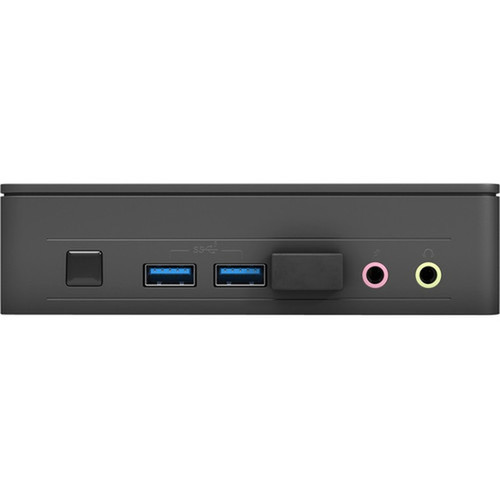
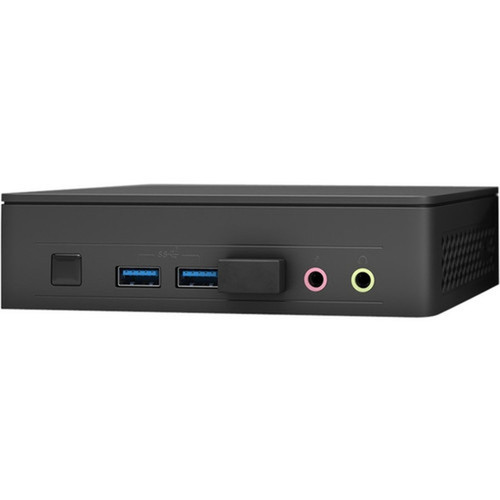
Asus BNUC11ATKC20001 NUC 11 Essential Barebone Mini PC - Intel Celeron N4505 Dual-Core - Up to 32GB DDR4 - WiFi 6 - Bluetooth 5. 1

Business volume discounts
Technical guidance
Preparation & staging
QC · ON · AB · BC
Product Features
Product Overview
The Asus NUC 11 Essential barebone mini PC delivers compact, efficient computing for everyday office and home environments. Built around the Intel Celeron N4505 dual-core processor, this system provides reliable performance for productivity tasks, web browsing, and light multimedia applications.
As a barebone kit, this NUC requires user installation of memory, storage, and operating system, offering flexibility to customize the configuration to specific needs. The mini PC form factor makes it ideal for space-constrained setups where traditional desktop towers would be impractical.
Relevant factors for this section include Processor Type, Processor Model, Processor Core, Chipset Manufacturer. When those points are considered together, they give buyers a clearer picture of how the product is equipped, how it fits into deployment, and what kind of day-to-day role it is meant to support.
Technical Overview
At the heart of the NUC 11 Essential is the Intel Celeron N4505 processor, a dual-core CPU with a base clock speed of 2.0 GHz and turbo boost capability up to 2.90 GHz. This 64-bit processor is paired with Intel UHD Graphics for basic display output and multimedia acceleration.
The system supports up to 32GB of DDR4-2933 memory across two SODIMM slots, providing ample capacity for multitasking and application performance. Storage expansion is handled through a single M.2 interface for NVMe or SATA SSDs, allowing for fast boot times and application loading.
Relevant factors for this section include Processor Type, Processor Model, Processor Core, Chipset Manufacturer. When those points are considered together, they give buyers a clearer picture of how the product is equipped, how it fits into deployment, and what kind of day-to-day role it is meant to support.
Key Product Advantages
The NUC 11 Essential combines compact design with modern connectivity options, making it a versatile solution for various computing scenarios. Its small footprint and low power consumption make it suitable for environments where space and energy efficiency are priorities.
These strengths make the product easier to deploy and manage in real environments, especially where reliability, usability, and day-to-day operational continuity matter. Notable benefits include Compact Mini PC Form Factor, Modern WiFi 6 Connectivity, Dual Display Output Support, Flexible OS Compatibility, Energy Efficient Design.
Deployment / Use Cases
This barebone mini PC excels in office environments as a space-saving workstation for productivity applications, email, and web-based tools. Its compact size allows for placement behind monitors, under desks, or in other constrained spaces where traditional PCs won't fit.
Home users will appreciate the NUC for media streaming, light gaming, and general computing tasks. The system's HDMI and DisplayPort outputs support dual monitor setups, enhancing productivity for office work or creative applications. Educational institutions and digital signage deployments can leverage the compact form factor for classroom or display installations.
Office Productivity Station
Configure with 8-16GB RAM and SSD for responsive performance with office suites, email clients, and web applications.
- Space-saving design fits in tight workspaces
- Quiet operation suitable for open offices
- Dual monitor support enhances productivity
Home Entertainment Hub
Pair with adequate storage for media libraries and use as a compact media center for streaming and light gaming.
- HDMI output connects to TVs and monitors
- WiFi 6 ensures smooth streaming
- Low power consumption for 24/7 operation
Highlights
- Intel Celeron N4505 dual-core processor with 2.0 GHz base clock (2.90 GHz turbo)
- Supports up to 32GB DDR4-2933 memory across two SODIMM slots
- Compact barebone mini PC form factor for space-constrained environments
- Modern connectivity with WiFi 6 (802.11ac) and Bluetooth 5.1
- Dual display support via HDMI and DisplayPort outputs
- Six USB ports including USB 3.2 Gen 1 and Gen 2 for fast data transfer
- Gigabit Ethernet for reliable wired network connectivity
- Compatible with Windows 11, Windows 10, and Linux operating systems
- Single M.2 interface for NVMe or SATA SSD storage expansion
- RoHS compliant for reduced environmental impact
Specifications
| Specifications | |
|---|---|
| Manufacturer | ASUS Computer International |
| Manufacturer Part Number | BNUC11ATKC20001 |
| Brand Name | Asus |
| Product Line | NUC 11 Essential |
| Product Model | NUC11ATKC2 |
| Product Name | NUC 11 Essential Kit - NUC11ATKC2 |
| Product Type | Barebone System |
| Processor | |
| Processor Type | Celeron |
| Processor Model | N4505 |
| Processor Core | Dual-core (2 Core) |
| Processor Speed | 2 GHz |
| Maximum Turbo Speed | 2.90 GHz |
| 64-bit Processing | Yes |
| Chipset | |
| Chipset Manufacturer | Intel |
| Memory | |
| Maximum Memory Supported | 32 GB |
| Memory Technology | DDR4 SDRAM |
| Memory Standard | DDR4-2933/PC4-23466 |
| Total Number of Memory Slots | 2 |
| Intel Optane Memory Ready | No |
| Display & Graphics | |
| Graphics Controller Model | UHD Graphics |
| Graphics Memory Technology | DDR4 SDRAM |
| Graphics Memory Accessibility | Shared |
| Network & Communication | |
| Ethernet Technology | Gigabit Ethernet |
| Wireless LAN | Yes |
| Wireless LAN Standard | IEEE 802.11ac |
| Bluetooth | Yes |
| Bluetooth Standard | Bluetooth 5.1 |
| I/O Expansions | |
| Number of M.2 Interfaces | 1 |
| Interfaces/Ports | |
| HDMI | Yes |
| Total Number of USB Ports | 6 |
| Number of USB 3.2 Gen 1 Ports | 2 |
| Number of USB 3.2 Gen 2 Ports | 2 |
| Network (RJ-45) | Yes |
| DisplayPort | Yes |
| Operating System | |
| Operating System Supported | Windows 11,Windows 10,Linux |
| Physical Characteristics | |
| Form Factor | Mini PC |
| Miscellaneous | |
| Environmental Compliance | Restriction of Hazardous Substances (RoHS) |
User Manual
FAQ
What components do I need to add to make this barebone system operational?
To complete the Asus NUC 11 Essential barebone system, you'll need to install DDR4 SODIMM memory modules (up to 32GB total across two slots), an M.2 NVMe or SATA SSD for storage, and an operating system such as Windows 11, Windows 10, or a Linux distribution. The system does not include these components, allowing you to customize the configuration based on your performance needs and budget.
What processor does this NUC 11 Essential model use?
This barebone system features the Intel Celeron N4505 processor, a dual-core CPU with a base clock speed of 2.0 GHz and maximum turbo frequency of 2.90 GHz. This 64-bit processor provides efficient performance for everyday computing tasks, web browsing, office applications, and light multimedia usage while maintaining low power consumption.
How much memory can I install in this mini PC?
The Asus NUC 11 Essential supports up to 32GB of DDR4 memory using two SODIMM slots. The system is compatible with DDR4-2933/PC4-23466 memory modules. This capacity allows for smooth multitasking with multiple applications open simultaneously, making the system suitable for office productivity, web browsing with multiple tabs, and light content creation tasks.
What wireless connectivity options does this NUC offer?
This mini PC includes both WiFi 6 (IEEE 802.11ac) and Bluetooth 5.1 wireless technologies. The WiFi 6 support provides faster wireless speeds, improved performance in crowded network environments, and better power efficiency compared to previous WiFi standards. Bluetooth 5.1 enables reliable connections with peripherals like wireless keyboards, mice, headphones, and speakers with extended range and lower latency.
Can this NUC support dual monitors?
Yes, the Asus NUC 11 Essential supports dual monitor configurations through its HDMI and DisplayPort outputs. You can connect one display via HDMI and another via DisplayPort simultaneously. This dual display capability enhances productivity for office work, content creation, or multitasking scenarios where having multiple screens improves workflow efficiency.
What operating systems are compatible with this barebone system?
The NUC 11 Essential is compatible with Windows 11, Windows 10, and various Linux distributions. This flexibility allows you to choose the operating system that best fits your needs, whether for business environments requiring Windows compatibility, development work using Linux, or specialized applications that run on specific operating systems. You'll need to purchase and install your preferred OS separately.
| Qty | Price | Available |
|---|


