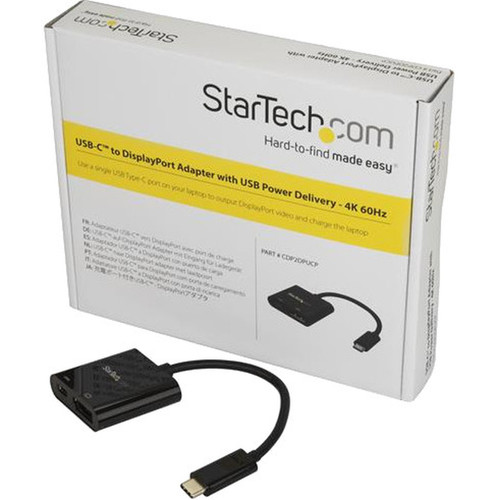
StarTech. com CDP2DPUCP USB-C to DisplayPort Adapter - 4K 60Hz with 60W Power Delivery Pass-Through

Business volume discounts
Technical guidance
Preparation & staging
QC · ON · AB · BC
Product Features
Technical Overview
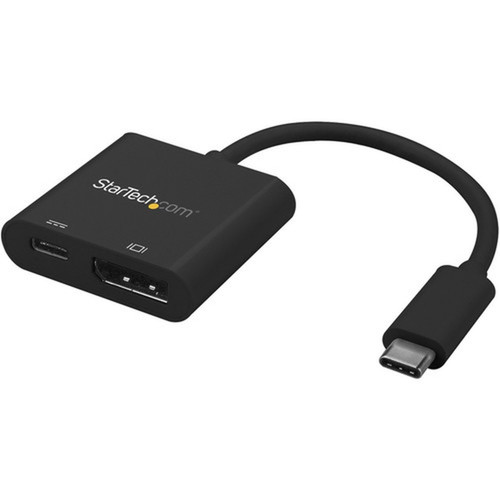
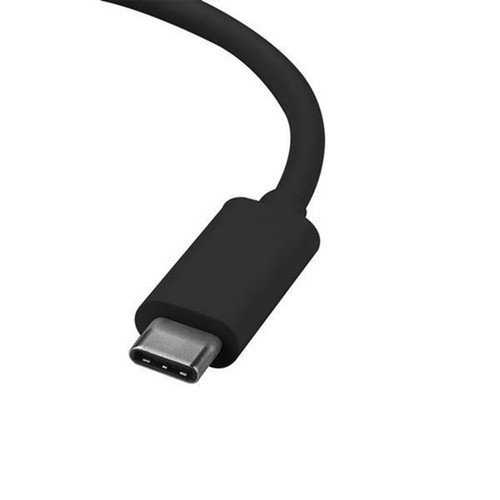
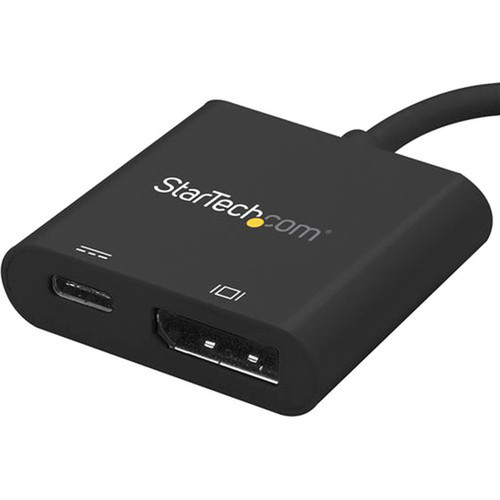
This USB-C to DisplayPort adapter implements DisplayPort Alternate Mode over USB-C, providing native DisplayPort signaling without compression or conversion latency. The 24-pin USB-C male connector delivers both video data and USB Power Delivery simultaneously, while the 20-pin DisplayPort female connector accepts standard DisplayPort cables for monitor connectivity.
The adapter's 60W Power Delivery pass-through capability enables device charging during video transmission, eliminating the need for separate power adapters. This feature is particularly valuable for modern ultrabooks and tablets that rely on USB-C for both display output and power input.
This section brings together practical product details such as Adapter Type, Connector Type on First End, Connector on First End Details, Color Family, so buyers can judge configuration, deployment fit, and day-to-day suitability with less guesswork.
A strong technical summary explains how the product's interfaces, hardware profile, and operating characteristics work together in real deployment. Buyers often need this context to confirm compatibility with existing devices, expected performance in daily use, and whether installation will be straightforward for IT staff or end users.
Key Product Advantages
This adapter simplifies workspace setups by combining video output and device charging into a single cable solution. The 60W Power Delivery pass-through maintains laptop battery levels during extended presentations or multi-monitor productivity sessions, while the compact black housing blends discreetly into professional environments.
Single-Cable Convenience
Delivers both 4K video and charging power through one USB-C connection, reducing cable clutter and simplifying desk organization.
- Eliminates separate power adapters
- Reduces cable management complexity
- Maintains clean workspace aesthetics
Broad Compatibility
Works with Thunderbolt 3 and USB-C laptops from major manufacturers including Dell, HP, Lenovo, Apple, and Microsoft Surface devices.
- Tested with leading monitor brands
- Backward compatible with 1080p displays
- Supports multiple operating systems
Deployment / Use Cases
The CDP2DPUCP adapter is ideal for modern office environments where employees use USB-C laptops with traditional DisplayPort monitors. IT departments can standardize on this solution to support diverse hardware while maintaining consistent video quality and charging capabilities across the organization.
Conference rooms benefit from this adapter's ability to connect presenter laptops to large-format displays while keeping devices powered throughout extended meetings. Educational institutions can use these adapters in computer labs and lecture halls to support various student devices without requiring multiple adapter types.
Corporate Workspace Standardization
Provides consistent 4K video output and charging for mixed laptop fleets, reducing support complexity and improving user experience.
- Supports Dell XPS, Lenovo ThinkPad, HP EliteBook
- Works with Thunderbolt 3 MacBook Pro
- Compatible with Surface Book/Laptop series
Presentation and Collaboration Spaces
Enables seamless connection between personal laptops and shared displays while maintaining device battery levels during extended sessions.
- HDCP support for protected content
- Driverless operation for guest presenters
- Compact design for portable use
Physical Profile
The adapter features a durable black housing that matches professional computing accessories. At just 0.80 ounces (22.68 grams), it adds minimal weight to laptop bags and remains unobtrusive when connected. The compact form factor ensures it doesn't interfere with adjacent ports on tightly spaced laptop designs.
The physical profile is practical for deployment planning because the dimensions and weight are clearly defined: 0.80 oz (22.68 g). This helps confirm rack, shelf, desk, or cabinet fit before installation.
- Weight
- 0.80 oz (22.68 g)
Highlights
- Supports 4K 60Hz UHD resolution (4096x2160/3840x2160)
- Provides 60W Power Delivery pass-through charging
- Compatible with Thunderbolt 3 and USB-C laptops
- Works with DisplayPort 1.2 Alt Mode (HBR2 21.6Gbps)
- HDCP 2.2 and 1.4 compliant for protected content
- Driverless plug-and-play operation
- Supports macOS, Windows, Chrome OS, iPadOS, and Linux
- Backward compatible with 1080p displays
- Tested with Dell, Samsung, Asus, Acer, and LG monitors
- 3-year limited warranty
Specifications
| Specifications | |
|---|---|
| Manufacturer | StarTech.com |
| Manufacturer Part Number | CDP2DPUCP |
| Brand Name | StarTech.com |
| Product Name | USB-C to DisplayPort Adapter with USB Power Delivery - 4K 60Hz |
| Packaged Quantity | 1 Each |
| Product Type | Video Adapter |
| Technical Information | |
| Adapter Type | DisplayPort/USB-C |
| Connector Type on First End | USB Type C - Male |
| Connector on First End Details | 1 x 24-pin USB Type C - Male |
| Connector Type on Second End | DisplayPort Digital Audio/Video - Female |
| Connector on Second End Details | 1 x 20-pin DisplayPort Digital Audio/Video - Female |
| Features | Reversible,USB- Power Delivery (USB PD),Charging,HDCP 2.2,HDCP 1.4 |
| Physical Characteristics | |
| Color Family | Black |
| Product Color | Black |
| Weight (Approximate) | 0.80 oz (22.68 g) |
| Miscellaneous | |
| Country of Origin | China |
| Environmentally Friendly | Yes |
| Environmental Certification | EU RoHS |
| Environmental Compliance | Restriction of Hazardous Substances (RoHS) 2,Registration, Evaluation, Authorization and Restriction of Chemicals (REACH),Waste Electrical and Electronic Equipment Directive (WEEE) |
| Warranty | |
| Limited Warranty | 3 Year |
User Manual
FAQ
How much power can this adapter deliver for charging my laptop?
This adapter provides up to 60W of USB Power Delivery pass-through charging. This sufficient power level maintains battery levels or charges most modern ultrabooks and tablets during use. The power delivery operates simultaneously with video transmission, eliminating the need for separate charging cables while connected to a DisplayPort monitor.
Which laptops and devices are compatible with this USB-C to DisplayPort adapter?
The adapter works with Thunderbolt 3 and USB-C laptops including Lenovo ThinkPad X1 Carbon, Dell XPS 13, HP EliteBook, Apple MacBook Pro 13/Air with Thunderbolt 3, Microsoft Surface Book 3/Laptop 3, and Chromebooks. It supports any device with DisplayPort Alternate Mode over USB-C, which includes most modern business and consumer laptops with USB-C video output capability.
Does this adapter require drivers or software installation?
No, this adapter operates as a driverless plug-and-play device. It works immediately when connected to compatible hardware without requiring additional software downloads or system configuration. This makes it ideal for shared workspaces, conference rooms, and environments where users connect personal devices without administrative privileges.
What refresh rate or brightness details are available?
Display-oriented products are best judged through screen, connectivity, and installation specifications. Those facts help buyers confirm visual fit, mounting flexibility, and deployment suitability more clearly than generic summary text.
What input or connectivity options are listed?
Connectivity options include USB Type C - Male, helping the product integrate into common office or home setups.
Does the display support VESA mounting or adjustment features?
Display-oriented products are best judged through screen, connectivity, and installation specifications. Those facts help buyers confirm visual fit, mounting flexibility, and deployment suitability more clearly than generic summary text.
What panel or display technology is mentioned?
Display-oriented products are best judged through screen, connectivity, and installation specifications. Those facts help buyers confirm visual fit, mounting flexibility, and deployment suitability more clearly than generic summary text.
What deployment or installation detail is listed?
Display-oriented products are best judged through screen, connectivity, and installation specifications. Those facts help buyers confirm visual fit, mounting flexibility, and deployment suitability more clearly than generic summary text.
| Qty | Price | Available |
|---|