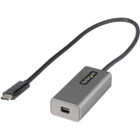
StarTech. com CDP2MDPEC USB-C to Mini DisplayPort Adapter - 4K 60Hz UHD - HDCP 2. 2 - 12" Cable - White

Business volume discounts
Technical guidance
Preparation & staging
QC · ON · AB · BC
Product Features
Technical Overview
This video adapter implements DisplayPort Alternate Mode over USB-C, supporting Mini DisplayPort 1.2 HBR2 specifications. The adapter handles 4K UHD resolution at 60Hz with full HDCP 2.2 and 1.4 content protection for secure media playback.
The compact design incorporates a 24-pin USB Type-C male connector on one end and a 20-pin Mini DisplayPort 1.2 female connector on the other, with 2-channel audio support for complete multimedia connectivity.
This section brings together practical product details such as Adapter Type, Connector Type on First End, Connector on First End Details, Color Family, so buyers can judge configuration, deployment fit, and day-to-day suitability with less guesswork.
A strong technical summary explains how the product's interfaces, hardware profile, and operating characteristics work together in real deployment. Buyers often need this context to confirm compatibility with existing devices, expected performance in daily use, and whether installation will be straightforward for IT staff or end users.
Key Product Advantages
This adapter stands out with its tested compatibility across major computer and monitor brands, ensuring reliable performance in diverse IT environments.
Broad Host Compatibility
Works with DP Alt Mode USB-C and Thunderbolt computers including Dell XPS, Precision, Latitude; Lenovo ThinkPad X1 Carbon, Extreme; Surface Laptop 3, Pro 7; HP EliteBook; Chromebook; and MacBook Pro/Air (Intel & M-Series).
Verified Display Performance
Tested for peak performance at 4K 60Hz on Mini DP monitors from Dell UltraSharp, Samsung, Asus ProArt, Acer, and LG, plus compatibility with Apple Cinema Displays (excluding Thunderbolt monitors).
Simplified Deployment
The driverless setup requires no software installation and works independently of operating system, making it ideal for IT deployments across mixed-platform environments.
Deployment / Use Cases
This adapter serves as an essential connectivity solution for expanding display capabilities in modern office setups. It enables users to connect newer USB-C laptops to existing Mini DisplayPort monitors, extending the useful life of display investments.
Common deployment scenarios include connecting business laptops to conference room displays, setting up dual-monitor workstations with mixed connectivity, and enabling high-resolution presentations from modern ultrabooks to legacy projection systems.
This section brings together practical product details such as Adapter Type, Connector Type on First End, Connector on First End Details, Color Family, so buyers can judge configuration, deployment fit, and day-to-day suitability with less guesswork.
Physical Profile
The adapter features a compact, portable design with white plastic construction weighing just 0.81 ounces. The 12-inch attached cable provides sufficient reach for most desk configurations while maintaining a clean, organized workspace appearance.
The physical profile is practical for deployment planning because the dimensions and weight are clearly defined: 0.81 oz (23 g). This helps confirm rack, shelf, desk, or cabinet fit before installation.
- Weight
- 0.81 oz (23 g)
Highlights
- Supports 4K UHD resolution at 60Hz refresh rate
- Connects USB-C/Thunderbolt computers to Mini DisplayPort monitors
- 12-inch attached cable for flexible placement
- Driverless setup with OS-independent operation
- HDCP 2.2 and 1.4 content protection support
- Compatible with major computer brands including Dell, Lenovo, Surface, HP
- Works with Apple Cinema Displays (excluding Thunderbolt models)
- Backward compatible with 1080p and supports ultrawide displays
- Compact, portable white plastic design
- 3-year limited warranty with EU RoHS environmental compliance
Specifications
| Specifications | |
|---|---|
| Manufacturer | StarTech.com |
| Manufacturer Part Number | CDP2MDPEC |
| Brand Name | StarTech.com |
| Product Name | USB-C to Mini DisplayPort Adapter |
| Product Type | Video Adapter |
| Technical Information | |
| Adapter Type | Mini DisplayPort/USB-C |
| Connector Type on First End | USB Type C - Male |
| Connector on First End Details | 1 x 24-pin Type C USB Male |
| Connector Type on Second End | Mini DisplayPort 1.2 Digital Audio/Video - Female |
| Connector on Second End Details | 1 x 20-pin Mini DisplayPort Mini DisplayPort 1.2 Digital Audio/Video Female |
| Maximum Resolution Supported | 3840 x 2160 |
| Features | HDCP 2.2,HDCP 1.4 |
| Physical Characteristics | |
| Color Family | White |
| Product Color | White |
| Product Material | Plastic |
| Weight (Approximate) | 0.81 oz (23 g) |
| Miscellaneous | |
| Country of Origin | Vietnam |
| Environmentally Friendly | Yes |
| Environmental Certification | EU RoHS |
| Environmental Compliance | Restriction of Hazardous Substances (RoHS) 2,Registration, Evaluation, Authorization and Restriction of Chemicals (REACH),Waste Electrical and Electronic Equipment Directive (WEEE) |
| Warranty | |
| Limited Warranty | 3 Year |
User Manual
FAQ
What resolution and refresh rate does this USB-C to Mini DisplayPort adapter support?
The adapter supports maximum resolution of 3840 x 2160 (4K UHD) at 60Hz refresh rate. It maintains backward compatibility with lower resolutions including 1080p and supports ultrawide displays up to 3440x1440 resolution.
Which computers are compatible with this video adapter?
The adapter works with computers supporting DisplayPort Alternate Mode over USB-C or Thunderbolt, including Dell XPS, Precision, Latitude; Lenovo ThinkPad X1 Carbon, Extreme; Microsoft Surface Laptop 3, Pro 7; HP EliteBook; Chromebook; and MacBook Pro/Air models with Intel or M-series processors.
Does this adapter work with Apple displays?
Yes, it's compatible with Apple Cinema Displays including the 30-inch (A1083) and 27-inch/24-inch LED models (A1316/A1267). However, it does not work with Thunderbolt monitors like the 27-inch Apple Thunderbolt Display (A1407), which requires Thunderbolt connectivity.
What is the cable length and does it require separate cables?
The adapter includes an integrated 12-inch (30cm) cable, eliminating the need for additional cabling. This attached cable provides sufficient length for most desk configurations while maintaining a clean setup.
Does this adapter require driver installation or specific software?
No, the adapter features a driverless setup that requires no software installation. It operates independently of the operating system, making it compatible with Windows, macOS, Chrome OS, and Linux systems without additional configuration.
What content protection standards does this adapter support?
The adapter supports HDCP 2.2 and HDCP 1.4 content protection standards, ensuring compatibility with protected media content from streaming services, Blu-ray players, and other copyright-protected sources.
What resolution or display format is specified?
It features a display specification of 3840 x 2160, giving you clear visuals for work and media use.
What refresh rate or brightness details are available?
Display-oriented products are best judged through screen, connectivity, and installation specifications. Those facts help buyers confirm visual fit, mounting flexibility, and deployment suitability more clearly than generic summary text.
| Qty | Price | Available |
|---|