














Shipping included*
Exclusions
Additional shipping fees may apply in rare circumstances for deliveries outside standard service areas. In most cases, this only potentially affects shipments to the Northwest Territories and Yukon, as well as certain heavy or oversized items.
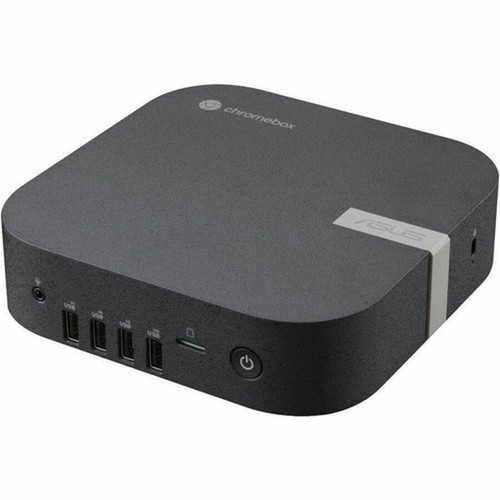
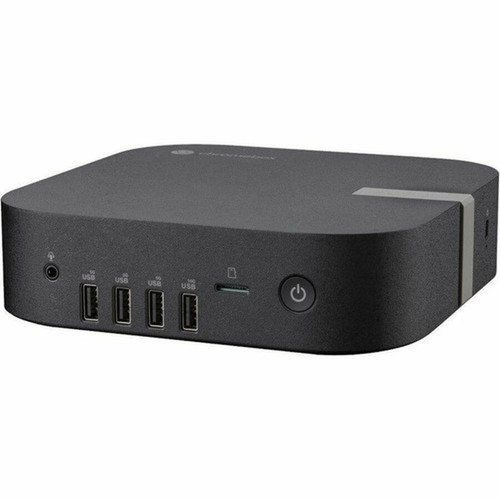
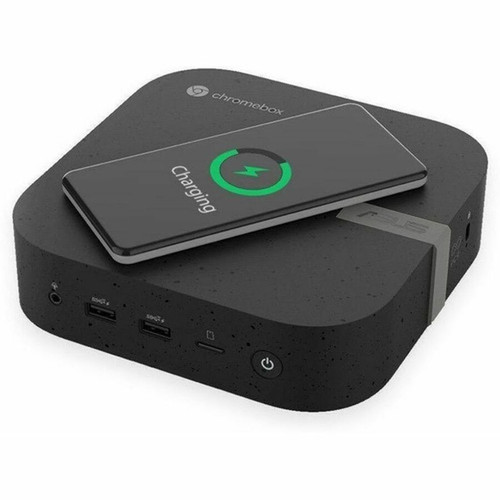
Asus CHROMEBOX5A-SC041UNENT Chromebox 5a Mini PC - Intel Celeron 7305 - 4 GB RAM - 128 GB NVMe SSD - ChromeOS - Eco Black

Business volume discounts
Technical guidance
Preparation & staging
QC · ON · AB · BC
Product Features
Technical Overview
At its core, the Chromebox 5a utilizes an Intel Celeron 7305 processor, a penta-core design operating at 1.10 GHz. This CPU, paired with an Intel chipset, provides the necessary performance for everyday productivity tasks, web applications, and media streaming while maintaining energy efficiency.
System memory is configured with 4 GB of DDR4 SDRAM, supporting responsive multitasking within the ChromeOS environment. Storage is handled by a 128 GB M.2 SSD using the PCI Express NVMe 4.0 x4 interface, offering significantly faster boot times, application launches, and file access compared to traditional storage.
Graphics are powered by integrated Intel graphics with shared system memory, sufficient for driving displays via the USB Type-C port's DisplayPort 1.4 capability. The connectivity suite is comprehensive, featuring Gigabit Ethernet for wired networking and a total of seven USB ports to accommodate peripherals.
Key Product Advantages
Streamlined ChromeOS Experience
ChromeOS provides a secure, cloud-centric operating system with seamless integration for Google Workspace. It offers automatic updates, built-in virus protection, and fast boot times, reducing IT overhead and ensuring users are always on the latest, most secure software version.
Compact and Deployable Design
The Mini PC form factor, measuring just over 1.8 inches tall, allows for placement behind monitors, under desks, or in wall-mounted setups. Its lightweight build and small footprint make it ideal for digital signage, kiosks, classroom labs, and hot-desking environments.
Modern Connectivity Suite
With multiple USB 3.2 Gen 1 and Gen 2 ports, including a multi-function USB Type-C port, the Chromebox 5a supports high-speed data transfer, display output, and power delivery. This flexibility simplifies cable management and peripheral connectivity.
Deployment / Use Cases
The Asus Chromebox 5a is purpose-built for scenarios where simplicity, security, and space efficiency are paramount. Its cloud-native architecture makes it an excellent choice for businesses adopting Software-as-a-Service (SaaS) models, as all applications and data reside securely online, minimizing local storage needs and simplifying device management.
In educational institutions, these devices are perfect for computer labs, library stations, or classroom carts, providing students with consistent, fast access to web-based learning tools and Google Classroom. For corporate settings, they serve well as front-desk terminals, meeting room systems, or task-worker desktops for email, CRM access, and document editing.
The compact size also lends itself to digital signage applications, where the unit can be discreetly mounted behind a display. The security slot adds a layer of physical theft deterrence for public-facing deployments.
Localization and Operating System
This device ships with ChromeOS pre-installed and configured. ChromeOS is a lightweight, Linux-based operating system developed by Google, centered around the Chrome web browser and cloud services. It is designed for users who primarily work within web applications.
The operating system includes built-in support for multiple languages and input methods. Management is centralized through the Google Admin console, allowing IT administrators to easily deploy, configure, and apply policies to fleets of Chromebox devices remotely. Automatic updates ensure security patches and new features are delivered seamlessly without user intervention.
Relevant factors for this section include Processor Manufacturer, Processor Type, Processor Model, Chipset Manufacturer. When those points are considered together, they give buyers a clearer picture of how the product is equipped, how it fits into deployment, and what kind of day-to-day role it is meant to support.
Physical Profile
Encased in an Eco Black finish, the Chromebox 5a presents a professional and minimalist aesthetic suitable for any workspace. Its compact dimensions—approximately 1.81 inches in height, 6.56 inches in width, and 6.53 inches in depth—define its Mini PC classification.
Weighing just 1.76 pounds, the unit is highly portable. The small footprint allows for versatile placement options, including VESA mount compatibility (bracket not included), enabling clean, cable-managed installations behind compatible monitors or under desks.
- Width
- 6.56" (166.50 mm)
- Depth
- 6.53" (165.80 mm)
- Height
- 1.81" (45.90 mm)
- Weight
- 1.76 lb (800 g)
What's in the Box
The package includes all essential components to get the Chromebox 5a up and running immediately.
Highlights
- Compact Mini PC form factor saves valuable desk space.
- Powered by an Intel Celeron 7305 penta-core processor for efficient everyday computing.
- 4 GB of DDR4 RAM supports smooth multitasking in ChromeOS.
- 128 GB high-speed NVMe PCIe 4.0 SSD ensures fast system responsiveness.
- Pre-installed ChromeOS offers a secure, low-maintenance cloud computing platform.
- Features Gigabit Ethernet for reliable, high-speed wired network connectivity.
- Includes seven USB ports (3x USB 3.2 Gen 1, 3x USB 3.2 Gen 2, 1x USB-C with DP and PD).
- Eco Black finish and small footprint suit professional and educational environments.
- Equipped with a security slot for physical anti-theft protection.
- Energy Star certified and RoHS compliant for environmental responsibility.
Specifications
| Specifications | |
|---|---|
| Manufacturer | ASUS Computer International |
| Manufacturer Part Number | CHROMEBOX5A-SC041UNENT |
| Brand Name | Asus |
| Product Line | Chromebox 5a |
| Product Model | CHROMEBOX5A-SC041UNENT |
| Product Name | CHROMEBOX5A-SC041UNENT Chromebox |
| Product Type | Chromebox |
| Processor | |
| Processor Manufacturer | Intel |
| Processor Type | Celeron |
| Processor Model | 7305 |
| Processor Core | Penta-core (5 Core) |
| Processor Speed | 1.10 GHz |
| Chipset | |
| Chipset Manufacturer | Intel |
| Memory | |
| Standard Memory | 4 GB |
| Memory Technology | DDR4 SDRAM |
| Storage | |
| Drive Type | SSD |
| Total Solid State Drive Capacity | 128 GB |
| Solid State Drive Interface | PCI Express NVMe 4.0 x4 |
| SSD Form Factor | M.2 |
| Display & Graphics | |
| Graphics Controller Manufacturer | Intel |
| Graphics Memory Technology | DDR4 SDRAM |
| Graphics Memory Accessibility | Shared |
| Network & Communication | |
| Ethernet Technology | Gigabit Ethernet |
| Interfaces/Ports | |
| Total Number of USB Ports | 7 |
| Number of USB 3.2 Gen 1 Ports | 3 |
| Number of USB 3.2 Gen 2 Ports | 3 |
| USB Type-C (Rear) | Yes |
| USB Type-C Detail | 1 x USB 3.2 Gen2 Type-C (with DP1.4 output and PD input) |
| Operating System | |
| Operating System Platform | ChromeOS |
| Operating System | ChromeOS |
| Physical Characteristics | |
| Color Family | Black |
| Product Color | Eco Black |
| Form Factor | Mini PC |
| Height | 1.81" (45.90 mm) |
| Width | 6.56" (166.50 mm) |
| Depth | 6.53" (165.80 mm) |
| Weight (Approximate) | 1.76 lb (800 g) |
| Miscellaneous | |
| Package Contents | CHROMEBOX5A-SC041UNENT Chromebox Power Adapter |
| Features | Security Slot |
| Energy Star | Yes |
| Environmental Compliance | Restriction of Hazardous Substances (RoHS) |
User Manual
FAQ
What processor does the Asus Chromebox 5a use, and what kind of performance can I expect?
The Chromebox 5a is equipped with an Intel Celeron 7305 processor. This is a penta-core (5-core) CPU with a base clock speed of 1.10 GHz. It is designed for energy-efficient performance, making it well-suited for everyday business and educational tasks such as web browsing, email, document editing, video conferencing, and streaming media within the ChromeOS environment. It provides a responsive experience for cloud-based applications but is not intended for intensive local software or high-end gaming.
Is the 4 GB of RAM sufficient for running ChromeOS and multiple tabs?
Yes, 4 GB of DDR4 SDRAM is a standard and sufficient configuration for the ChromeOS operating system. ChromeOS is a lightweight, optimized platform that manages memory efficiently. This amount of RAM comfortably supports everyday multitasking, including having multiple browser tabs open, using web-based applications like Google Workspace (Docs, Sheets, Slides), and streaming video content simultaneously. For users with extremely heavy tab usage (50+ tabs) or who plan to use Linux applications via Crostini, more memory might be beneficial, but for typical business and education workflows, 4 GB is adequate.
Can I expand the storage on this Chromebox?
The internal storage is a 128 GB M.2 NVMe SSD, which is not user-upgradeable in a typical consumer sense as it's soldered or integrated into the compact motherboard design. However, ChromeOS is cloud-centric, so local storage is primarily for the operating system, cache, and some offline files. For additional storage, you can easily use USB flash drives, external hard drives, or SD cards via adapters connected to the numerous USB ports. Cloud storage services like Google Drive are seamlessly integrated into the OS.
What display outputs are available on the Chromebox 5a?
The primary display output is through the USB 3.2 Gen2 Type-C port on the rear of the device. This port supports DisplayPort 1.4 output, allowing you to connect to a monitor, TV, or projector that has a DisplayPort, HDMI (via a compatible adapter), or USB-C input. The USB-C port also supports Power Delivery (PD) input, meaning you can potentially power the Chromebox through the same cable connected to a compatible monitor or power adapter, reducing cable clutter. There are no dedicated HDMI or DisplayPort connectors on the unit itself.
How is this Chromebox managed in a business or school IT environment?
Asus Chromebox devices are designed for easy centralized management through the Google Admin console. IT administrators can enroll devices into their organization's domain, push standardized policies, configure network settings (including secure Wi-Fi), install approved apps and extensions, and manage user access remotely. This console also allows for tracking device health, forcing updates, and remotely wiping devices if lost or stolen, making it an efficient solution for deploying and maintaining a large fleet of computers with minimal hands-on effort.
What is included in the box with the Chromebox 5a?
The package contains the Asus Chromebox 5a unit itself (model CHROMEBOX5A-SC041UNENT) and the necessary power adapter to run the device. You will need to provide your own display, keyboard, mouse, and any necessary video cables (e.g., a USB-C to HDMI/DisplayPort cable or adapter to connect to your monitor). The power adapter is included to ensure you have all the core hardware required for operation.
| Qty | Price | Available |
|---|