Shipping included*
Exclusions
Additional shipping fees may apply in rare circumstances for deliveries outside standard service areas. In most cases, this only potentially affects shipments to the Northwest Territories and Yukon, as well as certain heavy or oversized items.
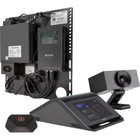
Crestron 6511597 Flex UC-MX70-T Video Conference Equipment for Teams - Full HD 1080p Content at 30 fps - CMOS Sensor - HDMI - Network - USB

Business volume discounts
Technical guidance
Preparation & staging
QC · ON · AB · BC
Product Features
Technical Overview
At its core, the UC-MX70-T features a CMOS image sensor that supports Full HD graphics modes for content sharing at 1920 x 1080 resolution. The 30 fps maximum frame rate maintains fluid motion and picture clarity during presentations, video playback, and screen sharing sessions.
Connectivity is handled through a comprehensive port selection: HDMI input accepts external video sources, a wired network RJ-45 port enables instant connectivity for Teams collaboration, and USB interfaces support peripheral integration. This technical foundation ensures the device functions as a central hub for modern conference room AV needs.
This section brings together practical product details such as Image Sensor Type, Graphics Modes (Content), Maximum Video Resolution (Content), Maximum Frame Rate, so buyers can judge configuration, deployment fit, and day-to-day suitability with less guesswork.
A strong technical summary explains how the product's interfaces, hardware profile, and operating characteristics work together in real deployment. Buyers often need this context to confirm compatibility with existing devices, expected performance in daily use, and whether installation will be straightforward for IT staff or end users.
Key Product Advantages
The Crestron Flex UC-MX70-T simplifies conference room technology by combining essential collaboration features into a single, manageable device. Its dedicated design for Microsoft Teams ensures optimized performance and seamless integration within the Teams ecosystem.
Optimized for Microsoft Teams
Engineered specifically for Teams environments, this device delivers reliable performance with native compatibility, reducing setup complexity and ensuring stable operation during critical meetings.
- Dedicated Teams integration
- Reduced setup complexity
- Stable operation
Flexible Mounting Options
The tabletop and bracket mount form factor allows installation across various room configurations, from small huddle spaces to medium conference rooms, adapting to different furniture and wall setups.
- Tabletop placement
- Bracket mounting
- Room configuration flexibility
Comprehensive Connectivity
With HDMI, network RJ-45, and USB ports, the UC-MX70-T connects easily to displays, network infrastructure, and peripherals, supporting diverse presentation and collaboration scenarios.
- HDMI for external sources
- Network for Teams connectivity
- USB for peripherals
Deployment / Use Cases
This video conference equipment is ideal for organizations seeking to standardize their Microsoft Teams meeting rooms with reliable, purpose-built hardware. Its balanced feature set addresses common collaboration needs without unnecessary complexity.
Primary deployment scenarios include small to medium conference rooms where consistent audio-visual performance is required for daily meetings, client presentations, and team collaborations. The device serves as the central AV component in these spaces, handling content sharing and Teams connectivity through a single integrated solution.
Standardized Teams Rooms
Deploy across multiple meeting rooms to create uniform Teams experiences, ensuring consistent performance and reducing support overhead through standardized hardware configurations.
Content-Focused Meetings
Support presentation-heavy meetings with Full HD 1080p content sharing at 30 fps, maintaining clarity for slides, documents, and video materials during collaborative sessions.
Highlights
- Dedicated video conference equipment for Microsoft Teams environments
- Full HD 1080p content sharing at 1920 x 1080 resolution
- 30 fps frame rate ensures smooth, flicker-free video presentation
- CMOS image sensor for reliable visual capture
- HDMI input for connecting external video sources
- Network RJ-45 port for instant Teams connectivity
- USB interface for peripheral integration
- Tabletop or bracket mount form factor for installation flexibility
Specifications
| Specifications | |
|---|---|
| Manufacturer | Crestron Electronics, Inc |
| Manufacturer Part Number | 6511597 |
| Brand Name | Crestron |
| Product Line | Flex |
| Product Model | UC-MX70-T |
| Product Name | Flex UC-MX70-T Video Conference Equipment for Teams |
| Product Type | Video Conference Equipment |
| Camera | |
| Image Sensor Type | CMOS |
| Video | |
| Graphics Modes (Content) | Full HD |
| Maximum Video Resolution (Content) | 1920 x 1080 |
| Maximum Frame Rate | 30 fps |
| Interfaces/Ports | |
| HDMI In | Yes |
| Network (RJ-45) | Yes |
| USB | Yes |
| Physical Characteristics | |
| Form Factor | Tabletop,Bracket Mount |
FAQ
What is the maximum video resolution for content sharing on the Crestron Flex UC-MX70-T?
The Crestron Flex UC-MX70-T supports Full HD content sharing at a maximum resolution of 1920 x 1080. This 1080p resolution ensures clear, detailed visuals for presentations, documents, and video materials during conference sessions.
What frame rate does this video conference equipment support?
This device delivers content at a maximum frame rate of 30 frames per second (fps). This frame rate maintains smooth motion and picture clarity during screen sharing, video playback, and presentation scenarios, preventing flickering or stuttering visuals.
What type of image sensor does the UC-MX70-T use?
The Crestron Flex UC-MX70-T utilizes a CMOS (Complementary Metal-Oxide-Semiconductor) image sensor. CMOS sensors provide reliable image capture with good performance in typical conference room lighting conditions.
What connectivity options are available on this Teams conference equipment?
Connectivity includes HDMI input for external video sources, a network RJ-45 port for wired Teams connectivity, and USB interfaces for peripheral devices. This combination supports flexible integration with room displays, network infrastructure, and additional collaboration tools.
How can the Crestron Flex UC-MX70-T be mounted or installed?
The device features a form factor that supports both tabletop placement and bracket mounting. This dual mounting capability allows installation flexibility for various room configurations, from central table setups to wall-mounted installations near displays.
Is this device specifically designed for Microsoft Teams?
Yes, the Crestron Flex UC-MX70-T is engineered as dedicated video conference equipment for Microsoft Teams environments. This dedicated design ensures optimized performance, reliable operation, and seamless integration within the Teams collaboration ecosystem.
What camera resolution or video format is listed?
It features a display specification of 1920 x 1080, giving you clear visuals for work and media use.
What field of view or room-coverage detail is listed?
Display-oriented products are best judged through screen, connectivity, and installation specifications. Those facts help buyers confirm visual fit, mounting flexibility, and deployment suitability more clearly than generic summary text.
| Qty | Price | Available |
|---|