








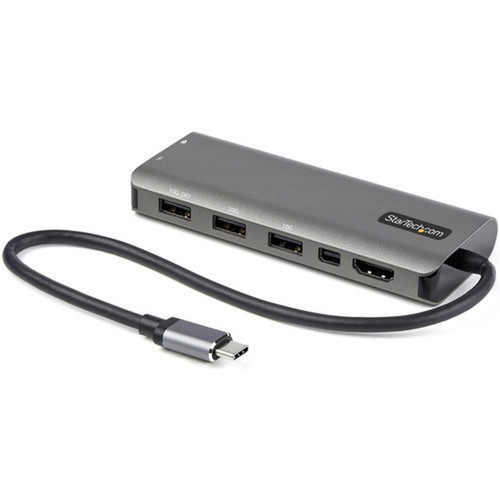
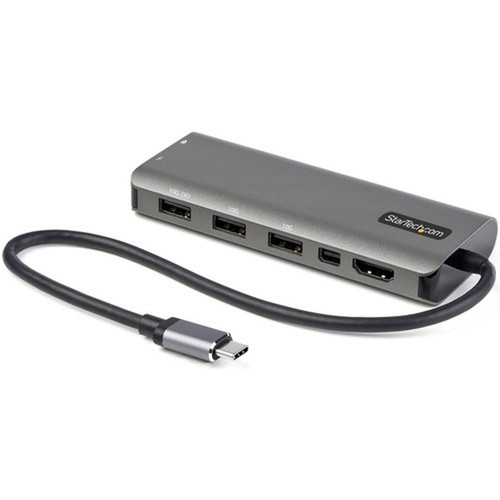



StarTech.com DKT31CMDPHPD USB-C Multiport Adapter - 6-in-1 Mini Dock with HDMI/mDP 4K 60Hz - 100W PD - 4 x 10Gbps USB - 12" Cable

Business volume discounts
Technical guidance
Preparation & staging
QC · ON · AB · BC
Product Features
Technical Overview
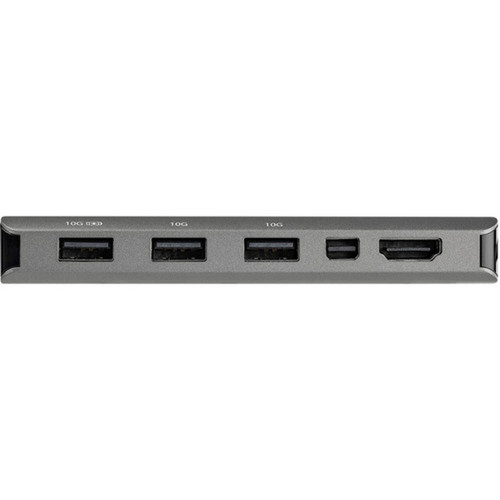
This USB-C multiport adapter leverages DisplayPort 1.4 Alt-Mode technology to deliver 4K resolution at 60Hz refresh rates on compatible host devices, with fallback to 4K 30Hz via DP 1.2 Alt-Mode for broader compatibility. The video output supports both HDMI 2.0b and Mini DisplayPort interfaces through a selectable configuration, enabling connection to modern monitors and displays without requiring additional adapters.
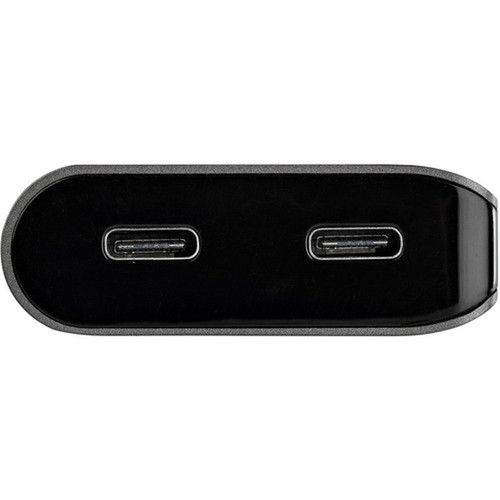
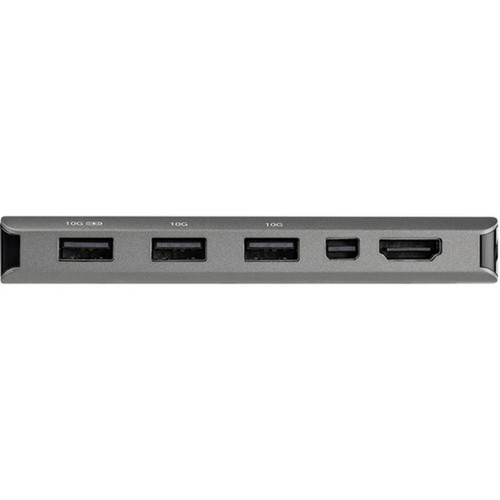
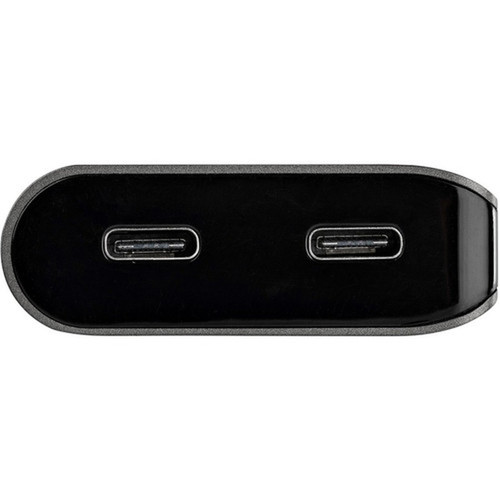
The connectivity suite includes four 10Gbps USB ports: three USB-A ports with one supporting BC 1.2 charging for peripheral devices, plus one USB-C data port. Power management is handled through USB Power Delivery 3.0 with intelligent allocation that reserves 15W for the adapter itself to prevent video flickering and device dropouts, while delivering up to 85W to charge connected laptops.
Relevant factors for this section include Connectivity Technology, Number of Displays Supported, Supported Resolutions, Host Interface. When those points are considered together, they give buyers a clearer picture of how the product is equipped, how it fits into deployment, and what kind of day-to-day role it is meant to support.
Key Product Advantages
The DKT31CMDPHPD distinguishes itself through intelligent power management that eliminates common hub issues like video flickering and device disconnections. By reserving 15W specifically for the adapter's operation, it ensures stable video output and USB connectivity even when charging power-hungry laptops at up to 85W. This design prevents overdrawing power from the host—a frequent problem with basic USB-C dongles.
Extended Cable Design
The 12" attached cable provides necessary reach to reduce mechanical stress on laptop USB-C ports, particularly valuable for devices used on risers, docking stations, or in tight workspace configurations.
- Reduces port strain on 2-in-1 devices
- Easier cable management
- Compatible with laptop stands and risers
Broad Device Compatibility
Works with USB-C laptops, ultrabooks, Chromebooks, and Thunderbolt 3/4 systems including Surface Pro 7, iPad Pro, Dell XPS 13, Lenovo X1 Carbon, MacBooks with Intel and M1 chips, and Surface Laptop 4.
- Supports Intel 11th Gen and newer for DP 1.4
- Compatible with M1 MacBooks
- Works with 5Gbps USB-C ports
Deployment / Use Cases
This multiport adapter serves as an ideal travel companion for professionals who need to connect to external displays and peripherals in multiple work environments. Its compact aluminum design fits easily in laptop bags while providing full docking station functionality for presentations, extended desktop setups, or temporary workstation configurations in shared office spaces, hotel rooms, or client sites.
For IT departments supporting hybrid workforces, the adapter offers a standardized solution that works across diverse device ecosystems—from Windows laptops to MacBooks to Chromebooks. The consistent 100W PD charging capability ensures devices remain powered during extended use, while the selectable video output (HDMI or Mini DisplayPort) accommodates different display technologies found in conference rooms and home offices.
Mobile Professional Setup
Enables instant connection to external monitors, wired networks, and peripherals when moving between office locations, eliminating the need to carry multiple single-function adapters.
- Single-cable docking solution
- 4K presentation capability
- Charges laptop during use
IT Standardization
Provides consistent connectivity experience across mixed-device environments, reducing support complexity while maintaining high-performance video and data transfer standards.
- Uniform solution for Windows/macOS/Chrome OS
- Eliminates dongle confusion
- Reduces cable clutter
Physical Profile
Measuring 6.30" in height and 16.70" in width with the cable extended, the adapter maintains a compact footprint that doesn't dominate workspace real estate. The lightweight 3-ounce aluminum construction provides durability for frequent transport while dissipating heat effectively during continuous operation. The attached 12" cable offers practical reach without the bulk of separate cables, making storage and deployment straightforward in briefcases and laptop compartments.
- Width
- 16.70" (424.18 mm)
- Height
- 6.30" (160.02 mm)
- Weight
- 3 oz (85.05 g)
What's in the Box
The package includes the complete USB-C multiport adapter ready for immediate deployment with connected devices.
Package contents include Docking Station Quick-Start Guide, Docking Station. These included items support setup, installation, and immediate deployment without needing to source the core bundled accessories separately.
Highlights
- 6-in-1 USB-C multiport adapter with HDMI or Mini DisplayPort 4K 60Hz video output
- 100W Power Delivery 3.0 passthrough charging with intelligent 15W reservation for stable operation
- Four 10Gbps USB ports: three USB-A (one with BC 1.2 charging) plus one USB-C data port
- 12" attached cable reduces strain on device ports for 2-in-1 devices and laptops on risers
- Supports DisplayPort 1.4 Alt-Mode for 4K 60Hz (falls back to 4K 30Hz with DP 1.2)
- Compatible with USB-C, Thunderbolt 3/4, and USB4 host systems
- Works with Windows, macOS, Chrome OS, iPadOS, and Android operating systems
- Durable aluminum construction for frequent travel between work environments
- Bus-powered operation or external power adapter support for flexibility
- 3-year limited warranty with RoHS, REACH, and WEEE environmental compliance
Specifications
| Specifications | |
|---|---|
| Manufacturer | StarTech.com |
| Manufacturer Part Number | DKT31CMDPHPD |
| Brand Name | StarTech.com |
| Product Name | Docking Station |
| Packaged Quantity | 1 Each |
| Product Type | Docking Station |
| Technical Information | |
| Connectivity Technology | Wired |
| Number of Displays Supported | 1 |
| Supported Resolutions | 4096 x 2160 |
| Screen Mode Supported | 4K |
| Device Supported | Monitor,Workstation,Tablet,Notebook |
| Interfaces/Ports | |
| Host Interface | USB 3.1 (3.1 Gen 2) Type C |
| Total Number of USB Ports | 3 |
| Number of USB Type-C Ports | 1 |
| USB Type-C | Yes |
| USB Type-C Detail | USB 3.1 USB Type C (10 pin, Gen 2, 10 Gbps) ; USB-C (24 pin) USB Power Delivery only |
| Number of USB Type-A Ports | 1 |
| USB Type-A | Yes |
| Mini DisplayPort | Yes |
| Number of HDMI Ports | 1 |
| HDMI | Yes |
| Thunderbolt | Yes |
| Software | |
| Operating System Supported | macOS 14,Windows 8.1,Windows 10,Windows 11,Mac OS X 10.13 High Sierra,Mac OS X 10.15 Catalina,Mac OS X 11.0 Big Sur,Mac OS X 12.0 Monterey,Mac OS X 13.0 Ventura,Ubuntu 18.04,Ubuntu 20.04,iPadOS,Android |
| Power Description | |
| Maximum Power Supply Wattage | 100 W |
| Physical Characteristics | |
| Height | 6.30" (160.02 mm) |
| Width | 16.70" (424.18 mm) |
| Weight (Approximate) | 3 oz (85.05 g) |
| Miscellaneous | |
| Package Contents | Docking Station Quick-Start Guide |
| Compatibility | Microsoft Surface Pro 7 Apple iPad Pro HP Elite Notebook Dell XPS 13 9310 Lenovo X1 Carbon 9th Gen Apple MacBooks Microsoft Surface Laptop 4 Google Chromebook |
| Environmentally Friendly | Yes |
| Environmental Certification | EU RoHS |
| Environmental Compliance | Restriction of Hazardous Substances (RoHS) 2,Registration, Evaluation, Authorization and Restriction of Chemicals (REACH),Waste Electrical and Electronic Equipment Directive (WEEE) |
| Country of Origin | China |
| Warranty | |
| Limited Warranty | 3 Year |
User Manual
FAQ
What video resolutions does this USB-C adapter support?
The adapter supports up to 4096 x 2160 resolution at 60Hz refresh rates when connected to host devices with DisplayPort 1.4 Alt-Mode capability, typically found on Intel 11th Gen and newer processors. For devices with DP 1.2 Alt-Mode support, it delivers 4K resolution at 30Hz. The video output works through either HDMI 2.0b or Mini DisplayPort interfaces, providing flexibility for different display connections.
How much power can this adapter deliver to charge my laptop?
The adapter features USB Power Delivery 3.0 with 100W total passthrough capability. It intelligently reserves 15W for its own operation to ensure stable video and USB performance, delivering up to 85W for charging connected laptops. This power management prevents common issues like video flickering or device dropouts that occur when hubs overdraw power from the host system.
What types of USB ports are included on this multiport adapter?
The adapter provides four 10Gbps USB ports: three USB-A ports and one USB-C data port. One of the USB-A ports supports BC 1.2 charging for peripheral devices like smartphones and tablets. All ports operate at USB 3.2 Gen 2 speeds (10Gbps), enabling fast data transfers for external storage, peripherals, and docking accessories while maintaining backward compatibility with USB 3.0/3.1 devices.
Is this adapter compatible with Thunderbolt laptops and Apple M1 MacBooks?
Yes, the adapter is fully compatible with Thunderbolt 3 and Thunderbolt 4 laptops, as well as Apple MacBooks with both Intel processors and M1 chips. It works with USB4 systems and maintains backward compatibility with standard USB-C ports operating at 5Gbps or 10Gbps speeds. The broad compatibility extends to devices like Surface Pro 7, iPad Pro, Dell XPS 13, Lenovo X1 Carbon, and various Chromebook models.
Why does this adapter have a 12-inch attached cable instead of a direct connector?
The 12" (30cm) attached cable reduces mechanical stress on your laptop's USB-C port, which is particularly important for 2-in-1 devices, tablets, and laptops used on risers or docking stations. The extended reach provides better cable management options, prevents port damage from repeated insertions, and offers flexibility in workspace configurations where the laptop position might be elevated or angled away from peripherals.
What operating systems are supported by this USB-C multiport adapter?
The adapter supports macOS 14 through Mac OS X 10.13 High Sierra, Windows 8.1 through Windows 11, Ubuntu 18.04 and 20.04, iPadOS, Android, and Chrome OS. This wide operating system compatibility makes it suitable for mixed-device environments in business, education, and home office settings. No additional drivers are required for most functionality—the adapter works as a plug-and-play solution across these platforms.
| Qty | Price | Available |
|---|


