












Targus DSU150BT Universal Docking Station - USB-C Host - 80W PD - Dual HDMI - Gigabit Ethernet - 4 USB Ports - DisplayLink - Black

Business volume discounts
Technical guidance
Preparation & staging
QC · ON · AB · BC
Product Features
Technical Overview
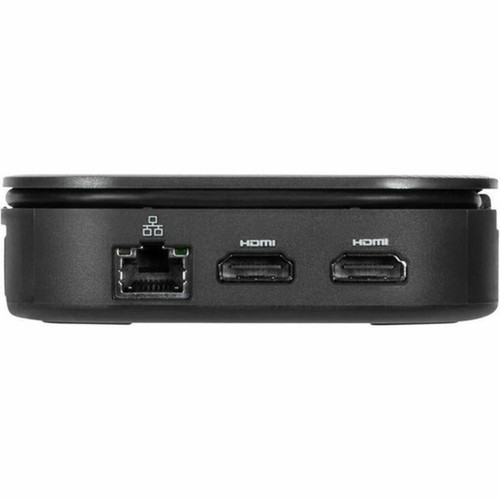
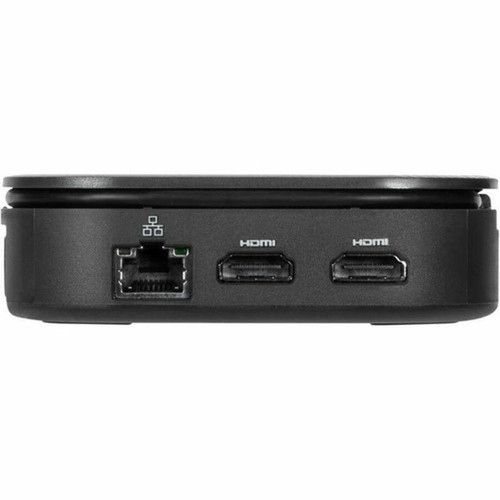
The DSU150BT supports single 2K resolution at 2560 x 1440 @50Hz or dual HD displays at 2048 x 1152 @60Hz through its two HDMI 1.4b ports. The USB-C host interface enables simultaneous data transfer, video output, and power delivery, with one dedicated USB-C port providing PD Pass-Thru with Fast Role Swap capability up to 80W.
Four USB ports include two USB-A 3.2 Gen 2 ports operating at 10 Gbps for high-speed peripheral connections and two USB-C ports—one for 10 Gbps data transfer and another exclusively for power input. The integrated Gigabit Ethernet port delivers reliable wired networking, while the compact design measures just 4.13" x 4.13" x 1.13" and weighs approximately 7.04 ounces.
Relevant factors for this section include Connectivity Technology, Charging Capability, Number of Displays Supported, Ethernet Technology. When those points are considered together, they give buyers a clearer picture of how the product is equipped, how it fits into deployment, and what kind of day-to-day role it is meant to support.
Key Product Advantages
The Targus DSU150BT stands out with its combination of universal compatibility, robust connectivity, and compact design. DisplayLink technology ensures reliable multi-display support across diverse operating systems without requiring proprietary drivers on many platforms.
These strengths make the product easier to deploy and manage in real environments, especially where reliability, usability, and day-to-day operational continuity matter. Notable benefits include Comprehensive Device Support, Enhanced Security Features.
Comprehensive Device Support
Connects notebooks, keyboards, mice, hard drives, and desktop PCs through a single USB-C connection, eliminating cable clutter while maintaining full functionality.
- Single-cable simplicity
- Mixed device environments
- Legacy USB-A support included
Enhanced Security Features
Includes a Kensington security slot for physical theft prevention and TAA compliance for government and educational procurement requirements.
- Equipment safeguarding
- Government procurement ready
- Industry-standard security
Deployment / Use Cases
This docking station excels in hybrid work environments where users need to quickly connect laptops to full desktop setups. The universal compatibility makes it ideal for organizations with mixed device fleets, supporting everything from corporate Windows laptops to personal macOS devices and Chrome OS educational systems.
The compact form factor and included security features make the DSU150BT suitable for shared workspaces, hot-desking arrangements, and educational computer labs where equipment protection and easy connectivity are priorities. The 80W power delivery ensures compatible laptops remain charged during extended use sessions.
Hybrid Work Solutions
Enables seamless transition between office and remote work by providing consistent docking capabilities regardless of the host device or operating system.
Educational & Institutional Deployments
TAA compliance and universal OS support make this dock suitable for government, educational, and institutional procurement where standardization and security are essential.
Physical Profile
The DSU150BT features a sleek black finish with dimensions of 4.13" wide by 4.13" deep by 1.13" high (104.90 mm x 104.90 mm x 28.70 mm), creating a minimal desktop footprint. Weighing just 7.04 ounces (199.58 grams), this compact dock easily integrates into any workspace without consuming valuable desk real estate. The design includes a tethered 13-inch USB-C host connector that stows neatly when not in use.
- Width
- 4.13" (104.90 mm)
- Depth
- 1.13" (28.70 mm)
- Height
- 4.13" (104.90 mm)
- Weight
- 7.04 oz (199.58 g)
Highlights
- Universal compatibility with DisplayLink technology across Windows, macOS, Chrome OS, Android, and Ubuntu
- Supports single 2K (2560 x 1440 @50Hz) or dual HD (2048 x 1152 @60Hz) displays via HDMI 1.4b
- 80W USB Power Delivery with PD Pass-Thru and Fast Role Swap capability
- Four USB ports: 2x USB-A 3.2 Gen 2 (10 Gbps) and 2x USB-C (1 data, 1 power)
- Integrated Gigabit Ethernet port for reliable wired networking
- 13-inch tethered USB-C host connector with included USB-A legacy adapter
- Compact design: 4.13" x 4.13" x 1.13" (104.90 mm x 104.90 mm x 28.70 mm)
- Kensington security slot for equipment protection
- TAA Compliant for government and institutional procurement
- Industry-leading 3-year limited warranty
Specifications
| Specifications | |
|---|---|
| Manufacturer | Targus Group International |
| Manufacturer Part Number | DSU150BT |
| Brand Name | Targus |
| Product Line | Universal |
| Product Model | DSU150BT |
| Product Name | Universal DSU150BT Docking Station |
| Product Type | Docking Station |
| Technical Information | |
| Connectivity Technology | Wired |
| Charging Capability | Yes |
| Number of Displays Supported | 2 |
| Supported Resolutions | 2560 x 1440,2048 x 1152 |
| Screen Mode Supported | 2K,HD |
| Device Supported | Notebook,Keyboard,Mouse,Hard Drive,Desktop PC |
| Network & Communication | |
| Ethernet Technology | Gigabit Ethernet |
| Interfaces/Ports | |
| Host Interface | USB Type C |
| Total Number of USB Ports | 4 |
| Number of USB 3.2 Gen 2 Type-A Ports | 2 |
| Number of USB Type-C Ports | 2 |
| USB Type-C | Yes |
| USB Type-C Detail | 1 x USB-C® 3.2 Gen 2 port (10 Gbps), 1 x USB-C® (power in only) port supports PD Pass-Thru with Fast Role Swap up to 80W |
| Number of USB Type-A Ports | 2 |
| USB Type-A | Yes |
| Number of RJ-45 Ports | 1 |
| Network (RJ-45) | Yes |
| VGA | No |
| DisplayPort | No |
| Mini DisplayPort | No |
| Number of HDMI Ports | 2 |
| HDMI | Yes |
| USB Power Delivery | 80W |
| Software | |
| Operating System Supported | Windows,macOS,ChromeOS,Android,Ubuntu |
| Physical Characteristics | |
| Product Color | Black |
| Height | 4.13" (104.90 mm) |
| Width | 4.13" (104.90 mm) |
| Depth | 1.13" (28.70 mm) |
| Weight (Approximate) | 7.04 oz (199.58 g) |
| Miscellaneous | |
| Kensington Security Slot | Yes |
| TAA Compliant | Yes |
| Warranty | |
| Limited Warranty | 3 Year |
FAQ
What operating systems does the Targus DSU150BT docking station support?
The DSU150BT offers universal compatibility with Windows, macOS, Chrome OS, Android, and Ubuntu operating systems. This broad support is enabled by DisplayLink technology, which provides reliable multi-display functionality across diverse platforms without requiring proprietary drivers on many systems, making it ideal for mixed-device environments.
How many displays can I connect to this docking station and at what resolutions?
You can connect up to two displays simultaneously. The dock supports single 2K resolution at 2560 x 1440 @50Hz or dual HD displays at 2048 x 1152 @60Hz. Both displays connect via HDMI 1.4b ports, providing flexible monitor configurations for productivity, content creation, or presentation scenarios.
What power delivery capability does the USB-C port provide?
The docking station features 80W USB Power Delivery with PD Pass-Thru and Fast Role Swap technology. One dedicated USB-C port serves exclusively as a power input, delivering up to 80W to compatible laptops while maintaining stable power delivery during connection and disconnection events, ensuring your device remains charged during use.
What types of USB ports are available on the DSU150BT docking station?
The dock provides four USB ports: two USB-A 3.2 Gen 2 ports operating at 10 Gbps for high-speed peripheral connections, and two USB-C ports—one for 10 Gbps data transfer and another exclusively for power input. This combination supports modern USB-C devices while maintaining compatibility with legacy USB-A accessories.
Does this docking station include Ethernet connectivity?
Yes, the DSU150BT includes one Gigabit Ethernet RJ-45 port that provides reliable wired networking at speeds up to 1000 Mbps. This is particularly valuable in office environments where stable, high-speed internet connections are essential for video conferencing, large file transfers, and cloud-based applications.
What security and compliance features does this docking station offer?
The docking station includes a Kensington security slot for physical theft prevention using standard cable locks. It is also TAA (Trade Agreements Act) compliant, meeting procurement requirements for government, educational, and institutional purchases in the United States. These features make it suitable for secure environments and regulated procurement scenarios.
| Qty | Price | Available |
|---|


