
IOGEAR GCS922DPKIT 2-Port USB DVI KVM Switch with DisplayPort Adapters Bundle - 1920 x 1200 Resolution

Business volume discounts
Technical guidance
Preparation & staging
QC · ON · AB · BC
Product Features
Technical Overview
This KVM switch supports video resolutions up to 1920 x 1200 at 60Hz, delivering clear visual output for productivity and general computing tasks. The USB 2.0 interface ensures compatibility with standard keyboards and mice, while the dedicated USB mouse port can also accommodate peripheral sharing for devices like external storage drives.
The switch operates without an external power supply, drawing power directly from the connected computers via USB. This simplifies installation and reduces cable management requirements. USB hot-plugging support allows for flexible connection and disconnection of peripherals without system reboots.
Relevant factors for this section include Number of Computers Supported, Number of Local Users Supported, Maximum Video Resolution. When those points are considered together, they give buyers a clearer picture of how the product is equipped, how it fits into deployment, and what kind of day-to-day role it is meant to support.
Key Product Advantages
This KVM solution offers several practical benefits for multi-computer workstations. The included DisplayPort to DVI adapters ensure compatibility with modern graphics outputs, while the complete cable set eliminates the need for additional purchases.
Simplified Switching
The push-button remote port selector provides immediate control over which computer receives keyboard and mouse input, facilitating efficient workflow transitions.
- Instant computer selection
- No software configuration required
- Physical button for reliability
Peripheral Flexibility
Beyond basic keyboard and mouse sharing, the USB mouse port supports additional USB devices, expanding the switch's utility for storage or other peripherals.
- USB peripheral sharing capability
- Hot-plugging support
- Eliminates peripheral duplication
Deployment / Use Cases
This KVM switch is ideal for environments where users need to access multiple computers from a single desk. Common applications include IT support stations, development workstations, financial trading desks, and media production setups where separate systems are maintained for different functions.
The compact dimensions and lightweight design make it suitable for space-constrained desktops, while the cable-included approach ensures immediate functionality out of the box. The switch's passive power design makes it particularly useful for mobile workstations or temporary setups where power outlets may be limited.
IT Support Stations
Technicians can efficiently switch between test systems and primary workstations without rearranging cables or peripherals.
Multi-System Development
Developers working across different operating systems or hardware configurations can maintain separate computers while using shared input devices.
Physical Profile
Measuring 3.44 inches wide by 4.06 inches deep by 1.06 inches high, the GCS922U switchbox presents a compact footprint that fits easily on most desktops. The lightweight construction at approximately 12 ounces minimizes desk load while maintaining durability for regular use.
The physical profile is practical for deployment planning because the dimensions and weight are clearly defined: 1.06" (26.92 mm), 3.44" (87.38 mm), 4.06" (103.12 mm), 12 oz (340.19 g). This helps confirm rack, shelf, desk, or cabinet fit before installation.
- Width
- 3.44" (87.38 mm)
- Depth
- 4.06" (103.12 mm)
- Height
- 1.06" (26.92 mm)
- Weight
- 12 oz (340.19 g)
What's in the Box
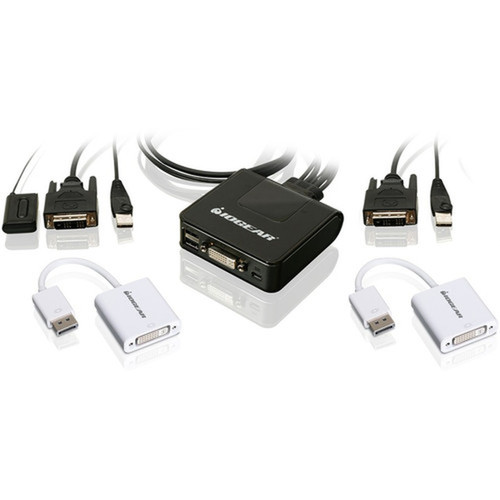
This bundle includes all components needed for immediate deployment. The package contains the GCS922U KVM switchbox, two DisplayPort to DVI adapters, a quick start guide for installation reference, and warranty documentation.
Highlights
- Control two DVI-D or DisplayPort USB 2.0 computers with one keyboard and mouse
- Supports video resolutions up to 1920 x 1200 at 60Hz
- USB mouse port enables peripheral sharing for external storage devices
- Push-button remote port selector for instant computer switching
- Supports USB hot-plugging without system reboots
- No external power supply required
- Includes all necessary cables for immediate setup
- DisplayPort to DVI adapters compliant with DisplayPort Specification 1.1a
- Compact dimensions: 3.44" x 4.06" x 1.06" (87.38 x 103.12 x 26.92 mm)
- Backed by a 3-year limited warranty
Specifications
| Specifications | |
|---|---|
| Manufacturer | IOGEAR, Inc |
| Manufacturer Part Number | GCS922DPKIT |
| Brand Name | IOGEAR |
| Product Model | GCS922U |
| Product Name | 2-Port USB DVI Cable KVM with DisplayPort Adapters Bundle |
| Packaged Quantity | 1 |
| Product Type | KVM Switchbox |
| Technical Information | |
| Number of Computers Supported | 2 |
| Number of Local Users Supported | 1 |
| Video | |
| Maximum Video Resolution | 1920 x 1200 |
| Interfaces/Ports | |
| USB | Yes |
| DVI | Yes |
| Number of USB Ports | 2 |
| Number of DVI Ports | 1 |
| Physical Characteristics | |
| Height | 1.06" (26.92 mm) |
| Width | 3.44" (87.38 mm) |
| Depth | 4.06" (103.12 mm) |
| Weight (Approximate) | 12 oz (340.19 g) |
| Miscellaneous | |
| Package Contents | GCS922U KVM Switchbox 2 x DisplayPort to DVI Adapters 1 x Quick Start Guide 1 x Warranty |
| Environmentally Friendly | Yes |
| Environmental Compliance | Restriction of Hazardous Substances (RoHS),Waste Electrical and Electronic Equipment Directive (WEEE) |
| Country of Origin | China |
| Warranty | |
| Limited Warranty | 3 Year |
User Manual
FAQ
How many computers can I connect to this KVM switch?
The IOGEAR GCS922DPKIT supports two computers simultaneously. You can connect two DVI-D or DisplayPort USB 2.0 interface systems and control both from a single keyboard and mouse setup, switching between them as needed.
What video resolution does this KVM switch support?
This switch supports maximum video resolution of 1920 x 1200 at 60Hz. This provides clear display output suitable for productivity applications, general computing tasks, and most professional workflows that don't require ultra-high-resolution displays.
Does this KVM require an external power supply?
No, this KVM switch operates without an external power supply. It draws power directly from the connected computers via USB, which simplifies installation and reduces cable clutter on your desk. This passive power design makes it particularly convenient for mobile or temporary setups.
What comes in the package with this KVM switch?
The bundle includes the GCS922U KVM switchbox, two DisplayPort to DVI adapters, a quick start guide for installation instructions, and warranty documentation. All necessary cables are included, so you can begin using the switch immediately without additional purchases.
Can I use this switch with DisplayPort computers?
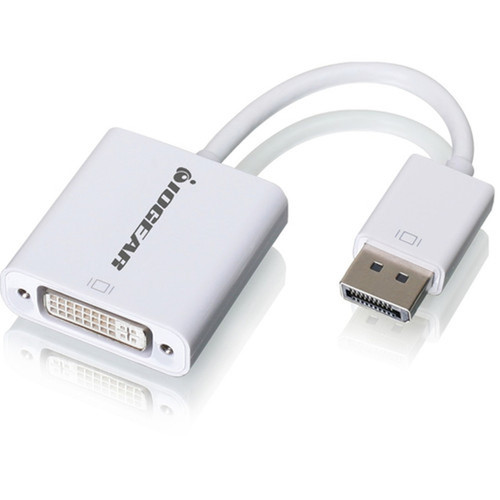
Yes, this bundle includes two DisplayPort to DVI adapters that allow you to connect DisplayPort-equipped computers to the DVI input on the KVM switch. The adapters are compliant with DisplayPort Specification 1.1a and support both 1.62 Gbps and 2.7 Gbps data rates.
What is the warranty coverage for this product?
IOGEAR provides a 3-year limited warranty for the GCS922DPKIT KVM switch bundle. This warranty covers defects in materials and workmanship under normal use. The warranty documentation included in the package provides specific terms and conditions for coverage.
| Qty | Price | Available |
|---|