


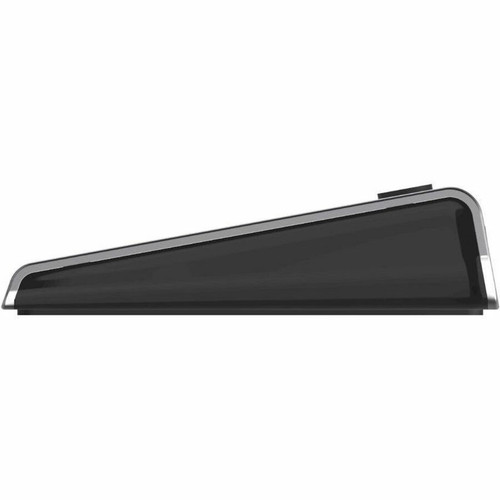


Belkin INC004BTSGY Universal USB-C 11-in-1 Multiport Dock - 100W PD - 4K Triple Display - GigE - SD/microSD Reader

Business volume discounts
Technical guidance
Preparation & staging
QC · ON · AB · BC
Product Features
Technical Overview
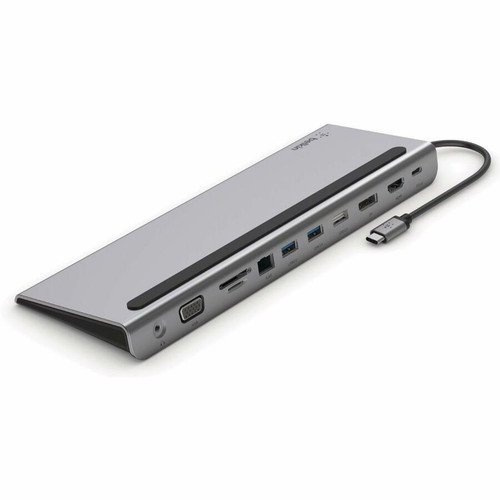
This 11-in-1 dock provides extensive connectivity through its USB-C host interface. The display subsystem supports up to three simultaneous monitors at resolutions up to 4K UHD (3840×2160), with additional support for 1080p and 720p modes. Video outputs include HDMI, DisplayPort 1.2, and legacy VGA for maximum display compatibility across modern and older equipment.
Data transfer capabilities include two USB 3.0 ports for high-speed peripherals, one USB 2.0 port for keyboards and mice, and a dedicated USB-C PD port delivering 100W of charging power. The integrated Gigabit Ethernet port ensures reliable wired network connectivity, while the SD and microSD card reader simplifies media transfer from cameras and mobile devices.
Relevant factors for this section include Connectivity Technology, Charging Capability, Number of Displays Supported, Ethernet Technology. When those points are considered together, they give buyers a clearer picture of how the product is equipped, how it fits into deployment, and what kind of day-to-day role it is meant to support.
Key Product Advantages
Belkin's multiport dock consolidates essential workstation connections into a single streamlined solution. The 100W USB Power Delivery capability eliminates the need for separate chargers while powering compatible laptops during use. Triple display support enables extended desktop configurations for multitasking across spreadsheets, design applications, and communication tools.
Universal Compatibility
Works with Windows and macOS systems including recent Apple Silicon MacBooks, iPad Pro tablets, Microsoft Surface devices, and leading Chromebook models from ASUS, Dell, HP, and Lenovo.
- M1/M2 MacBook compatibility
- Surface Pro/Book support
- Enterprise notebook ready
Professional Audio Support
Includes a combined headphone/microphone jack for conference calls, video meetings, and multimedia applications without requiring additional adapters.
- 3.5mm combo jack
- Clear audio transmission
- Meeting-ready connectivity
Deployment / Use Cases
The Belkin dock serves as an ideal solution for hybrid work environments where users transition between office and remote locations. Its comprehensive port selection makes it suitable for financial analysts requiring multiple monitor setups, graphic designers needing fast media card access, and IT professionals managing network configurations through wired Ethernet.
In educational settings, the dock supports classroom presentations through VGA compatibility with older projectors while maintaining modern HDMI connections for newer displays. For sales teams, the compact design facilitates easy transport between client sites while providing instant connectivity to conference room displays and network resources.
Hot-Desking Solutions
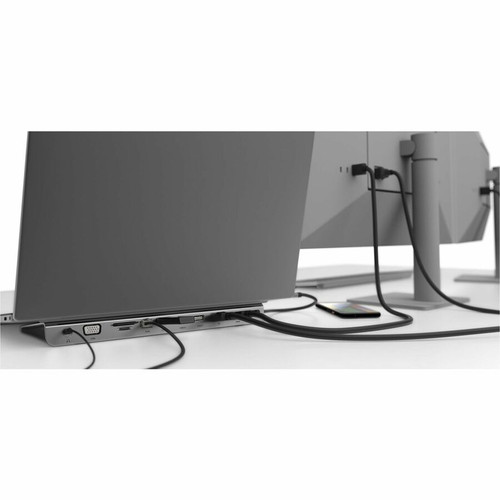
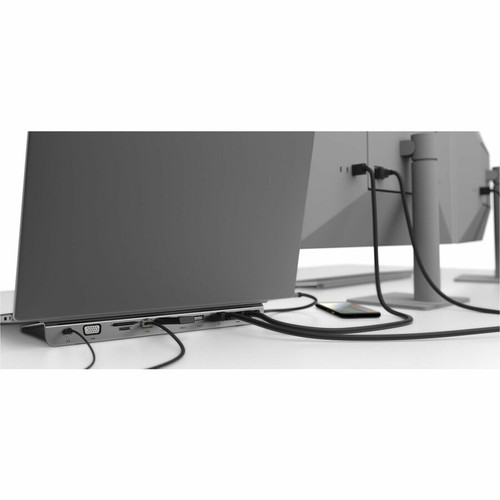
Enables quick workstation setup with single-cable connectivity for monitors, network, peripherals, and power—perfect for shared office spaces and flexible work arrangements.
Content Creation Station
Supports high-resolution displays for video editing while providing fast media transfer through USB 3.0 ports and SD card readers for photography and videography workflows.
Physical Profile
Measuring 10.24" wide × 3.54" high × 0.91" deep (260 × 90 × 23 mm) and weighing approximately 12.8 ounces (363 g), the dock maintains a slim footprint that fits neatly on desks or beneath monitor stands. The compact design minimizes desk clutter while providing substantial connectivity, making it equally suitable for permanent office installations and mobile work kits.
- Width
- 10.24" (260 mm)
- Depth
- 0.91" (23 mm)
- Height
- 3.54" (90 mm)
- Weight
- 12.80 oz (362.87 g)
Highlights
- 11-in-1 connectivity through single USB-C connection
- Supports up to three 4K displays simultaneously
- 100W USB Power Delivery charges compatible laptops
- Gigabit Ethernet for reliable wired networking
- SD and microSD card reader for media transfer
- HDMI, DisplayPort 1.2, and legacy VGA outputs
- Compatible with Windows, macOS, and Chrome OS devices
- Includes headphone/microphone combo audio jack
- Compact design with slim profile for desk placement
- 1-year limited warranty from Belkin
Specifications
| Specifications | |
|---|---|
| Manufacturer | Belkin International, Inc |
| Manufacturer Part Number | INC004BTSGY |
| Brand Name | Belkin |
| Product Line | Connect |
| Product Name | Connect USB-C 11-in-1 Multiport Dock |
| Packaged Quantity | 1 Each |
| Product Type | Docking Station |
| Technical Information | |
| Connectivity Technology | Wired |
| Charging Capability | Yes |
| Number of Displays Supported | 3 |
| Supported Resolutions | 3840 x 2160,1920 x 1080,1280 x 720 |
| Screen Mode Supported | 4K |
| Memory Card Reader | Yes |
| Memory Card Supported | SD,microSD |
| Device Supported | Monitor,Tablet PC,Notebook |
| Network & Communication | |
| Ethernet Technology | Gigabit Ethernet |
| Interfaces/Ports | |
| Host Interface | USB Type C |
| Total Number of USB Ports | 4 |
| Number of USB 2.0 Ports | 1 |
| Number of USB 3.0 Ports | 2 |
| USB Type-C | Yes |
| USB Type-C Detail | USB-C PD port |
| Number of RJ-45 Ports | 1 |
| Network (RJ-45) | Yes |
| VGA | Yes |
| Number of DisplayPorts | 1 |
| DisplayPort | Yes |
| DisplayPort Version | 1.2 |
| Headphone/Microphone Combo Port | Yes |
| Number of HDMI Ports | 1 |
| HDMI | Yes |
| USB Power Delivery | 100W |
| Software | |
| Operating System Supported | Windows,macOS |
| Physical Characteristics | |
| Height | 3.54" (90 mm) |
| Width | 10.24" (260 mm) |
| Depth | 0.91" (23 mm) |
| Weight (Approximate) | 12.80 oz (362.87 g) |
| Miscellaneous | |
| Compatibility | iPad 7th gen iPad 8th gen iPad 9th gen iPad Pro (12.9") 5th Gen iPad Pro (12.9") 3rd Gen iPad Pro (12.9") 4th Gen MacBook Air M2 (2022) MacBook Pro 13" M2 (2022) MacBook Air 13" M1 (2020) MacBook Air 13" (2018) MacBook Air 15" M2 (2023) MacBook Pro 13" M1 (2020) MacBook Pro 15" (2017) MacBook Pro 15" (2018) MacBook Pro 16" (2019) iPad mini 6th Gen ASUS Chromebook Dell XPS 15" Google Pixelbook HP Envy 360 Lenovo Chromebook ThinkPad X1 Carbon Yoga 730 Yoga 920 Portege X20W-E Portege X30-E Surface Book 2 Surface Pro 3 Surface Pro X Acer Chromebook |
| Country of Origin | China |
| Warranty | |
| Limited Warranty | 1 Year |
FAQ
How many displays can I connect to this docking station?
The Belkin USB-C 11-in-1 Multiport Dock supports up to three simultaneous displays. You can connect monitors using the HDMI, DisplayPort, and VGA outputs to create an extended desktop configuration. All connected displays can operate at resolutions up to 4K (3840×2160), with additional support for 1080p and 720p modes depending on your specific monitor capabilities and system configuration.
Does this dock provide power to my laptop?
Yes, the dock includes a USB-C Power Delivery port that delivers up to 100W of charging power to compatible laptops. This eliminates the need for a separate power adapter while using the dock, keeping your device charged during extended work sessions. The power delivery system works with USB-C laptops that support PD charging, including recent MacBook Air, MacBook Pro, and many Windows ultrabook models.
What types of memory cards does the reader support?
The integrated memory card reader supports both SD and microSD card formats. This allows direct transfer of photos, videos, and files from cameras, drones, smartphones, and other devices without requiring separate card readers or adapters. The reader is particularly useful for photographers, videographers, and content creators who regularly work with media from multiple sources.
Which operating systems are compatible with this dock?
The Belkin dock is compatible with both Windows and macOS operating systems. It works with recent versions of Windows 10 and 11, as well as macOS on Intel and Apple Silicon Macs. The dock supports plug-and-play functionality on most systems, though some features may require driver installation on Windows computers. It also maintains compatibility with many Chrome OS devices from manufacturers like ASUS, Dell, and Lenovo.
What video output options are available?
The dock provides three distinct video output options: HDMI, DisplayPort 1.2, and VGA. This combination ensures compatibility with virtually any display, from modern 4K monitors via HDMI or DisplayPort to older projectors and monitors using VGA connections. The DisplayPort implementation supports version 1.2 specifications, enabling high-resolution output and multi-stream transport capabilities for advanced display configurations.
Can I use this dock with tablets like iPad Pro?
Yes, the dock is compatible with recent iPad Pro models including the 12.9-inch 3rd, 4th, and 5th generations, as well as iPad mini 6th generation and standard iPad 7th through 9th generations. When connected to compatible iPads, the dock can provide display output, Ethernet connectivity, USB peripheral support, and charging through the USB-C PD port, effectively transforming your tablet into a more capable workstation.
| Qty | Price | Available |
|---|