




Kensington K32800WW SD1700P USB-C Dual 4K Portable Docking Station with Qi Charging - 100W Power Pass-Through - Gigabit Ethernet - Pantone Black C

Business volume discounts
Technical guidance
Preparation & staging
QC · ON · AB · BC
Product Features
Technical Overview
The SD1700P utilizes USB 3.2 Gen 2 Type-C connectivity with DisplayPort Alt Mode to deliver video signals to two independent 4K displays simultaneously at 60Hz refresh rates. This 10Gbps interface supports both data transfer and power delivery, with the dock capable of passing through up to 100W to charge compatible laptops and tablets. The integrated Gigabit Ethernet controller provides stable wired networking with 1Gbps maximum throughput, while three USB 3.2 Gen 2 ports (two Type-A, one Type-C) maintain high-speed peripheral connections.
Wireless charging functionality follows the Qi standard, allowing compatible smartphones to charge when placed on the dock's surface without cables. The dock's power architecture manages both host charging and peripheral power distribution efficiently, with the USB-C port providing 5V/0.9A output for connected devices. Environmental compliance includes RoHS certification, and the dock originates from Taiwan with full TAA compliance for government procurement scenarios.
Key Product Advantages
The SD1700P consolidates multiple workspace essentials into one streamlined device that reduces cable clutter while enhancing productivity. Its 100W power pass-through capability means you can charge your laptop through the same cable that handles video, data, and networking—eliminating the need for separate power adapters. The integrated Qi wireless charging surface provides convenient phone charging without additional accessories, while dual 4K monitor support creates expansive digital workspaces for multitasking professionals.
Simplified Connectivity
A single USB-C connection to your laptop delivers video to two 4K monitors, Gigabit Ethernet networking, multiple USB peripherals, and device charging simultaneously.
- Reduces cable clutter on desks
- Maintains laptop portability
- Streamlines daily setup process
Power Management
The dock intelligently manages up to 100W of power delivery to charge your laptop while providing power to connected USB devices and wireless charging for smartphones.
- Eliminates separate laptop charger
- Supports power-hungry devices
- Optimizes power distribution
Deployment / Use Cases
Hybrid workers transitioning between office and remote locations benefit from the SD1700P's portable form factor and comprehensive connectivity. At home or in satellite offices, the dock instantly converts a laptop into a full workstation with dual monitors, wired networking, and peripheral support. The plug-and-play design means no IT support is required for setup, making it ideal for distributed teams and individual professionals who value simplicity.
Creative professionals working with high-resolution content appreciate the dual 4K monitor support at 60Hz for smooth video playback and detailed image editing. Financial analysts and data scientists benefit from the expanded screen real estate for multiple applications and datasets, while the Gigabit Ethernet ensures reliable connectivity for large file transfers and video conferencing. The dock's compatibility with Windows, macOS, and iPadOS makes it versatile across different organizational ecosystems.
Hot-Desking Environments
Employees moving between workstations can connect instantly to dual monitors, network, and peripherals with a single USB-C cable, maintaining productivity without dedicated desks.
Conference Room Setups
The dock enables quick presentation mode with laptop connectivity to room displays while maintaining network access and charging capabilities during meetings.
Physical Profile
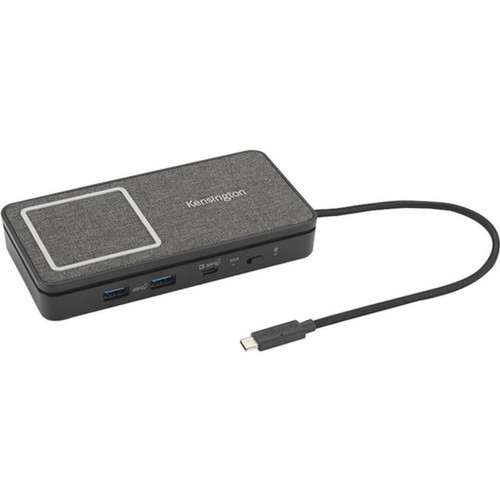
Encased in Pantone Black C with professional aesthetics, the SD1700P measures 5.93" wide × 3.01" high × 1.13" deep (150.50 × 76.50 × 28.60 mm) and weighs approximately 10.72 oz (303.91 g). Its compact, portable form factor fits easily in laptop bags for transportation between worksites while maintaining a substantial feel with quality construction. The low-profile design occupies minimal desk space, and the smooth surface accommodates Qi wireless charging for properly positioned smartphones.
- Width
- 5.93" (150.50 mm)
- Depth
- 1.13" (28.60 mm)
- Height
- 3.01" (76.50 mm)
- Weight
- 10.72 oz (303.91 g)
What's in the Box
The package includes everything needed for immediate deployment of the docking station.
Highlights
- Connects to dual 4K monitors at 60Hz through a single USB-C cable
- Delivers up to 100W power pass-through to charge laptops while docked
- Includes integrated Qi wireless charging for compatible smartphones
- Provides Gigabit Ethernet for reliable wired networking up to 1Gbps
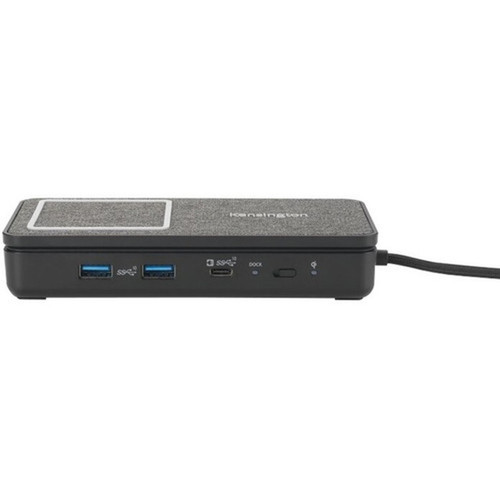
- Features three USB 3.2 Gen 2 ports (two Type-A, one Type-C) for high-speed peripherals
- Offers plug-and-play operation with no drivers required for setup
- Supports Windows 10, macOS 11.0 Big Sur, and iPadOS 13 operating systems
- Compact portable design in Pantone Black C for professional workspaces
- TAA compliant for government and educational procurement requirements
- Backed by a 3-year limited warranty for long-term reliability
Specifications
| Specifications | |
|---|---|
| Manufacturer | Kensington Computer Products Group |
| Manufacturer Part Number | K32800WW |
| Brand Name | Kensington |
| Product Line | The Innovator |
| Product Model | SD1700P |
| Product Name | The Innovator SD1700P Docking Station |
| Packaged Quantity | 1 |
| Package Type | Retail |
| Product Type | Docking Station |
| Technical Information | |
| Connectivity Technology | Wired |
| Number of Displays Supported | 2 |
| Supported Resolutions | 3840 x 2160 |
| Screen Mode Supported | 4K @ 60Hz |
| Device Supported | Desktop PC,Tablet PC,Monitor,Smartphone,Notebook |
| Network & Communication | |
| Ethernet Technology | Gigabit Ethernet |
| Interfaces/Ports | |
| Host Interface | USB 3.2 (Gen 2) Type C |
| Total Number of USB Ports | 3 |
| Number of USB 3.2 Gen 2 Type-A Ports | 2 |
| Number of USB 3.2 Gen 2 Type-C Ports | 1 |
| USB Type-C | Yes |
| USB Type-C Detail | 1 x USB-C 3.2 Gen2 10Gbps (5V/0.9A, up to 100W power pass-through) |
| Number of USB Type-A Ports | 2 |
| USB Type-A | Yes |
| Number of RJ-45 Ports | 1 |
| Network (RJ-45) | Yes |
| Number of HDMI Outputs | 2 |
| HDMI | Yes |
| Software | |
| Operating System Supported | Mac OS X 11.0 Big Sur,Windows 10,iPadOS 13 |
| Physical Characteristics | |
| Product Color | Pantone Black C |
| Form Factor | Portable |
| Height | 3.01" (76.50 mm) |
| Width | 5.93" (150.50 mm) |
| Depth | 1.13" (28.60 mm) |
| Weight (Approximate) | 10.72 oz (303.91 g) |
| Miscellaneous | |
| Package Contents | The Innovator SD1700P Docking Station 1 x Instruction Guide 1 x Warranty Card 1 x Compliance Sheet |
| Compatibility | USB-C Laptops & Ultrabooks that support Power Delivery and Monitors that support up to dual 4K |
| Environmentally Friendly | Yes |
| Environmental Compliance | Restriction of Hazardous Substances (RoHS) |
| TAA Compliant | Yes |
| Country of Origin | Taiwan |
| Warranty | |
| Limited Warranty | 3 Year |
User Manual
FAQ
What devices are compatible with the Kensington SD1700P docking station?
The SD1700P is compatible with laptops, tablets, and devices featuring USB-C ports that support both Power Delivery and DisplayPort Alt Mode. This includes many Windows 10 laptops, macOS 11.0 Big Sur or later MacBooks, and iPadOS 13 or later tablets. Your host device must provide at least 5V/3A through its USB-C port for proper operation, and monitors must support HDMI connectivity up to 4K resolution at 60Hz.
Can this dock charge my laptop while connected to dual monitors?
Yes, the SD1700P provides up to 100W of power pass-through to charge compatible laptops through the same USB-C connection that handles video output to dual 4K monitors. This eliminates the need for a separate laptop charger while docked. The dock intelligently manages power distribution between the host device and connected peripherals, ensuring your laptop receives adequate charging current during operation.
How does the wireless charging feature work on this docking station?
The integrated Qi wireless charging surface allows you to place compatible smartphones on the dock to charge without cables. This follows the standard Qi wireless charging protocol supported by many modern smartphones. The charging area is typically located on the top surface of the dock, and your phone must support Qi charging to utilize this feature. The dock provides this functionality alongside all other connectivity features simultaneously.
What video resolutions and refresh rates does this dock support?
The SD1700P supports dual monitor output at up to 3840 x 2160 (4K) resolution on each display with a 60Hz refresh rate. This provides sharp, detailed imagery suitable for professional applications, content creation, and multimedia consumption. The dock uses DisplayPort Alt Mode over USB-C to transmit video signals, then converts them to HDMI for connection to standard monitors. Both displays can operate at maximum resolution simultaneously.
Does this docking station require software installation or drivers?
No, the SD1700P operates as a plug-and-play device without requiring software installation, drivers, or firmware updates. Simply connect the dock to your laptop's USB-C port, and it should immediately recognize connected monitors, network, and peripherals. This driverless operation ensures compatibility across different systems and simplifies deployment in environments where users cannot install software, such as managed corporate or educational settings.
What is the warranty coverage for the Kensington SD1700P docking station?
Kensington provides a 3-year limited warranty for the SD1700P docking station, covering defects in materials and workmanship under normal use. The warranty period begins from the date of purchase, and coverage typically includes repair or replacement of defective units. Warranty details are included in the package documentation, and the dock's TAA compliance ensures it meets stringent quality standards for reliable performance in professional environments.
| Qty | Price | Available |
|---|