
Kensington K58362WW MagPro Elite Privacy Screen for Surface Laptop 3 15" LCD - Anti-glare - Fingerprint Resistant - Magnetic

Business volume discounts
Technical guidance
Preparation & staging
QC · ON · AB · BC
Product Features
Product Overview
The Kensington MagPro Elite Privacy Screen K58362WW is a premium accessory designed specifically for the Microsoft Surface Laptop 3 with a 15-inch LCD display. This privacy filter integrates advanced optical technology to protect sensitive on-screen information from prying eyes in open or high-traffic environments.
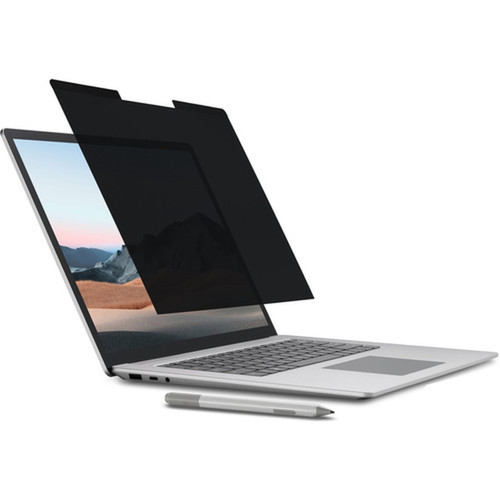
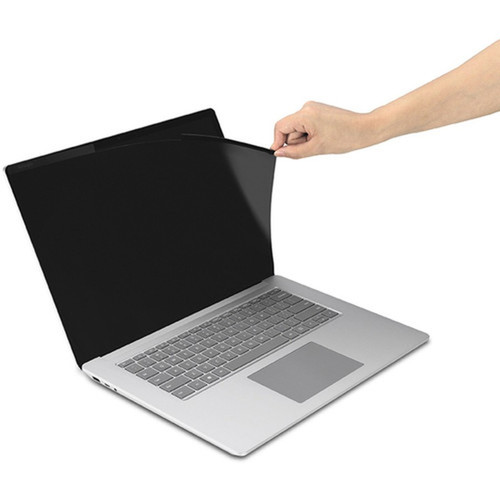
Engineered with a magnetic attachment system, the screen installs and removes effortlessly without adhesives or permanent modifications to your device. Its reversible matte-to-glossy finish allows users to switch between anti-glare and standard viewing modes, adapting to different lighting conditions and personal preferences while maintaining touch sensitivity for full interactivity.
Relevant factors for this section include Display Type Supported, Display Size Supported, Device Supported, Durability. When those points are considered together, they give buyers a clearer picture of how the product is equipped, how it fits into deployment, and what kind of day-to-day role it is meant to support.
Technical Overview
This privacy screen employs a micro-louver technology that narrows the viewing angle, making the display content visible only to the person directly in front of the screen. Side-angle visibility is significantly reduced, ensuring confidential data remains private in shared workspaces, public transit, or client-facing scenarios.
The filter incorporates an anti-reflective coating that minimizes glare from overhead lighting or windows, enhancing readability and reducing eye strain. Blue light reduction technology further supports visual comfort during extended use, filtering out a portion of high-energy visible light emissions from the display.
Relevant factors for this section include Display Type Supported, Display Size Supported, Device Supported, Durability. When those points are considered together, they give buyers a clearer picture of how the product is equipped, how it fits into deployment, and what kind of day-to-day role it is meant to support.
Key Product Advantages
The MagPro Elite stands out with its combination of robust privacy protection, user-friendly installation, and multi-functional design. Its magnetic mounting ensures a secure fit without compromising the laptop's aesthetics or requiring tools, making it ideal for professionals who need to frequently transition between private and collaborative work settings.
Enhanced Privacy Security
Restricts screen visibility to approximately a 30-degree cone directly in front of the display, effectively shielding financial data, proprietary information, and personal communications from casual observers.
- Micro-louver technology
- Wide-angle privacy protection
- Maintains front-view clarity
Durability & Maintenance
A fingerprint-resistant coating repels oils and smudges, keeping the screen clean with minimal wiping. The hard-coated surface resists scratches from daily handling and storage, preserving optical clarity over the product's lifespan.
Deployment / Use Cases
This privacy screen is particularly valuable in environments where visual confidentiality is critical. Financial analysts, healthcare administrators, legal professionals, and government employees can use it to comply with data protection regulations while working in open-plan offices, co-working spaces, or during travel.
The reversible feature allows the same filter to serve dual purposes: the matte side for glare reduction in brightly lit areas, and the glossy side for maximum color vibrancy and clarity in controlled lighting. This flexibility makes it suitable for presentations, design reviews, and media consumption when privacy is not required, eliminating the need to remove the filter entirely.
Corporate & Government Use
TAA compliance ensures eligibility for U.S. federal government purchases under the Trade Agreements Act, making this filter a trusted choice for agencies and contractors handling sensitive information.
Mobile Professionals
Lightweight and slim profile adds minimal bulk, fitting seamlessly into laptop bags for security on the go in airports, cafes, and client sites where shoulder surfing is a concern.
Highlights
- Designed exclusively for Microsoft Surface Laptop 3 15-inch LCD models
- Magnetic attachment system for tool-free installation and removal
- Reversible matte-to-glossy finish adapts to different lighting conditions
- Anti-glare and blue light reduction for reduced eye strain
- Fingerprint-resistant coating for easy cleaning and maintenance
- Micro-louver technology restricts viewing angles to protect privacy
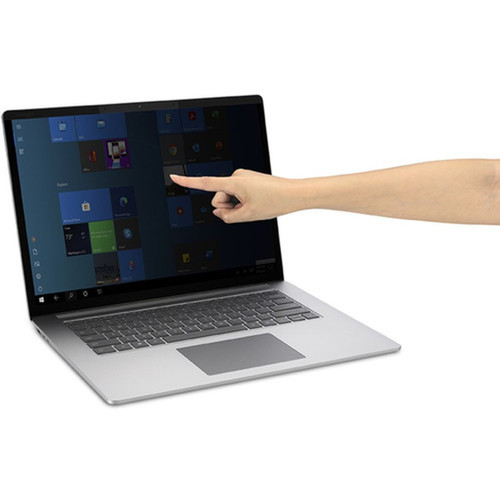
- Fully touch-sensitive surface maintains all interactive capabilities
- TAA compliant for U.S. federal government procurement eligibility
- Backed by a 2-year limited warranty from Kensington
Specifications
| Specifications | |
|---|---|
| Manufacturer | Kensington Computer Products Group |
| Manufacturer Part Number | K58362WW |
| Brand Name | Kensington |
| Product Line | MagPro Elite |
| Product Name | MagPro Elite Privacy Screen for Surface Laptop 3 15IN |
| Product Type | Privacy Screen Filter |
| Technical Information | |
| Display Type Supported | LCD |
| Display Size Supported | 15" (381 mm) |
| Device Supported | Notebook |
| Anti-glare | Yes |
| Blue Light Reduction | Yes |
| Features | Anti-reflective,Magnetic,Privacy,Reversible Matte-to-Glossy,Touch Sensitive |
| Physical Characteristics | |
| Durability | Fingerprint Resistant |
| Miscellaneous | |
| Compatibility | Microsoft Surface Laptop 3 |
| Country of Origin | Taiwan |
| TAA Compliant | Yes |
| Warranty | |
| Limited Warranty | 2 Year |
User Manual
FAQ
Is this privacy screen compatible with other laptop models besides the Surface Laptop 3?
No, the Kensington MagPro Elite K58362WW is specifically designed for the Microsoft Surface Laptop 3 with a 15-inch LCD display. Its magnetic attachment and precise dimensions are tailored to this model, ensuring a perfect fit and optimal privacy performance. Using it on other devices may result in poor adhesion, gaps that compromise privacy, or potential damage.
How does the magnetic attachment work, and does it leave residue on my laptop?
The privacy screen uses a thin, flexible magnetic frame that aligns with the edges of the Surface Laptop 3 display. It attaches securely through magnetic force without adhesives, tapes, or clips, leaving no residue on the laptop. This allows for quick installation and removal whenever needed, preserving the device's original finish and making it ideal for shared or temporary use scenarios.
What is the difference between the matte and glossy sides of the reversible screen?
The matte side features an anti-glare coating that diffuses reflections from ambient light, reducing eye strain and improving readability in bright environments. The glossy side offers maximum color saturation and contrast for vibrant visuals, suitable for media viewing or design work in controlled lighting. You can flip the filter to choose the side that best matches your current task and lighting conditions.
Does the privacy screen affect touchscreen functionality or display quality?
No, the screen is fully touch-sensitive, supporting all gestures, taps, and stylus inputs without lag or interference. Optical clarity is maintained with high transparency materials, so colors and brightness remain accurate when viewed head-on. The micro-louver technology only narrows the viewing angle from the sides, preserving front-view image quality while providing privacy.
What does TAA compliance mean, and why is it important?
TAA (Trade Agreements Act) compliance indicates that this product is manufactured in a designated country, making it eligible for purchase by U.S. federal government agencies and contractors. This is crucial for organizations involved in government projects, as non-compliant products cannot be used in federal acquisitions. The screen's origin in Taiwan meets these requirements, ensuring broad procurement suitability.
How do I clean and maintain the privacy screen?
Use a soft, lint-free cloth slightly dampened with water or a mild screen cleaner. Gently wipe the surface to remove dust, fingerprints, or smudges. Avoid abrasive materials, harsh chemicals, or excessive pressure that could scratch the coating. The fingerprint-resistant layer minimizes frequent cleaning, but regular maintenance will keep optical performance optimal and extend the product's life.
| Qty | Price | Available |
|---|