







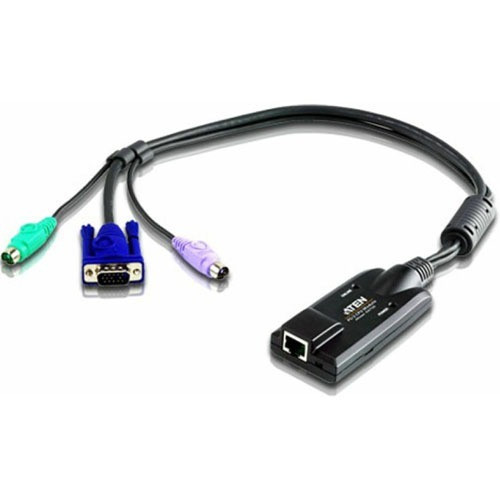
Aten KA7120 KVM Adapter Cable - RJ-45 Female Network to PS/2 Mouse - PS/2 Keyboard - VGA Male

Business volume discounts
Technical guidance
Preparation & staging
QC · ON · AB · BC
Product Features
Technical Overview
This KVM adapter cable features a precise connector configuration that ensures reliable signal transmission between network-based KVM switches and legacy peripheral ports. The first end uses an RJ-45 female connector, which plugs directly into the network port of compatible KVM switches, supporting standard KVM-over-IP or Cat5/Cat6 cabling systems.
The second end splits into three distinct male connectors: a 6-pin Mini-DIN (PS/2) for mouse, another 6-pin Mini-DIN (PS/2) for keyboard, and a 15-pin HD-15 (VGA) for video. This design allows simultaneous connection of all three legacy interfaces without requiring separate adapters, simplifying cable management and reducing clutter in server setups.
This section brings together practical product details such as Connector Type on First End, Connector on First End Details, Connector Type on Second End, Product Color, so buyers can judge configuration, deployment fit, and day-to-day suitability with less guesswork.
Key Product Advantages
The KA7120 streamlines server management by bridging modern network KVM technology with older PS/2 and VGA hardware, eliminating the need for multiple adapters and reducing installation time.
Legacy Interface Support
Enables control of servers with PS/2 mouse, PS/2 keyboard, and VGA video through a single network KVM switch, extending the lifespan of existing equipment.
- Compatible with PS/2 peripherals
- Supports VGA displays up to standard resolutions
- No driver installation required
Rack-Ready Design
Includes a rack mount kit and guide for secure installation in server racks, promoting organized cable management and easy access in data centers.
- Reduces cable clutter
- Facilitates tidy server room layouts
- Mounts securely in standard racks
Deployment / Use Cases
The Aten KA7120 is ideal for IT environments where legacy servers or workstations with PS/2 and VGA ports need to be integrated into a centralized KVM-over-network system. It is commonly used in data centers, server rooms, and industrial control settings where older hardware remains in service alongside newer network infrastructure.
Typical applications include managing rack-mounted servers that lack USB or digital video outputs, controlling test benches with legacy equipment, and extending KVM switch functionality to remote locations via Cat5/Cat6 cabling. The adapter ensures reliable connectivity for administrative tasks such as BIOS configuration, system diagnostics, and remote troubleshooting without requiring physical access to each machine.
What's in the Box
The package includes all necessary components for immediate deployment: the KVM adapter cable itself, a rack mount kit for organized installation, and a rack mounting guide with step-by-step instructions.
Highlights
- Connects RJ-45 female network port to PS/2 mouse, PS/2 keyboard, and VGA male
- Includes rack mount kit and mounting guide for server room installation
- Black color for discreet integration into IT environments
- Enables legacy PS/2 and VGA hardware to work with network KVM switches
- Reduces cable clutter with a single adapter solution
- Durable construction for reliable performance in data centers
- No additional drivers or software required for basic functionality
- Compatible with standard Cat5/Cat6 cabling systems
Specifications
| Specifications | |
|---|---|
| Manufacturer | ATEN Technology, Inc |
| Manufacturer Part Number | KA7120 |
| Brand Name | ATEN |
| Product Name | KVM Adapter Cable |
| Product Type | KVM Cable |
| Technical Information | |
| Connector Type on First End | RJ-45 Network - Female |
| Connector on First End Details | 1 x RJ-45 Network - Female |
| Connector Type on Second End | Mini-DIN (PS/2) - Male,HD-15 - Male |
| Connector on Second End Details | 1 x 6-pin Mini-DIN (PS/2) - Male,1 x 15-pin HD-15 - Male |
| Physical Characteristics | |
| Product Color | Black |
| Miscellaneous | |
| Package Contents | 1 x KVM Adapter Cable 1 x Rack Mount Kit 1 x Rack Mounting Guide |
User Manual
FAQ
What connectors does the Aten KA7120 KVM adapter cable have?
The KA7120 has an RJ-45 female connector on one end for connecting to a network KVM switch. The other end splits into three male connectors: a 6-pin Mini-DIN (PS/2) for mouse, another 6-pin Mini-DIN (PS/2) for keyboard, and a 15-pin HD-15 (VGA) for video. This configuration allows simultaneous connection of legacy PS/2 and VGA devices through a single network port.
Is this adapter compatible with modern KVM-over-IP switches?
Yes, the Aten KA7120 is designed to work with KVM switches that use RJ-45 network ports for connectivity, including KVM-over-IP models. It converts the network signal into separate PS/2 and VGA interfaces, enabling control of legacy servers from a centralized console. Ensure your KVM switch supports the required signal types for PS/2 and VGA over Cat5/Cat6 cabling.
What is included in the package with the KA7120?
The package includes three items: the KVM adapter cable itself, a rack mount kit for secure installation in server racks, and a rack mounting guide with instructions. This provides everything needed for immediate deployment in a data center or server room environment, helping organize cables and equipment efficiently.
Can I use this adapter for non-server applications, like desktop computers?
While primarily designed for server room use, the KA7120 can also connect legacy desktop computers with PS/2 and VGA ports to a network KVM switch. It is suitable for any scenario where you need to control older hardware remotely, such as in industrial settings, labs, or offices with mixed technology generations. The rack mount kit may not be necessary for desktop setups.
Does the adapter require any software or drivers to function?
No, the Aten KA7120 operates as a passive adapter cable and does not require additional software or drivers for basic functionality. It transmits signals directly between the KVM switch and the connected devices. However, for advanced features like KVM-over-IP management, you may need software provided by your KVM switch manufacturer.
What are the typical use cases for this KVM adapter cable?
Common use cases include managing rack-mounted servers with PS/2 and VGA ports in data centers, controlling legacy test equipment in labs, and extending KVM switch access to remote locations via network cabling. It is ideal for IT administrators who need to maintain older hardware while integrating it into modern network-based management systems, reducing the need for physical access to each machine.
What refresh rate or brightness details are available?
Display-oriented products are best judged through screen, connectivity, and installation specifications. Those facts help buyers confirm visual fit, mounting flexibility, and deployment suitability more clearly than generic summary text.
What input or connectivity options are listed?
Connectivity options include 1 x RJ-45 Network - Female, helping the product integrate into common office or home setups.
| Qty | Price | Available |
|---|


