










Shipping included*
Exclusions
Additional shipping fees may apply in rare circumstances for deliveries outside standard service areas. In most cases, this only potentially affects shipments to the Northwest Territories and Yukon, as well as certain heavy or oversized items.
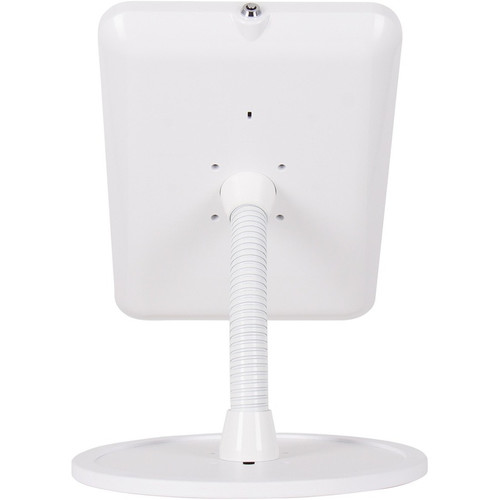
The Joy Factory KAA115W Elevate II Flex Countertop Kiosk for iPad 10. 2-inch - White - 14" Height - 75 x 75/100 x 100 VESA

Business volume discounts
Technical guidance
Preparation & staging
QC · ON · AB · BC
Product Features
Technical Overview
This kiosk delivers reliable hardware support with a focus on durability and user adjustability. The construction includes a heavy-duty base weighing 7.25 pounds (3288.54 grams) to ensure stability even with active touchscreen use. The adjustable angle mechanism allows precise positioning to reduce glare and improve accessibility, while the 90-degree rotation capability lets you quickly switch between portrait and landscape modes to match application requirements.
The integrated cable management system routes cords through the stand's arm to maintain a clean, professional appearance and minimize tripping hazards. Security is addressed with both a physical key lock to secure the iPad in the cradle and a Kensington lock slot for attaching the entire unit to a fixed surface. The kiosk stands 14 inches (355.60 mm) tall, placing the tablet at an ergonomic height for standing or seated interaction.
Key Product Advantages
The Elevate II Flex Kiosk combines security, flexibility, and professional design to enhance tablet-based workflows. Its weighted base and solid construction provide exceptional stability, preventing accidental knocks or tips during high-traffic use. The adjustable viewing angle and rotation capabilities allow you to optimize the display for different users, lighting conditions, and applications without needing tools.
Enhanced Security
Dual security options protect your investment. The key lock secures the iPad in the cradle, while the Kensington slot lets you attach the entire kiosk to a counter or desk, deterring theft in public or shared spaces.
- Key lock for iPad retention
- Kensington slot for kiosk anchoring
- Deters unauthorized removal
Flexible Positioning
Adjust the tablet's angle for optimal viewing and rotate it 90 degrees to switch between portrait and landscape orientations. This adaptability ensures comfortable use for various tasks and user heights.
- Adjustable angle mechanism
- 90-degree rotation
- Portrait and landscape support
Clean Installation
Integrated cable management hides power and data cables within the stand's arm, reducing clutter and tripping hazards. This maintains a professional appearance and simplifies maintenance.
- Internal cable routing
- Reduces visible clutter
- Improves safety
Deployment / Use Cases
This kiosk is ideal for businesses that use iPads as interactive terminals in customer-facing or operational roles. Its secure, adjustable design makes it suitable for environments where tablets need to remain accessible yet protected from theft or damage.
Common applications include retail point-of-sale systems where staff or customers scan items or process payments, hotel or restaurant self-check-in kiosks, museum or gallery interactive displays, reception desks for digital sign-ins, and warehouse or factory floors for inventory management. The white color and modern style blend seamlessly into professional settings, while the VESA mounting compatibility allows for permanent installations on counters, walls, or other surfaces.
Retail & Hospitality
Deploy as a secure POS terminal or self-service kiosk for orders, check-ins, or information lookup. The adjustable screen ensures visibility for customers of different heights.
Corporate & Education
Use in lobbies for digital directories, in meeting rooms for presentation controls, or in classrooms for interactive learning stations. The lockable design prevents unauthorized removal.
Physical Profile
The kiosk features a sleek white finish that complements modern office or retail decor. With a height of 14 inches (355.60 mm), it positions the tablet at a comfortable viewing level for standing interactions. The weighted base provides a low center of gravity to prevent tipping, and the compact countertop form factor minimizes desk space usage. The build quality ensures long-term durability in high-use environments.
- Height
- 14" (355.60 mm)
- Weight
- 7.25 lb (3288.54 g)
Highlights
- Securely holds 10.2-inch iPad 9th/8th/7th Gen tablets
- Weighted base prevents tipping for enhanced stability
- Adjustable viewing angle and 90-degree rotation flexibility
- Key lock and Kensington slot for theft deterrence
- Integrated cable management for a clean setup
- Supports VESA 75x75 mm and 100x100 mm mounting patterns
- Modern white design suits professional environments
- 14-inch height optimizes ergonomic viewing
Specifications
| Specifications | |
|---|---|
| Manufacturer | The Joy Factory |
| Manufacturer Part Number | KAA115W |
| Brand Name | The Joy Factory |
| Product Line | Elevate II |
| Product Name | Elevate II Flex Countertop Kiosk for iPad 10.2-inch 9th | 8th | 7th Gen (Black) |
| Product Type | Tablet PC Stand |
| Technical Information | |
| Maximum Screen Size Supported | 10.2" |
| Style | Modern |
| Application/Usage | iPad,Tablet |
| Features | Flexible,Cable Management,Weighted Base,Key Lock,Kensington Slot,90° Rotation,Adjustable Angle |
| Physical Characteristics | |
| Mounting Pattern | 75 x 75,100 x 100 |
| Color Family | White |
| Product Color | White |
| Form Factor | Countertop |
| Height | 14" (355.60 mm) |
| Weight (Approximate) | 7.25 lb (3288.54 g) |
| Miscellaneous | |
| Country of Origin | Taiwan |
User Manual
FAQ
Which iPad models are compatible with this kiosk?
The kiosk is designed for 10.2-inch iPad models, specifically the 9th generation, 8th generation, and 7th generation. It supports tablets up to 10.2 inches in screen size, ensuring a secure fit for these devices. The adjustable cradle accommodates the thickness and form factor of these iPads, providing stable holding without obstructing ports or buttons.
How does the kiosk enhance security for my iPad?
Security is addressed through two methods: a key lock that secures the iPad within the cradle to prevent removal, and a Kensington lock slot that allows you to attach the entire kiosk to a countertop or desk using a compatible security cable. This dual approach deters theft in public or shared spaces, making it suitable for retail, lobbies, or other high-traffic areas.
Can I adjust the viewing angle and orientation of the iPad?
Yes, the kiosk offers full flexibility in positioning. The adjustable angle mechanism lets you tilt the iPad forward or backward to reduce glare and improve visibility for users of different heights. Additionally, you can rotate the tablet 90 degrees to switch between portrait and landscape orientations, which is useful for apps that require specific screen layouts.
What mounting options does this kiosk support?
The kiosk supports standard VESA mounting patterns of 75x75 mm and 100x100 mm, providing compatibility with a wide range of countertop, wall, or arm mounts. This allows for permanent installations in fixed locations. The unit itself has a countertop form factor with a weighted base, so it can also stand freely on desks or tables without additional mounting.
How does the cable management system work?
The integrated cable management routes power and data cables through the arm of the kiosk, hiding them from view and reducing clutter. This not only maintains a clean, professional appearance but also minimizes tripping hazards and makes it easier to keep the area organized. It helps protect cables from damage and keeps them securely in place during use.
What are the physical dimensions and weight of the kiosk?
The kiosk stands 14 inches (355.60 mm) tall, positioning the iPad at an ergonomic height for interaction. It weighs approximately 7.25 pounds (3288.54 grams), with much of that weight concentrated in the base to provide stability and prevent tipping. The compact design minimizes desk space usage while ensuring durability in business environments.
What power capacity is listed for this UPS?
Power specifications help show where the unit fits best, including the type of load level, electrical environment, and backup role it is intended to support. These are usually the most decision-critical facts in a UPS or power-protection comparison.
| Qty | Price | Available |
|---|


