











Logitech 910-006556 MX Master 3S Wireless Mouse - 8K DPI Darkfield - Bluetooth/Radio Frequency - 32. 8 ft Range - Black

Business volume discounts
Technical guidance
Preparation & staging
QC · ON · AB · BC
Product Features
Technical Overview
At the core of the MX Master 3S is an 8K DPI Darkfield sensor, which enables precise tracking on virtually any surface—including glass—without requiring a mouse pad. This high-resolution sensor offers customizable sensitivity settings through Logi Options+ software, allowing users to fine-tune pointer speed for different applications and tasks.
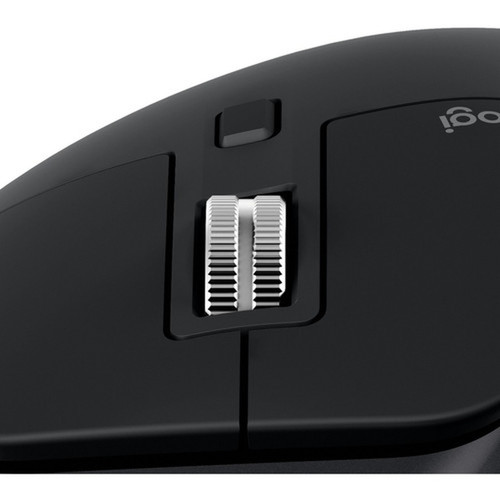
The mouse features MagSpeed electromagnetic scrolling, delivering remarkable speed and precision that is 90% faster and 87% more accurate than conventional mechanical scrolling. Its scroll wheel operates with near silence, complementing the new Quiet Clicks mechanism that reduces audible click noise by 90% while maintaining tactile feedback.
This section brings together practical product details such as Pointing Device Connectivity Technology, Pointing Device Wireless Technology, Pointing Device Wireless Operating Distance, Pointing Device Host Interface, so buyers can judge configuration, deployment fit, and day-to-day suitability with less guesswork.
Key Product Advantages
The MX Master 3S distinguishes itself through a combination of advanced tracking, ergonomic design, and intelligent software integration that streamlines complex workflows across multiple devices and operating systems.
Any-Surface Tracking
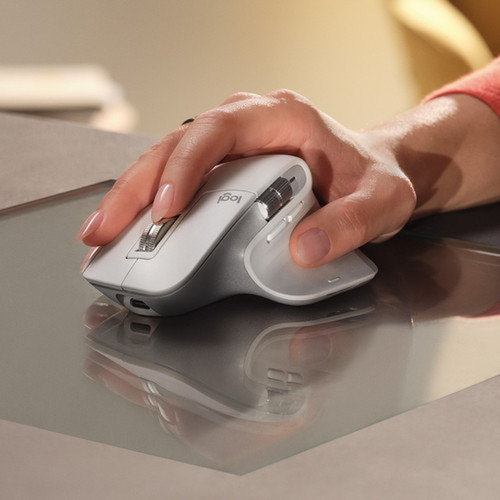
The upgraded Darkfield sensor with 8000 DPI sensitivity allows the mouse to track accurately on challenging surfaces like glass, granite, and high-gloss finishes, eliminating the need for a traditional mouse pad.
- Works on glass
- 8000 DPI precision
- Customizable sensitivity
Quiet & Precise Operation
Quiet Clicks technology reduces audible noise by 90% without compromising the satisfying tactile response, making it ideal for shared office environments, libraries, and home offices where noise discipline matters.
- 90% quieter clicks
- Tactile feedback maintained
- Office-friendly
Cross-Computer Workflow
Logitech Flow technology enables seamless control of up to three computers simultaneously, allowing users to transfer text, images, and files between Windows and macOS systems by simply moving the cursor across screen boundaries.
- Control multiple computers
- Cross-platform file transfer
- Windows & macOS compatible
Deployment / Use Cases
The MX Master 3S is engineered for professionals who manage complex digital workflows across multiple devices and applications. Its combination of precision tracking, customizable controls, and multi-device connectivity makes it particularly valuable in environments where efficiency and ergonomics are priorities.
Creative professionals such as graphic designers, video editors, and 3D modelers benefit from the high-precision 8K DPI sensor and customizable button profiles for applications like Adobe Creative Suite. Software developers and IT administrators appreciate the ability to switch between coding environments, virtual machines, and system monitoring tools using the thumb wheel and gesture button.
Multi-Device Productivity
Connect to up to three devices simultaneously via Bluetooth or the Logi Bolt receiver, switching between a desktop PC, laptop, and tablet with a button press. This setup is ideal for hybrid workers who use different systems for various tasks.
- Three-device pairing
- Instant switching
- Bluetooth & receiver support
Application-Specific Optimization
Logi Options+ software allows users to create custom button configurations for specific applications, automating repetitive tasks in programs like Excel, Photoshop, Visual Studio Code, and web browsers.
- App-specific profiles
- Button customization
- Workflow automation
Physical Profile
The MX Master 3S features a contoured design measuring 4.92" in depth, 3.32" in width, and 2.01" in height, with a weight of 4.97 ounces. Its shape is specifically crafted for right-handed users, with a thumb rest and optimally positioned controls that reduce strain during prolonged use. The matte black finish provides both aesthetic appeal and practical durability, while the compact dimensions ensure it fits comfortably on most desk setups without occupying excessive space.
- Width
- 3.32" (84.30 mm)
- Depth
- 4.92" (124.90 mm)
- Height
- 2.01" (51 mm)
- Weight
- 4.97 oz (141 g)
What's in the Box
The package includes all essential components for immediate use, supporting both wireless connectivity and convenient recharging.
Highlights
- 8K DPI Darkfield sensor tracks on any surface including glass
- Quiet Clicks technology reduces audible noise by 90%
- MagSpeed electromagnetic scrolling is 90% faster and 87% more precise
- Ergonomic right-handed design with thumb rest for comfort
- Connect via Bluetooth 5.0 or included Logi Bolt USB receiver
- Logitech Flow enables cross-computer control between Windows and macOS
- Compatible with Windows, macOS, Chrome OS, Linux, iPadOS, and Android
- Rechargeable battery with USB-C charging cable included
- Customizable buttons and app-specific profiles via Logi Options+ software
- Contains certified post-consumer recycled plastic and is carbon neutral
Specifications
| Specifications | |
|---|---|
| Manufacturer | Logitech |
| Manufacturer Part Number | 910-006556 |
| Brand Name | Logitech |
| Product Line | MX MASTER 3S |
| Product Name | MX Master 3S Performance Wireless Mouse (Black) |
| Packaged Quantity | 1 Each |
| Product Type | Mouse |
| Pointing Device | |
| Pointing Device Connectivity Technology | Wireless |
| Pointing Device Wireless Technology | Bluetooth/Radio Frequency |
| Pointing Device Wireless Operating Distance | 32.80 ft (9997.44 mm) |
| Wireless Operating Frequency | 2.40 GHz |
| Movement Detection | Darkfield |
| Movement Resolution (dpi) | 8000 |
| Total Number of Buttons | 7 |
| Scroller Type | Scroll Wheel |
| Ergonomic Fit | Right-handed |
| Bluetooth Version | 5 |
| Rechargeable | Yes |
| Interfaces/Ports | |
| Pointing Device Host Interface | USB |
| Battery Information | |
| Battery Size Supported | Proprietary Battery Size |
| Physical Characteristics | |
| Color Family | Black |
| Product Color | Black |
| Height | 2.01" (51 mm) |
| Width | 3.32" (84.30 mm) |
| Depth | 4.92" (124.90 mm) |
| Weight (Approximate) | 4.97 oz (141 g) |
| Miscellaneous | |
| Package Contents | MX MASTER 3S Performance Wireless Mouse Logi Bolt USB Receiver USB-C Charging Cable (USB-A to USB-C) User Documentation |
| Operating System Compatibility | Windows 10,Windows 11,ChromeOS,Linux,iPadOS 14,macOS 10.15,Android 8.0 |
| Platform Supported | PC,Mac |
| Environmentally Friendly | Yes |
| Environmental Compliance | Waste Electrical and Electronic Equipment Directive (WEEE),Restriction of Hazardous Substances (RoHS) |
| Country of Origin | China |
| Warranty | |
| Limited Warranty | 1 Year |
FAQ
What surfaces can the MX Master 3S track on?
The MX Master 3S features Darkfield tracking technology that works on virtually any surface, including challenging materials like glass, granite, and high-gloss finishes. This eliminates the need for a traditional mouse pad, providing flexibility in various work environments.
How does the Quiet Clicks feature work?
Quiet Clicks technology reduces the audible noise of mouse clicks by approximately 90% compared to standard mechanical switches. It maintains the satisfying tactile feedback users expect while making the mouse significantly quieter, ideal for shared offices, libraries, or home offices where noise reduction is important.
What is MagSpeed scrolling and how does it benefit users?
MagSpeed scrolling uses electromagnetic technology to deliver scrolling that is 90% faster, 87% more precise, and operates with near silence compared to traditional mechanical scroll wheels. This allows for rapid navigation through long documents, web pages, and spreadsheets with exceptional control and minimal noise.
How many devices can I connect to the MX Master 3S simultaneously?
The MX Master 3S can connect to up to three devices at once using either Bluetooth or the included Logi Bolt USB receiver. You can easily switch between connected devices with a button press, making it ideal for users who work across multiple computers, tablets, or operating systems.
What operating systems are compatible with this mouse?
The MX Master 3S is compatible with Windows 10, Windows 11, ChromeOS, Linux, iPadOS 14, macOS 10.15, and Android 8.0. This broad compatibility ensures the mouse works seamlessly across PC, Mac, and mobile platforms commonly used in professional environments.
What is included in the Logitech Flow feature?
Logitech Flow allows you to control multiple computers with a single mouse and keyboard, moving the cursor seamlessly between screens regardless of operating system. You can also copy and paste text, images, and files between Windows and macOS computers, creating a unified workflow across different systems.
What screen size is listed?
Logitech MX Master 3S Wireless Mouse - Darkfield - Wireless - 32.80 ft (9997.44 mm) - Bluetooth/Radio Frequency - 2.40 GHz - - Black - (910-006556) is best judged through its screen, connectivity, and installation specifications, which help buyers confirm visual fit and deployment suitability.
What resolution or display format is specified?
It features a display specification of 8000, giving you clear visuals for work and media use.
| Qty | Price | Available |
|---|


