








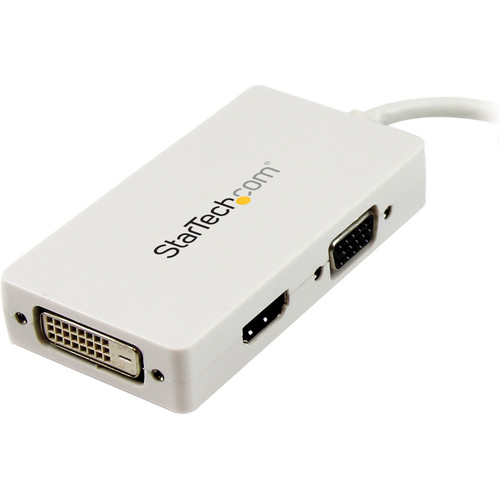


StarTech. com MDP2VGDVHDW Travel A/V Adapter - 3-in-1 Mini DisplayPort to VGA DVI HDMI Converter - White

Business volume discounts
Technical guidance
Preparation & staging
QC · ON · AB · BC
Product Features
Technical Overview
This adapter features a Mini DisplayPort male connector on one end and three female connectors on the other: HDMI, VGA, and DVI-D. The HDMI connector supports digital audio and video, the VGA connector handles analog video, and the DVI-D connector provides digital video output. This configuration allows users to connect to a wide range of monitors, projectors, and TVs without needing multiple adapters.
The adapter operates with both passive and active features, ensuring reliable signal conversion across different display technologies. It supports a maximum resolution of 1920x1200 or 1080p, which is suitable for most business and entertainment applications. The compact design minimizes desk clutter and enhances portability, weighing only 2 ounces.
This section brings together practical product details such as Connector Type on First End, Connector on First End Details, Connector Type on Second End, Color Family, so buyers can judge configuration, deployment fit, and day-to-day suitability with less guesswork.
Key Product Advantages
The StarTech.com MDP2VGDVHDW adapter simplifies connectivity by consolidating three adapter functions into one device. This reduces the need to carry multiple converters, saving space and reducing setup time. Its plug-and-play design ensures immediate compatibility without software installation, making it user-friendly for both IT professionals and casual users.
Versatile Connectivity
Connect to HDMI, VGA, or DVI displays from a single Mini DisplayPort source, covering most common display interfaces in business and home environments.
Portable Design
With a lightweight build and small footprint, this adapter is easy to pack in laptop bags or briefcases, ideal for travel and mobile presentations.
Environmental Compliance
Meets EU RoHS, REACH, and WEEE directives, ensuring environmentally responsible manufacturing and disposal practices.
Deployment / Use Cases
This adapter is well-suited for business travelers who need to connect laptops to various display types in conference rooms or client offices. It enables seamless presentations on projectors via VGA, monitors via DVI, or modern TVs via HDMI, ensuring compatibility across different venue setups.
In office environments, it supports multi-monitor configurations by allowing users to extend their desktop to additional screens. IT departments can deploy these adapters as standard issue for employees with Mini DisplayPort laptops, reducing support calls for display connectivity issues. Home users can also benefit by connecting laptops to home theater systems or secondary monitors for entertainment or productivity tasks.
Business Presentations
Use with projectors or large displays in meeting rooms to deliver clear, high-resolution presentations from Mini DisplayPort laptops.
Office Workstations
Extend desktop space by connecting to secondary monitors, improving multitasking and workflow efficiency in corporate settings.
Physical Profile
The adapter features a clean white exterior that blends well with modern office aesthetics. Its compact dimensions and lightweight construction make it easy to handle and store. The durable build ensures reliable performance during frequent travel, while the color-coded connectors help users quickly identify the correct port for their display.
The physical profile is practical for deployment planning because the dimensions and weight are clearly defined: 2 oz (56.70 g). This helps confirm rack, shelf, desk, or cabinet fit before installation.
- Weight
- 2 oz (56.70 g)
What's in the Box
The package includes all necessary components for immediate use, ensuring a complete out-of-the-box experience.
Highlights
- 3-in-1 adapter converts Mini DisplayPort to VGA, DVI, or HDMI
- Supports video resolutions up to 1920x1200/1080p
- Plug-and-play installation with no drivers required
- Compatible with Intel Thunderbolt devices outputting DisplayPort
- Compact and lightweight design for easy portability
- Sleek white finish for modern aesthetics
- Passive and active operation for reliable signal conversion
- Includes installation guide for quick setup
- RoHS, REACH, and WEEE compliant for environmental safety
- Backed by a 2-year limited warranty
Specifications
| Specifications | |
|---|---|
| Manufacturer | StarTech.com |
| Manufacturer Part Number | MDP2VGDVHDW |
| Brand Name | StarTech.com |
| Product Name | Travel A/V Adapter: 3-in-1 Mini DisplayPort to VGA DVI or HDMI Converter - White |
| Packaged Quantity | 1 Each |
| Product Type | Video Adapter |
| Technical Information | |
| Connector Type on First End | HDMI Digital Audio/Video - Female,DB-15 Video - Female,DVI-D Digital Video - Female |
| Connector on First End Details | 1 x 19-pin HDMI Digital Audio/Video - Female,1 x 15-pin DB-15 Video - Female,1 x 25-pin DVI-D Digital Video - Female |
| Connector Type on Second End | Mini DisplayPort Digital Audio/Video - Male |
| Connector on Second End Details | 1 x 20-pin Mini DisplayPort Digital Audio/Video - Male |
| Features | Passive,Active |
| Physical Characteristics | |
| Color Family | White |
| Product Color | White |
| Weight (Approximate) | 2 oz (56.70 g) |
| Miscellaneous | |
| Package Contents | 1 x Mini DisplayPort to HDMI/VGA/DVI Adapter 1 x Installation Guide |
| Country of Origin | China |
| Environmentally Friendly | Yes |
| Environmental Certification | EU RoHS |
| Environmental Compliance | Restriction of Hazardous Substances (RoHS) 2,Registration, Evaluation, Authorization and Restriction of Chemicals (REACH),Waste Electrical and Electronic Equipment Directive (WEEE) |
| Warranty | |
| Limited Warranty | 2 Year |
User Manual
FAQ
What devices are compatible with this Mini DisplayPort adapter?
This adapter is compatible with laptops, desktops, and other devices equipped with a Mini DisplayPort output. It also works with Intel Thunderbolt devices that can output a DisplayPort signal, making it suitable for many modern Apple and Windows computers. Ensure your device supports the maximum resolution of 1920x1200 or 1080p for optimal performance.
Does this adapter support audio through HDMI?
Yes, when using the HDMI connector, the adapter supports both digital audio and video transmission. This allows you to connect to TVs or monitors with built-in speakers for a complete multimedia experience. The VGA and DVI connectors only carry video signals, so audio would need to be handled separately through other means.
Is this adapter plug-and-play, or does it require drivers?
This adapter is plug-and-play and does not require any additional drivers or software installation. Simply connect the Mini DisplayPort end to your device and the desired display connector to your monitor, and it should work immediately. This makes it user-friendly for quick setups in various environments.
Can I use this adapter with a Thunderbolt 3 or USB-C port?
This adapter is designed for Mini DisplayPort connections and may not work directly with Thunderbolt 3 or USB-C ports without an additional adapter. However, if your Thunderbolt 3 device supports DisplayPort output via a compatible adapter or dock, it could function indirectly. Check your device's specifications for DisplayPort compatibility.
What is included in the package with this adapter?
The package includes one Mini DisplayPort to HDMI/VGA/DVI adapter and one installation guide. This provides everything needed for basic setup and use. No additional cables or accessories are included, so you may need standard display cables depending on your monitor connections.
What refresh rate or brightness details are available?
Display-oriented products are best judged through screen, connectivity, and installation specifications. Those facts help buyers confirm visual fit, mounting flexibility, and deployment suitability more clearly than generic summary text.
What input or connectivity options are listed?
1 x 19-pin HDMI Digital Audio/Video - Female,1 x 15-pin DB-15 Video - Female,1 x 25-pin DVI-D Digital Video - Female.
Does the display support VESA mounting or adjustment features?
Display-oriented products are best judged through screen, connectivity, and installation specifications. Those facts help buyers confirm visual fit, mounting flexibility, and deployment suitability more clearly than generic summary text.
| Qty | Price | Available |
|---|


