







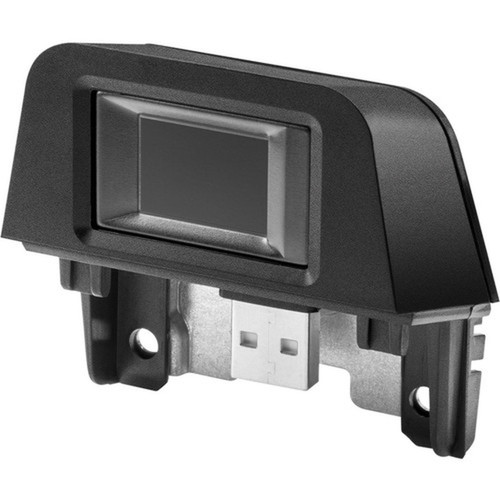
HP N3R64AA RP9 Integrated Fingerprint Reader - USB Biometric Security Device

Business volume discounts
Technical guidance
Preparation & staging
QC · ON · AB · BC
Product Features
Technical Overview
Engineered for precision and durability, the HP RP9 Fingerprint Reader utilizes advanced biometric scanning technology to capture and verify fingerprint data accurately. The device supports standard USB connectivity, ensuring broad compatibility with modern computers and operating systems that have USB ports and appropriate driver support.
Its technical design prioritizes ease of integration and consistent performance. The reader processes fingerprint images rapidly, reducing authentication time while maintaining high security standards to prevent unauthorized access.
This section brings together practical product details such as USB, Height, Width, Depth, so buyers can judge configuration, deployment fit, and day-to-day suitability with less guesswork.
A strong technical summary explains how the product's interfaces, hardware profile, and operating characteristics work together in real deployment. Buyers often need this context to confirm compatibility with existing devices, expected performance in daily use, and whether installation will be straightforward for IT staff or end users.
Key Product Advantages
The HP RP9 Fingerprint Reader delivers tangible benefits for security-conscious organizations by replacing password-based logins with biometric authentication. This reduces the risk of credential theft, simplifies user access, and enhances overall system security without complex infrastructure changes.
Enhanced Security
Fingerprint authentication provides a unique, non-transferable credential that is difficult to replicate, offering stronger protection than traditional passwords.
- Reduces password-related breaches
- Unique biometric identifier
User Convenience
Quick fingerprint scans allow for faster logins compared to typing passwords, improving user productivity and reducing support calls for password resets.
- Fast authentication
- Minimizes login friction
Easy Deployment
The USB interface and compact size enable simple installation on desktops or workstations, with minimal setup required for integration into existing systems.
- Plug-and-play setup
- Space-efficient design
Deployment / Use Cases
The HP RP9 Fingerprint Reader is ideal for environments where secure, efficient user authentication is a priority. Its design supports a range of business applications, from individual workstations to shared access points, enhancing security protocols without disrupting workflow.
Common use cases include securing sensitive workstations in finance or HR departments, controlling access to shared computers in libraries or labs, and providing biometric login for point-of-sale systems or kiosks. The device's reliability makes it suitable for daily use in offices, educational institutions, and retail settings.
Office Workstations
Deploy on employee desktops to replace password logins, ensuring only authorized personnel access company systems and data.
Shared Access Points
Use in libraries, labs, or reception areas to manage multi-user access securely, tracking logins via biometric data instead of shared credentials.
Physical Profile
The HP RP9 Fingerprint Reader features a compact and lightweight design, with dimensions of 1.40" in height, 2.30" in width, and 2.48" in depth, making it unobtrusive on any desktop. Weighing only 45.4 grams, it is easy to position near keyboards or monitors without occupying significant space. The sturdy construction ensures durability for daily use, while the small footprint allows flexible placement in various workspace configurations.
- Width
- 2.30" (58.42 mm)
- Depth
- 2.48" (62.99 mm)
- Height
- 1.40" (35.56 mm)
- Weight
- 45.4 g
Highlights
- HP RP9 Integrated Fingerprint Reader for biometric authentication
- Part number N3R64AA ensures exact model identification
- USB interface for plug-and-play connectivity
- Compact dimensions: 1.40" H x 2.30" W x 2.48" D
- Lightweight at 45.4 grams for easy desktop placement
- Enhances security by replacing password-based logins
- Suitable for offices, labs, and shared access points
- Manufactured in China with HP quality standards
Specifications
| Specifications | |
|---|---|
| Manufacturer | HP Inc. |
| Manufacturer Part Number | N3R64AA |
| Brand Name | HP |
| Product Name | RP9 Integrated Finger Print Reader (N3R64AA) |
| Product Type | Fingerprint Reader |
| Interfaces/Ports | |
| USB | Yes |
| Physical Characteristics | |
| Height | 1.40" (35.56 mm) |
| Width | 2.30" (58.42 mm) |
| Depth | 2.48" (62.99 mm) |
| Weight (Approximate) | 45.4 g |
| Miscellaneous | |
| Country of Origin | China |
FAQ
What is the HP RP9 Fingerprint Reader used for?
The HP RP9 Fingerprint Reader is a biometric security device designed to authenticate users via fingerprint scans, replacing traditional password logins. It enhances access control for computers, workstations, or shared systems in business, educational, or retail environments by providing a secure, unique identifier for each user.
How do I connect the HP RP9 Fingerprint Reader to a computer?
The HP RP9 Fingerprint Reader connects via a standard USB interface. Simply plug it into an available USB port on your computer. It typically supports plug-and-play functionality, but you may need to install drivers or software provided by HP or your operating system for full biometric features.
What are the dimensions and weight of the HP RP9 Fingerprint Reader?
The HP RP9 Fingerprint Reader measures 1.40 inches in height, 2.30 inches in width, and 2.48 inches in depth, with a weight of approximately 45.4 grams. This compact and lightweight design makes it easy to place on desktops without taking up much space.
Where is the HP RP9 Fingerprint Reader manufactured?
The HP RP9 Fingerprint Reader is manufactured in China. HP ensures that products meet their quality and reliability standards, regardless of origin, to deliver consistent performance for security applications.
Can the HP RP9 Fingerprint Reader be used in shared environments?
Yes, the HP RP9 Fingerprint Reader is suitable for shared environments like libraries, labs, or reception areas. It allows multiple users to authenticate securely with their unique fingerprints, eliminating the need for shared passwords and enhancing access control for communal computers or systems.
| Qty | Price | Available |
|---|


