Brother QL800 Direct Thermal Label Printer - Monochrome - 1.6 lps - 300 x 600 dpi - 2.44" Roll Media - USB - PC/Mac

Business volume discounts
Technical guidance
Preparation & staging
QC · ON · AB · BC
Product Features
Technical Overview
The QL800 utilizes direct thermal printing technology, which eliminates the need for ink, toner, or ribbons, reducing ongoing consumable costs and maintenance. This technology heats specially coated media to produce monochrome images, offering a clean and straightforward printing process ideal for high-volume label applications.
With a maximum print speed of 1.6 lps, this printer handles rapid labeling demands efficiently, while the 300 x 600 dpi resolution ensures detailed output suitable for barcodes, text, and simple graphics. The printer supports roll media up to 2.44" in width, accommodating standard label sizes for retail, logistics, and office use.
Relevant factors for this section include Recommended Use, Print Color Capability, Maximum Mono Print Speed, USB. When those points are considered together, they give buyers a clearer picture of how the product is equipped, how it fits into deployment, and what kind of day-to-day role it is meant to support.
Key Product Advantages
The Brother QL800 stands out with its combination of speed, simplicity, and cost-effectiveness, making it a practical choice for businesses seeking reliable label printing. Its direct thermal design streamlines operations by removing complex consumables, while the robust construction ensures durability in daily use.
No Ink or Toner Required
Direct thermal printing uses heat-sensitive media, eliminating the need for ink cartridges, toner, or ribbons. This reduces long-term operating costs and minimizes maintenance, providing a cleaner and more economical printing solution.
- Lower consumable expenses
- Simplified maintenance
- Reduced environmental waste
High-Speed Labeling
With a print speed of 1.6 lps, the QL800 delivers fast label production, helping businesses meet tight deadlines and improve workflow efficiency. This speed is ideal for environments with frequent labeling needs, such as warehouses or retail settings.
- Rapid output for high-volume tasks
- Enhances productivity
- Supports time-sensitive operations
Compact and Versatile Design
The printer's small footprint (5.60" H x 4.90" W x 8.40" D) allows it to fit easily on desks or counters, while its support for various media types adds flexibility for different labeling applications.
- Space-saving form factor
- Adaptable to multiple media
- Easy integration into existing setups
Deployment / Use Cases
The Brother QL800 is well-suited for a range of business environments where efficient and reliable label printing is essential. Its monochrome output and direct thermal technology make it ideal for applications that prioritize speed, clarity, and cost-efficiency over color printing.
Common use cases include shipping and logistics for printing address labels and tracking barcodes, retail for price tags and inventory management, and office settings for file organization and asset tagging. The printer's compatibility with PC and Mac systems ensures it can be deployed in diverse IT infrastructures without compatibility issues.
Shipping and Logistics
Print shipping labels, tracking barcodes, and handling instructions quickly and clearly, supporting efficient package processing and inventory tracking in distribution centers or mailrooms.
Retail and Inventory
Generate price tags, shelf labels, and stock control tags to streamline pricing updates and inventory management, enhancing accuracy and reducing manual labor in stores or warehouses.
Physical Profile
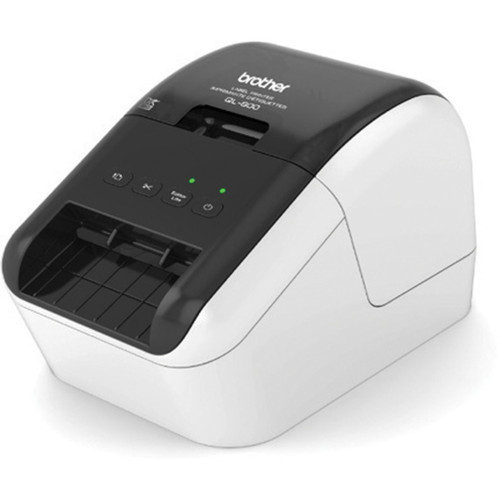
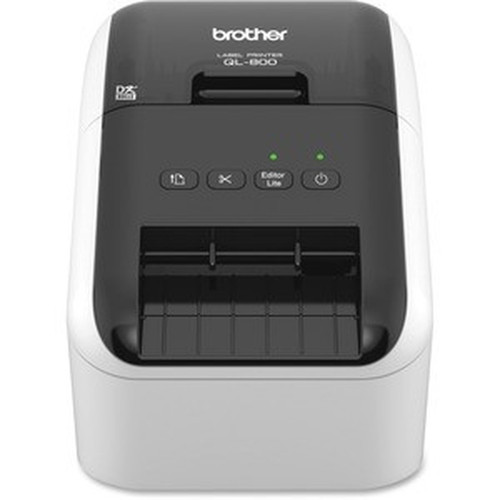
The QL800 features a compact and lightweight design, measuring 5.60" in height, 4.90" in width, and 8.40" in depth, with an approximate weight of 2.54 lb. This small footprint makes it easy to place on desks, counters, or in tight spaces, while the durable construction ensures stability during operation. The printer's sleek monochrome finish blends seamlessly into professional environments, and its simple front-loading media mechanism allows for quick paper changes without disrupting workflow.
- Width
- 4.90" (124.46 mm)
- Depth
- 8.40" (213.36 mm)
- Height
- 5.60" (142.24 mm)
- Weight
- 2.54 lb (1152.12 g)
Highlights
- Direct thermal printing technology eliminates ink, toner, and ribbons for lower operating costs.
- Monochrome output at 1.6 lines per second ensures fast and efficient label production.
- 300 x 600 dpi resolution delivers sharp, legible text and graphics for professional labels.
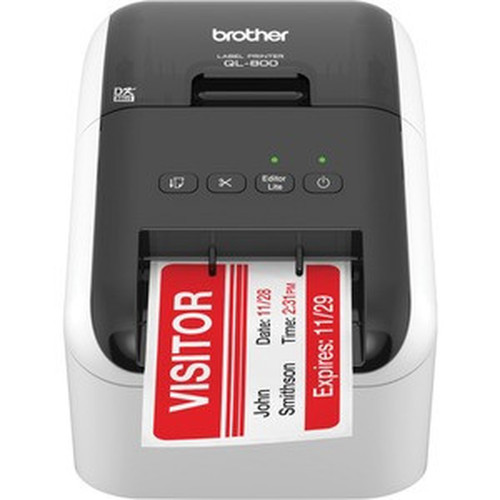
- Supports 2.44" roll media, including labels, continuous paper, and die-cut labels.
- USB connectivity provides easy plug-and-play integration with PC and Mac systems.
- Compact design (5.60" H x 4.90" W x 8.40" D) fits easily on desks or in small spaces.
- Energy Star certified for energy efficiency and reduced environmental impact.
- 2-year limited warranty with replacement service for added peace of mind.
Specifications
| Specifications | |
|---|---|
| Manufacturer | Brother Industries, Ltd |
| Manufacturer Part Number | QL800 |
| Brand Name | Brother |
| Product Model | QL800 |
| Product Name | QL series QL800, Direct Thermal Printer, Mono, USB, USB |
| Packaged Quantity | 1 Each |
| Product Type | Direct Thermal Printer |
| Technical Information | |
| Recommended Use | Label Print |
| Print Color Capability | Monochrome |
| Maximum Mono Print Speed | 1.6 lps |
| Maximum Print Resolution (dpi) | 300 x 600 |
| Interfaces/Ports | |
| USB | Yes |
| Media Types & Handling | |
| Media Type | Label,Continuous Paper,Die-cut Label |
| Media Size | Roll - 2.44" (61.98 mm) |
| Power Description | |
| Power Source | AC Supply |
| Physical Characteristics | |
| Height | 5.60" (142.24 mm) |
| Width | 4.90" (124.46 mm) |
| Depth | 8.40" (213.36 mm) |
| Weight (Approximate) | 2.54 lb (1152.12 g) |
| Miscellaneous | |
| Platform Supported | PC,Mac |
| Certifications & Standards | Energy Star |
| Country of Origin | China |
| Warranty | |
| Limited Warranty | 2 Year |
| Additional Warranty Information | 2 Year Limited Warranty & Replacement Service |
FAQ
What type of printing technology does the Brother QL800 use?
The Brother QL800 uses direct thermal printing technology. This method heats specially coated thermal paper to produce monochrome images without requiring ink, toner, or ribbons. It simplifies maintenance and reduces long-term consumable costs, making it ideal for high-volume label printing in business settings.
What is the maximum print speed of the QL800?
The QL800 has a maximum print speed of 1.6 lines per second (lps). This speed allows for rapid label production, supporting efficient workflows in environments like shipping departments, retail stores, or offices where quick labeling is essential for productivity and meeting deadlines.
What media sizes and types does this printer support?
The printer supports roll media with a width of 2.44" (61.98 mm). It is compatible with various media types, including labels, continuous paper, and die-cut labels. This versatility makes it suitable for different labeling applications, such as address labels, price tags, or inventory tags, in business and organizational contexts.
Is the Brother QL800 compatible with both PC and Mac computers?
Yes, the Brother QL800 is compatible with both PC and Mac platforms. It connects via USB for straightforward plug-and-play setup, allowing seamless integration into diverse IT environments. This cross-platform support ensures flexibility for businesses using mixed operating systems without requiring additional drivers or complex configurations.
What is the print resolution of the QL800?
The QL800 offers a maximum print resolution of 300 x 600 dots per inch (dpi). This resolution provides clear, detailed output for text, barcodes, and simple graphics, ensuring labels are legible and professional-looking. It is sufficient for most business labeling needs, including shipping labels and inventory tags.
Does the QL800 come with a warranty?
Yes, the Brother QL800 includes a 2-year limited warranty with replacement service. This warranty covers defects in materials and workmanship, providing reliable support and peace of mind for business users. It reflects the printer's durable construction and Brother's commitment to quality in professional printing equipment.
| Qty | Price | Available |
|---|