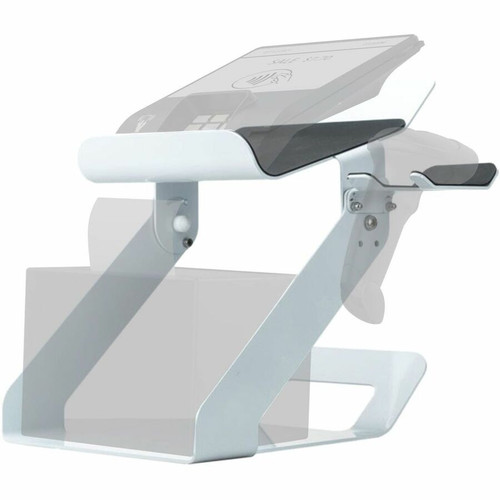



CTA Digital QPAD-POSP Point-of-Sale Printer Stand with Wireless Scanner Mount - Desk Organizer - Scratch & Slip Resistant - Adjustable Angle

Business volume discounts
Technical guidance
Preparation & staging
QC · ON · AB · BC
Product Features
Technical Overview
This printer stand supports a range of POS peripherals, including scanners, printers, terminals, and kiosks, making it versatile for various retail and service environments. Its desk form factor ensures easy integration into existing counter setups without requiring specialized mounting.
The stand incorporates multiple user-focused features: a scratch-resistant surface maintains appearance under heavy use, slip-resistant padding keeps equipment firmly in place, and rubber feet provide stability on smooth surfaces. The adjustable angle mechanism allows fine-tuning of the scanner mount to suit different operator heights and preferences.
This section brings together practical product details such as Application/Usage, Features, Form Factor, Weight (Approximate), so buyers can judge configuration, deployment fit, and day-to-day suitability with less guesswork.
A strong technical summary explains how the product's interfaces, hardware profile, and operating characteristics work together in real deployment. Buyers often need this context to confirm compatibility with existing devices, expected performance in daily use, and whether installation will be straightforward for IT staff or end users.
Key Product Advantages
The QPAD-POSP enhances point-of-sale operations by organizing critical hardware into a cohesive unit. Its design prioritizes durability and usability, with features that protect both the equipment and the workspace.
Space Optimization
Combines printer and wireless scanner into a single footprint, freeing up valuable desk space in crowded checkout areas.
- Reduces cable clutter
- Centralizes hardware access
Enhanced Stability
Rubber feet and slip-resistant padding prevent movement during use, ensuring equipment stays secure and operational.
- Minimizes vibration
- Protects desk surfaces
Ergonomic Flexibility
Adjustable scanner mount allows customization of viewing and scanning angles to reduce operator strain.
- Improves workflow efficiency
- Adapts to user preferences
Deployment / Use Cases
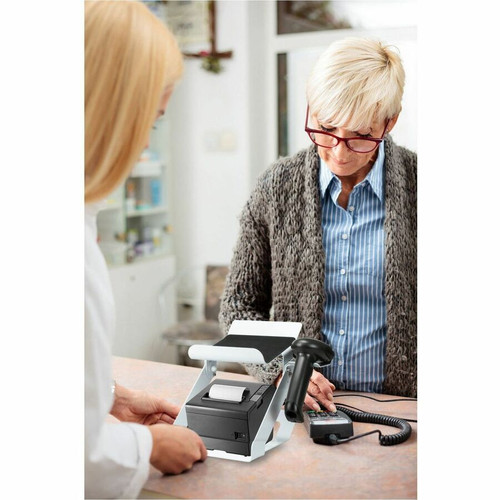
This stand is ideal for retail stores, restaurants, hotels, and other businesses that rely on point-of-sale systems. It fits seamlessly into environments where counter space is limited but organization is critical.
In retail settings, it keeps receipt printers and barcode scanners accessible and tidy. For hospitality venues, it supports quick transaction processing at front desks or bar areas. The compatibility with kiosks also makes it suitable for self-service terminals in libraries, museums, or transportation hubs.
This section brings together practical product details such as Application/Usage, Features, Form Factor, Weight (Approximate), so buyers can judge configuration, deployment fit, and day-to-day suitability with less guesswork.
Retail Checkout Counters
Organizes printers and scanners for cashiers, speeding up transactions and reducing errors during peak hours.
Hospitality Front Desks
Provides a compact solution for hotel or restaurant POS systems, maintaining a professional appearance in customer-facing areas.
Physical Profile
Designed as a desk-mounted unit, the stand has a lightweight yet sturdy build at approximately 3.28 pounds. The rubber feet ensure it stays in place without sliding, while the overall form factor integrates smoothly with standard counter depths. The adjustable components allow for minor customization without compromising stability.
The physical profile is practical for deployment planning because the dimensions and weight are clearly defined: 3.28 lb (1487.78 g). This helps confirm rack, shelf, desk, or cabinet fit before installation.
- Weight
- 3.28 lb (1487.78 g)
What's in the Box
The package includes all necessary components for immediate setup.
Highlights
- Desk-mounted printer stand with integrated wireless scanner mount
- Compatible with scanners, printers, POS terminals, and kiosks
- Scratch-resistant and slip-resistant surface for durability
- Padded design secures equipment and prevents desk damage
- Adjustable angle allows ergonomic scanner positioning
- Rubber feet provide stability on smooth surfaces
- Lightweight at approximately 3.28 lb (1487.78 g)
- Includes 1-year limited warranty for peace of mind
Specifications
| Specifications | |
|---|---|
| Manufacturer | CTA Digital, Inc |
| Manufacturer Part Number | QPAD-POSP |
| Brand Name | CTA Digital |
| Product Name | Point-of-Sale Printer Stand with Wireless Scanner Mount |
| Packaged Quantity | 1 |
| Product Type | Printer Stand |
| Technical Information | |
| Application/Usage | Scanner,Printer,POS Terminal,Kiosk |
| Features | Scratch Resistant,Slip Resistant,Padded,Adjustable Angle,Rubber Feet |
| Physical Characteristics | |
| Form Factor | Desk |
| Weight (Approximate) | 3.28 lb (1487.78 g) |
| Miscellaneous | |
| Package Contents | POS Printer Stand 1 x Wireless scanner mount |
| Warranty | |
| Limited Warranty | 1 Year |
User Manual
FAQ
What types of equipment is the QPAD-POSP stand compatible with?
The stand is designed for point-of-sale peripherals, including scanners, printers, POS terminals, and kiosks. It accommodates standard-sized receipt printers and wireless barcode scanners, making it suitable for retail, hospitality, and service environments.
Does the stand include both the printer stand and scanner mount?
Yes, the package contains both the POS printer stand and a dedicated wireless scanner mount. This provides a complete solution for organizing two essential POS hardware components in one unit.
How does the adjustable angle feature work?
The scanner mount offers adjustable angle positioning, allowing you to tilt it for optimal ergonomics. This helps reduce operator strain by aligning the scanner with the user's natural hand or eye level, improving scanning efficiency during extended use.
What are the key durability features of this stand?
It includes scratch-resistant and slip-resistant surfaces to withstand daily commercial use. The padded area secures equipment, while rubber feet prevent sliding and protect desk surfaces from scratches or marks.
Is the stand easy to set up on a desk?
Yes, it has a simple desk form factor with no complex mounting required. Just place it on a counter, position your printer and scanner, and adjust the angle as needed. The lightweight design makes it easy to reposition if necessary.
What warranty coverage does CTA Digital provide?
CTA Digital offers a 1-year limited warranty on the QPAD-POSP stand. This covers defects in materials or workmanship under normal use, providing assurance for business investments in POS organization.
What power capacity is listed for this UPS?
Power specifications help show where the unit fits best, including the type of load level, electrical environment, and backup role it is intended to support. These are usually the most decision-critical facts in a UPS or power-protection comparison.
| Qty | Price | Available |
|---|