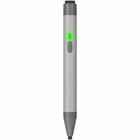
SMART Board RX-PEN Stylus - 2 Pack - Active - White & Gray - Interactive Display Compatible

Business volume discounts
Technical guidance
Preparation & staging
QC · ON · AB · BC
Product Features
Technical Overview
Engineered for SMART Board interactive displays, the RX-PEN stylus uses active technology to deliver consistent tracking and pressure sensitivity. The 0.20" diameter tip offers fine control for detailed work, while the rubber construction reduces screen wear and provides a comfortable writing feel.
Compatibility is specifically tailored to the SMART Board RX Series, ensuring seamless integration and optimal performance. The stylus operates without batteries or charging, relying on the display's built-in technology for activation and precision.
This section brings together practical product details such as Device Supported, Stylus Type, Color Family, Product Color, so buyers can judge configuration, deployment fit, and day-to-day suitability with less guesswork.
Key Product Advantages
This stylus set enhances interactive display usability with reliable, precise input for a variety of professional and educational applications.
Precise Navigation
The fine rubber tip allows accurate cursor control, swiping, and selection, improving efficiency in presentations and collaborative sessions.
- Accurate pointing and clicking
- Smooth swipe gestures
- Reduced finger smudges
Enhanced Annotation
Draw, paint, and annotate directly on digital documents with natural feel, ideal for marking up presentations, diagrams, or lesson plans.
- Natural writing experience
- Clear digital ink
- Easy erasing and editing
Durable & Practical
The two-pack design provides a backup pen and supports multiple users, while the dual colors help distinguish between pens or users quickly.
- Backup ready
- User identification
- Long-lasting rubber tip
Deployment / Use Cases
The SMART Board RX-PEN stylus is versatile for environments where interactive displays are central to communication and collaboration.
In classrooms, teachers and students can use it for interactive lessons, real-time annotation, and group problem-solving. Corporate teams benefit from precise presentation control, brainstorming sessions, and document markup during meetings. Creative professionals find it useful for sketching, design reviews, and detailed editing on large touchscreens.
Education
Enable interactive teaching with smooth writing, drawing, and navigation on SMART Board displays for engaging student participation.
Business Collaboration
Facilitate meetings with accurate annotation, presentation control, and collaborative editing on interactive whiteboards.
Highlights
- Active stylus technology for precise interaction with SMART Board RX Series displays
- Twin pack includes two pens in white and gray for backup or multi-user setups
- 0.20" (5 mm) rubber tip enables accurate navigation, drawing, and annotation
- Compatible specifically with SMART Board RX Series interactive displays
- Enhances digital workflows in education, business, and creative environments
- No batteries or charging required—ready to use out of the package
- Reduces finger smudges and screen wear compared to direct touch
- Ideal for note-taking, presentation control, and collaborative editing
Specifications
| Specifications | |
|---|---|
| Manufacturer | SMART Technologies, Inc |
| Manufacturer Part Number | RX-PEN |
| Brand Name | SMART Board |
| Product Name | Stylus |
| Packaged Quantity | 2 Pack |
| Product Type | Stylus |
| Technical Information | |
| Device Supported | Interactive Display |
| Stylus Type | Active |
| Physical Characteristics | |
| Color Family | Dual Color |
| Product Color | White,Gray |
| Diameter | 0.20" (5 mm) |
| Miscellaneous | |
| Compatibility | SMART Board RX Series Interactive Dispaly |
FAQ
What displays are compatible with the SMART Board RX-PEN stylus?
The stylus is specifically designed for SMART Board RX Series interactive displays. It uses active technology that integrates with these models to provide precise tracking and input. It is not compatible with other brands or non-RX Series SMART Boards without verified compatibility.
Does the stylus require batteries or charging?
No, the RX-PEN stylus does not need batteries or charging. It operates as an active stylus using the interactive display's built-in technology for activation and precision. This makes it ready to use immediately and eliminates maintenance concerns.
What is the tip size and material?
The tip diameter is 0.20 inches (5 mm) and made of rubber. This fine size allows for detailed control and accurate input, while the rubber material provides a smooth writing feel and helps reduce wear on the display surface over time.
How many styluses come in the package?
The package includes two styluses, one in white and one in gray. This twin pack is useful for having a backup pen, enabling multiple users, or distinguishing between different functions or users during collaborative sessions.
What are the primary uses for this active stylus?
Primary uses include navigation, swiping, drawing, painting, annotating electronic documents, and precise selection on compatible interactive displays. It is ideal for educational instruction, business presentations, creative design, and any task requiring accurate digital input.
What screen size is listed?
SMART Board Stylus - 2 Pack - Active - White, Gray - Interactive Display Device Supported (RX-PEN) is best judged through its screen, connectivity, and installation specifications, which help buyers confirm visual fit and deployment suitability.
| Qty | Price | Available |
|---|