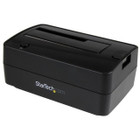
StarTech.com SDOCKU313E USB 3.1 & eSATA Hard Drive Docking Station - Single-Bay for 2.5"/3.5" SATA SSD/HDD - 6TB Support - UASP - Tool-Less Design

Business volume discounts
Technical guidance
Preparation & staging
QC · ON · AB · BC
Product Features
Technical Overview
This drive dock supports the full SATA I, II, and III specifications with a 6 Gbps interface, ensuring your drives operate at their maximum potential speed. The inclusion of UASP (USB Attached SCSI Protocol) significantly enhances performance over USB connections by reducing CPU overhead and improving data transfer efficiency compared to standard USB mass storage protocols.
The docking station maintains backward compatibility with USB 3.0, 2.0, and 1.x through the included USB Type-B to A cable, while the additional USB Type-B to C cable provides native connectivity to modern USB-C enabled devices. The eSATA port offers an alternative high-speed connection for systems equipped with eSATA interfaces, giving you multiple connectivity options based on your available ports and performance needs.
Relevant factors for this section include Number of Total Expansion Bays, Number of 2.5"/3.5" Bays, Hot Swappable Bays, Wireless LAN. When those points are considered together, they give buyers a clearer picture of how the product is equipped, how it fits into deployment, and what kind of day-to-day role it is meant to support.
Key Product Advantages
The SDOCKU313E combines practical design with robust performance features that streamline drive access and data management tasks. Its top-loading design with a built-in ejection button allows for secure drive insertion and easy removal without touching drive connectors directly.
Tool-Less Operation
Insert 2.5" or 3.5" SATA drives directly without trays, brackets, or screws. The simple drop-in design saves time during frequent drive changes.
- No tools required for installation
- Works with both SSD and HDD form factors
- Eliminates compatibility issues with drive trays
Comprehensive Cable Kit
Includes three connection cables covering USB-A, USB-C, and eSATA interfaces, plus a universal power adapter with multiple regional plugs.
- USB-A to USB-B cable for legacy systems
- USB-C to USB-B cable for modern devices
- eSATA cable for direct storage connections
Environmental Compliance
Manufactured with RoHS 2, REACH, and WEEE compliance, meeting international environmental standards for hazardous substance restrictions and electronic waste management.
Deployment / Use Cases
This hard drive docking station serves multiple roles in professional and personal computing environments where flexible storage access is required. Its single-bay design makes it particularly suitable for situations where you need to work with one drive at a time rather than maintaining multiple drives simultaneously connected.
Common applications include data recovery from failed or suspect drives, drive cloning and imaging operations, temporary storage expansion when internal bays are full, drive testing and diagnostics, and secure data wiping before drive disposal or repurposing. The hot-swappable capability allows you to change drives without powering down your computer, minimizing workflow interruptions during multi-drive operations.
Physical Profile
The compact black plastic enclosure measures 2.50" (63.50 mm) in height, 3.70" (93.98 mm) in width, and 5.70" (144.78 mm) in depth, with a weight of approximately 14.50 oz (411.07 g). This modest footprint occupies minimal desk space while providing stable support for inserted drives. The absence of a cooling fan results in silent operation, making it suitable for office environments where noise reduction is important.
- Width
- 3.70" (93.98 mm)
- Depth
- 5.70" (144.78 mm)
- Height
- 2.50" (63.50 mm)
- Weight
- 14.50 oz (411.07 g)
What's in the Box
The docking station ships with all necessary cables and accessories for immediate use with various computer systems and power outlets.
Highlights
- Connect 2.5" or 3.5" SATA SSDs/HDDs via USB 3.1 Gen 2 or eSATA
- Supports SATA I, II, and III interfaces at up to 6 Gbps speeds
- Top-loading design with built-in ejection button for easy drive access
- Tool-less, tray-less operation - insert drives directly without adapters
- Supports large drive capacities up to 6TB
- Includes USB Type-B to A cable for USB 3.0/2.0/1.x backward compatibility
- Includes USB Type-B to C cable for USB-C enabled devices
- UASP support enhances USB transfer performance
- Hot-swappable bay allows drive changes without system shutdown
- Comes with universal power adapter for multiple regions
Specifications
| Specifications | |
|---|---|
| Manufacturer | StarTech.com |
| Manufacturer Part Number | SDOCKU313E |
| Brand Name | StarTech.com |
| Product Name | USB 3.1 & eSATA HDD/SSD Docking Station |
| Packaged Quantity | 1 Each |
| Product Type | Drive Dock |
| I/O Expansions | |
| Number of Total Expansion Bays | 1 |
| Number of 2.5"/3.5" Bays | 1 |
| Hot Swappable Bays | Yes |
| Network & Communication | |
| Wireless LAN | No |
| UASP Support | Yes |
| Interfaces/Ports | |
| Drive Interface | SATA/600 |
| Host Interface | USB 3.1 Type B,eSATA |
| Physical Characteristics | |
| Color Family | Black |
| Product Color | Black |
| Product Material | Plastic |
| Cooling Fan | No |
| Form Factor | External |
| Height | 2.50" (63.50 mm) |
| Width | 3.70" (93.98 mm) |
| Depth | 5.70" (144.78 mm) |
| Weight (Approximate) | 14.50 oz (411.07 g) |
| Miscellaneous | |
| Package Contents | USB 3.1 & eSATA HDD/SSD Docking Station 1 x Universal Power Sdapter (NA/JP, EU, UK, ANZ) 1 x 3.3 ft. [1 m] USB-A to USB-B Cable 1 x 3.3 ft. [1 m] USB-C to USB-B Cable 1 x 3.3 ft. [1 m] eSATA Cable 1 x Quick-start Guide |
| Country of Origin | China |
| Environmentally Friendly | Yes |
| Environmental Certification | EU RoHS |
| Environmental Compliance | Restriction of Hazardous Substances (RoHS) 2,Registration, Evaluation, Authorization and Restriction of Chemicals (REACH),Waste Electrical and Electronic Equipment Directive (WEEE) |
| Warranty | |
| Limited Warranty | 2 Year |
User Manual
FAQ
What types of drives are compatible with this docking station?
The SDOCKU313E supports both 2.5" and 3.5" SATA solid-state drives (SSDs) and hard disk drives (HDDs) that use the standard SATA interface. It works with SATA I, II, and III specifications, providing compatibility with drives manufactured over the past decade. The dock does not support IDE/PATA drives, SAS drives, or M.2/NVMe drives.
What is the maximum drive capacity this dock can handle?
This docking station supports drives up to 6TB in capacity. The 6 Gbps SATA/600 interface ensures full performance with high-capacity modern drives. For optimal compatibility with very large drives, ensure your computer's operating system supports the drive's partitioning scheme (GPT for drives over 2TB).
What cables are included with the docking station?
The package includes three connection cables: a 3.3-foot USB-A to USB-B cable for connecting to traditional USB ports, a 3.3-foot USB-C to USB-B cable for modern USB-C devices, and a 3.3-foot eSATA cable for direct storage connections. Also included is a universal power adapter with interchangeable plugs for North America/Japan, European Union, United Kingdom, and Australia/New Zealand outlets.
What is UASP and how does it benefit performance?
UASP (USB Attached SCSI Protocol) is an advanced transfer protocol that improves USB storage performance by reducing CPU overhead and enabling more efficient command queuing. When connected to a USB 3.1 host that supports UASP, this docking station can achieve faster transfer speeds, particularly with small files, compared to standard USB mass storage protocols. UASP support is especially beneficial for SSD performance over USB connections.
Can I use this dock with both Windows and macOS computers?
Yes, the docking station is compatible with Windows, macOS, and Linux operating systems that support USB mass storage devices. Most modern operating systems will recognize the dock automatically without requiring additional drivers. For optimal performance with UASP, ensure your operating system has the necessary USB 3.1 drivers installed.
Is the drive bay hot-swappable?
Yes, the single drive bay is hot-swappable, allowing you to insert or remove drives without powering down your computer. This feature is particularly useful for IT professionals who need to test multiple drives or users who frequently swap between different storage devices. Always use the operating system's 'Safely Remove Hardware' feature before physically removing a drive to prevent data corruption.
| Qty | Price | Available |
|---|