







Shipping included*
Exclusions
Additional shipping fees may apply in rare circumstances for deliveries outside standard service areas. In most cases, this only potentially affects shipments to the Northwest Territories and Yukon, as well as certain heavy or oversized items.
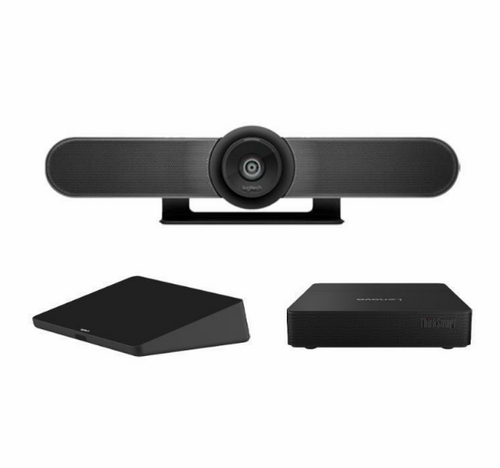
Logitech TAPMUPMSTLNV3 Video Conference Equipment - Microsoft Teams - Small Room Size

Business volume discounts
Technical guidance
Preparation & staging
QC · ON · AB · BC
Product Features
Product Overview
The Logitech TAPMUPMSTLNV3 video conference equipment delivers professional-grade collaboration capabilities specifically engineered for small meeting rooms. This solution integrates directly with Microsoft Teams, providing a unified communications platform that streamlines meeting setup and operation while maintaining high-quality audio and video performance.
Designed for compact environments like huddle spaces and executive offices, this equipment reduces technical complexity through its native Microsoft Teams compatibility. Organizations invested in the Microsoft ecosystem will find it offers seamless workflow integration, supporting modern business communication needs with reliable connectivity and intuitive operation.
The product's focus on small room optimization ensures it fits spatially constrained areas without compromising on meeting readiness. Its professional-grade construction and integration approach make it suitable for daily use in corporate, educational, and institutional settings where dependable video conferencing is essential for productivity and collaboration.
Technical Overview
The Logitech TAPMUPMSTLNV3 leverages Microsoft Teams as its unified communications platform, enabling comprehensive collaboration features including video calls, screen sharing, and team messaging directly from the meeting space. This technical foundation is optimized for small room environments, ensuring audio and video components work harmoniously within spatial constraints.
The equipment's design prioritizes ease of integration and operation, reducing configuration complexity while maintaining professional performance standards. Its compatibility with Microsoft Teams means it utilizes existing software environments without requiring proprietary additional applications, simplifying deployment for IT teams.
This technical approach supports reliable day-to-day operation in compact conference rooms, where quick meeting initiation and consistent performance are critical. The solution's architecture is built to handle the specific demands of smaller spaces, providing the necessary connectivity and processing capabilities for effective video meetings.
Relevant factors for this section include Room Size, Unified Communications Platform. When those points are considered together, they give buyers a clearer picture of how the product is equipped, how it fits into deployment, and what kind of day-to-day role it is meant to support.
Key Product Advantages
The Logitech TAPMUPMSTLNV3 offers distinct advantages for organizations implementing video conferencing in limited spaces. Its native Microsoft Teams integration provides a familiar collaboration interface that reduces training time and enhances user adoption, while the small room optimization ensures reliable performance in compact environments.
These strengths translate to practical benefits including quicker deployment cycles, reduced technical support requirements, and consistent meeting quality. The equipment's professional-grade construction delivers dependable operation for daily business communications, making it a cost-effective solution for extending collaboration capabilities to smaller meeting areas.
Seamless Microsoft Teams Integration
Provides direct access to Teams features without additional software, supporting familiar workflows and reducing configuration complexity.
- Native platform compatibility
- Reduced training requirements
- Streamlined user experience
Small Room Performance Optimization
Engineered specifically for compact spaces, delivering reliable audio and video quality within spatial constraints common to huddle rooms and executive offices.
- Spatially aware design
- Consistent meeting quality
- Compact footprint compatibility
Deployment / Use Cases
Deploy the Logitech TAPMUPMSTLNV3 in small meeting rooms, huddle spaces, or executive offices where space is limited but professional video conferencing capabilities are essential. It is ideal for daily team meetings, client presentations, and remote collaboration sessions that require reliable audio and video connectivity with Microsoft Teams integration.
Common deployment scenarios include corporate offices implementing standardized collaboration solutions across multiple small conference rooms, educational institutions facilitating remote learning and administrative meetings, and healthcare facilities supporting telemedicine consultations and staff communications. Government agencies and professional services firms also benefit from its secure, reliable performance in compact meeting environments.
The equipment supports use cases where quick meeting initiation, consistent performance, and minimal technical overhead are priorities. Its Microsoft Teams compatibility makes it particularly valuable for organizations already utilizing or transitioning to Microsoft's collaboration ecosystem, as it extends those capabilities to smaller meeting spaces without requiring separate infrastructure.
Corporate Huddle Rooms
Perfect for daily stand-ups, project updates, and brainstorming sessions in compact conference rooms where space efficiency matters.
- Supports small team collaboration
- Integrates with existing Microsoft Teams environments
- Minimal footprint installation
Remote Client Engagement
Enables professional video conferencing for client presentations, consultations, and partnership meetings from executive offices and small conference rooms.
- Professional-grade audio/video quality
- Microsoft Teams screen sharing capabilities
- Reliable connectivity for important meetings
Highlights
- Designed specifically for small meeting rooms and huddle spaces
- Integrated with Microsoft Teams for unified communications
- Streamlined setup and operation for ease of use
- Professional-grade video conferencing equipment
- Optimized for collaboration in compact environments
- Ideal for businesses using the Microsoft ecosystem
- Supports daily meetings and remote sessions
- Reduces technical complexity in small room deployments
- Native Microsoft Teams compatibility
- Reliable performance for professional communications
Specifications
| Specifications | |
|---|---|
| Manufacturer | Logitech |
| Manufacturer Part Number | TAPMUPMSTLNV3 |
| Brand Name | Logitech |
| Product Name | Video Conference Equipment |
| Product Type | Video Conference Equipment |
| Technical Information | |
| Room Size | Small |
| Miscellaneous | |
| Unified Communications Platform | Microsoft Teams |
FAQ
What room size is the Logitech TAPMUPMSTLNV3 designed for?
The Logitech TAPMUPMSTLNV3 video conference equipment is specifically engineered for small meeting rooms. This includes huddle spaces, compact conference rooms, and executive offices where spatial constraints require optimized audio and video solutions while maintaining professional-grade performance for business communications.
Is the Logitech TAPMUPMSTLNV3 easy to set up in a small room?
Yes, the Logitech TAPMUPMSTLNV3 is designed for streamlined setup and operation in small rooms. Its integration with Microsoft Teams reduces configuration complexity, and the equipment is optimized for the spatial constraints of compact environments, ensuring quick deployment and reliable performance with minimal technical overhead.
What are the typical use cases for this video conference equipment?
Typical use cases include small team meetings, client presentations, remote collaboration sessions, daily stand-ups, and departmental updates in corporate offices, educational institutions, healthcare facilities, and government agencies. It is ideal for scenarios where professional video conferencing is needed in limited spaces with Microsoft Teams integration.
Does this equipment require additional software for Microsoft Teams?
The Logitech TAPMUPMSTLNV3 is designed to work directly with Microsoft Teams, leveraging the existing Teams software environment. No additional proprietary software is typically required, as it integrates with the standard Microsoft Teams platform for unified communications and collaboration, simplifying deployment and maintenance.
How does this equipment benefit businesses using Microsoft Teams?
For businesses using Microsoft Teams, this equipment offers seamless integration that extends Teams capabilities to small meeting rooms. It reduces training time through familiar interfaces, supports existing workflows, and provides reliable video conferencing performance, making it a cost-effective solution for enhancing collaboration across compact meeting spaces within the Microsoft ecosystem.
What screen size is listed?
Logitech Video Conference Equipment - Small Room Size Supported (TAPMUPMSTLNV3) is best judged through its screen, connectivity, and installation specifications, which help buyers confirm visual fit and deployment suitability.
| Qty | Price | Available |
|---|


