








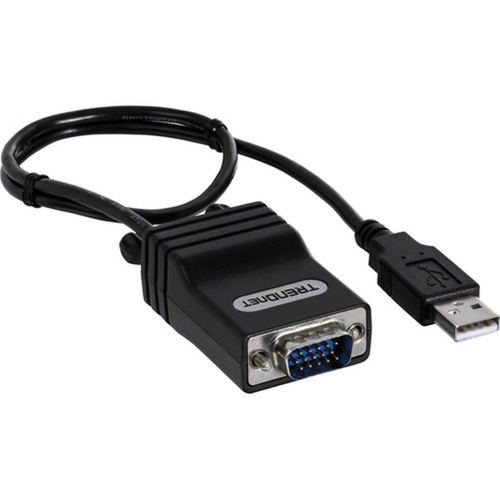

TRENDnet TK-CAT5U CAT5 USB Server Interface - KVM Extender - 1 Computer - UXGA 1600 x 1200 - RJ-45 - USB - VGA

Business volume discounts
Technical guidance
Preparation & staging
QC · ON · AB · BC
Product Features
Technical Overview
This KVM extender employs a straightforward wired architecture with three essential interfaces: a 10/100 Mbps Ethernet port for network connection to the CAT5 KVM switch, a USB 2.0 male connector for keyboard and mouse communication with the computer, and a VGA male connector for video output. The RJ-45 port utilizes standard Ethernet cabling, supporting distances achievable with CAT5, CAT5e, or CAT6 cables.
Video performance is capped at UXGA resolution (1600x1200), suitable for most server administration and monitoring applications. The interface operates independently of operating systems, with confirmed compatibility across Mac, PC, and Linux platforms. No additional drivers or configuration software is required for basic functionality.
Relevant factors for this section include Connectivity Technology, Number of Computers Supported, Graphic Mode, Maximum Video Resolution. When those points are considered together, they give buyers a clearer picture of how the product is equipped, how it fits into deployment, and what kind of day-to-day role it is meant to support.
Key Product Advantages
The TK-CAT5U simplifies remote server management by extending KVM signals over inexpensive, readily available CAT5 cabling. This eliminates the need for expensive proprietary cables while maintaining signal integrity over extended distances.
These strengths make the product easier to deploy and manage in real environments, especially where reliability, usability, and day-to-day operational continuity matter. Notable benefits include Universal Compatibility, Infrastructure Flexibility.
Universal Compatibility
Works with any TRENDnet CAT5 KVM switch and supports Mac, PC, and Linux computers without software installation.
- No driver requirements
- Cross-platform operation
- Hardware-level integration
Infrastructure Flexibility
Utilizes existing CAT5/5e/6 network cabling infrastructure, reducing deployment costs and complexity.
- Standard Ethernet cables
- No special media required
- Easy cable replacement
Deployment / Use Cases
This interface is specifically designed for environments where administrators need to manage servers or computers located in racks, enclosures, or separate rooms. Each computer requires its own TK-CAT5U unit, which connects directly to that system's USB and VGA ports before linking to the central KVM switch via CAT5 cable.
Typical deployments include data center server racks where multiple systems need consolidated management from a single KVM console. The solution is equally effective in laboratory environments, broadcast facilities, or industrial control rooms where equipment is housed in secure or inaccessible locations. The NDAA compliance makes it suitable for government IT infrastructure and regulated industries requiring certified hardware.
Data Center Management
Consolidate control of multiple servers from a single KVM console station, reducing the need for dedicated monitors and input devices at each rack.
Secure Environment Access
Manage equipment in locked server rooms or environmentally controlled spaces without requiring physical presence at each machine.
Highlights
- Extends KVM signals over CAT5/5e/6 cabling to a TRENDnet CAT5 KVM switch
- Supports one computer per interface unit with USB and VGA connections
- Delivers UXGA video resolution up to 1600x1200 for clear remote viewing
- Features 10/100 Mbps Ethernet, USB 2.0, and VGA interfaces in one compact unit
- Compatible with Mac, PC, and Linux systems without additional drivers
- NDAA compliant for government and enterprise security requirements
- Plug-and-play installation with no software configuration needed
- Lightweight design at 1.69 oz (48 g) for easy deployment
- Backed by a 2-year limited warranty for reliable operation
- Utilizes standard network cabling for cost-effective infrastructure
Specifications
| Specifications | |
|---|---|
| Manufacturer | TRENDnet |
| Manufacturer Part Number | TK-CAT5U |
| Brand Name | TRENDnet |
| Product Model | TK-CAT5U |
| Product Name | CAT5 USB Server Interface |
| Product Condition | New |
| Product Type | KVM Extender |
| Technical Information | |
| Connectivity Technology | Wired |
| Number of Computers Supported | 1 |
| Video | |
| Graphic Mode | UXGA |
| Maximum Video Resolution | 1600 x 1200 |
| Interfaces/Ports | |
| Network (RJ-45) | Yes |
| USB | Yes |
| VGA | Yes |
| Number of Network (RJ-45) Ports | 1 |
| Physical Characteristics | |
| Transmitter Weight (Approximate) | 1.69 oz (48 g) |
| Miscellaneous | |
| Platform Supported | Mac,PC,Linux |
| Country of Origin | China |
| Warranty | |
| Limited Warranty | 2 Year |
User Manual
FAQ
What type of KVM switch does the TK-CAT5U interface with?
The TK-CAT5U is designed specifically to connect computers to TRENDnet CAT5 KVM switches. It uses a standard RJ-45 Ethernet port to network with these switches, extending keyboard, video, and mouse signals over CAT5, CAT5e, or CAT6 cabling. This interface is not compatible with other KVM switch brands or models that use different connection protocols.
How many computers can a single TK-CAT5U unit support?
Each TK-CAT5U interface supports exactly one computer. The unit connects directly to that computer's USB port for keyboard/mouse signals and VGA port for video output. To manage multiple computers remotely, you need one TK-CAT5U per computer, with all interfaces connecting to the same TRENDnet CAT5 KVM switch via individual CAT5 cables.
What video resolution does this KVM extender support?
The TK-CAT5U supports UXGA resolution up to 1600x1200 pixels. This provides sufficient clarity for server administration, system monitoring, and most IT management tasks. The interface maintains this resolution over the extended CAT5 cable connection to the KVM switch, ensuring administrators receive clear visual feedback during remote operations.
What types of cables can I use with the TK-CAT5U?
The TK-CAT5U works with standard CAT5, CAT5e, and CAT6 Ethernet cables for the connection between the interface and the KVM switch. These readily available network cables provide a cost-effective extension medium. The interface also requires standard USB and VGA cables to connect to the computer, though these are typically included with the computer itself rather than the interface unit.
Does this product require external power or special configuration?
The TK-CAT5U requires no external power source or special configuration. It draws minimal power through the USB connection to the computer. Installation is truly plug-and-play: connect the USB and VGA to the computer, connect the RJ-45 to CAT5 cable running to the KVM switch, and the interface immediately begins transmitting signals. No software installation or configuration steps are necessary for basic operation.
What connectivity or interface options are available?
Connectivity support is listed in the product specifications, including the relevant wireless or port options when available.
| Qty | Price | Available |
|---|


