








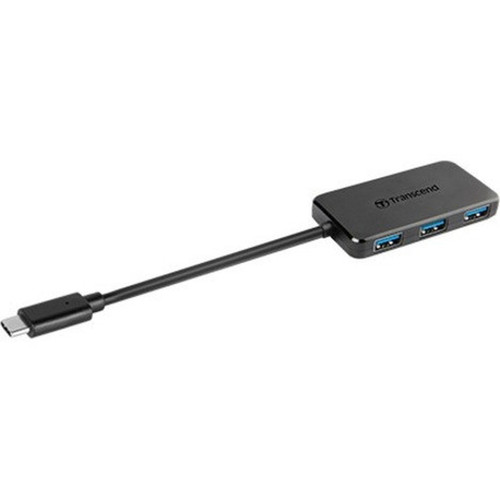




Transcend TS-HUB2C USB Type-C 4-Port Hub - 4x USB 3.1 Ports - PC/Mac/Linux

Business volume discounts
Technical guidance
Preparation & staging
QC · ON · AB · BC
Product Features
Technical Overview
This hub operates through a single USB Type-C host connection, delivering full USB 3.1 Gen 1 performance across all four downstream ports. The reversible connector design ensures hassle-free plug-and-play operation, while the internal circuitry maintains stable power distribution and data integrity. Each port supports transfer speeds up to 5 Gbps, backward compatible with USB 3.0 and USB 2.0 devices.
The hub requires no external power adapter, drawing operational power directly from the host system through the USB Type-C connection. Its chipset manages bandwidth allocation dynamically, preventing performance degradation when multiple high-speed devices are connected simultaneously. The design includes built-in surge protection and electromagnetic interference shielding for enhanced durability in office and professional environments.
Relevant factors for this section include Host Interface, Total Number of USB Ports, Number of USB 3.1 Ports. When those points are considered together, they give buyers a clearer picture of how the product is equipped, how it fits into deployment, and what kind of day-to-day role it is meant to support.
Key Product Advantages
Transcend's USB Type-C hub combines practical connectivity with user-friendly design. The reversible connector eliminates the frustration of incorrect insertion, while the four-port layout maximizes peripheral expansion without cluttering workspace. Its compact dimensions allow discreet placement beside laptops or under monitors, maintaining clean cable management.
Universal Compatibility
Works seamlessly across Windows, macOS, and Linux distributions without requiring additional drivers. The hub automatically negotiates optimal connection protocols with each connected device.
- Driver-free installation
- Automatic protocol detection
- Cross-platform support
Space-Efficient Design
Measuring just 2.91 inches wide and weighing only 29 grams, this hub adds minimal footprint to any setup. The slim profile fits easily in laptop bags for mobile professionals.
- Ultra-compact form factor
- Portable weight
- Low-profile placement
Deployment / Use Cases
The TS-HUB2C serves as an ideal connectivity solution for modern computing scenarios where USB Type-C hosts have limited native ports. It effectively expands single-port laptops and ultrabooks into fully functional workstations, supporting multiple peripherals simultaneously.
Creative professionals benefit from connecting external storage, drawing tablets, and input devices while maintaining fast data transfers. IT administrators deploy these hubs in help desk stations, conference rooms, and training facilities where multiple users need temporary peripheral access. The hub also supports point-of-sale systems, digital signage controllers, and kiosk installations requiring reliable USB expansion.
Mobile Workstation Expansion
Transform USB Type-C equipped laptops into complete desktop replacements by connecting monitors, external storage, keyboards, and mice through a single hub connection.
IT Support and Deployment
Simplify device diagnostics and configuration by providing multiple USB ports for flash drives, diagnostic tools, and peripheral testing at service desks and deployment stations.
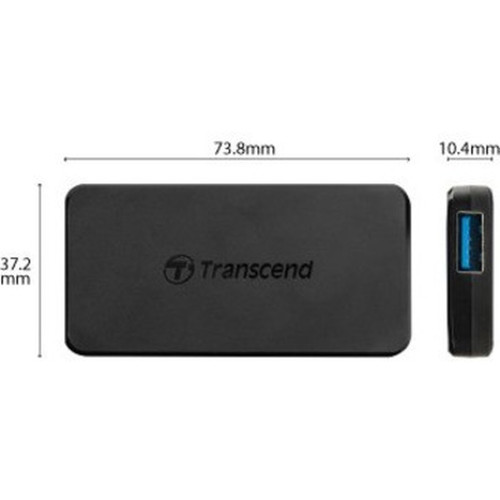
Physical Profile
The hub features a durable plastic enclosure with a matte finish that resists fingerprints and scratches. Its rectangular shape with rounded edges ensures safe handling and stable placement on various surfaces. The 0.41-inch depth allows the hub to sit flush against walls or monitor stands, while the 1.46-inch height provides adequate clearance for connected cables.
- Width
- 2.91" (73.80 mm)
- Depth
- 0.41" (10.40 mm)
- Height
- 1.46" (37.20 mm)
- Weight
- 29 g
Highlights
- Reversible USB Type-C connector for foolproof plug-and-play operation
- Four USB 3.1 ports supporting data transfers up to 5 Gbps each
- Compact dimensions: 2.91" x 0.41" x 1.46" (73.80 mm x 10.40 mm x 37.20 mm)
- Lightweight 29-gram design for portable and desktop use
- Bus-powered operation requires no external power adapter
- Compatible with Windows, macOS, and Linux operating systems
- Backward compatible with USB 3.0 and USB 2.0 devices
- Manufactured in Taiwan with Transcend's quality standards
Specifications
| Specifications | |
|---|---|
| Manufacturer | Transcend Information, Inc |
| Manufacturer Part Number | TS-HUB2C |
| Brand Name | Transcend |
| Product Name | USB Type-C 4-Port Hub |
| Product Type | USB Hub |
| Technical Information | |
| Host Interface | USB Type C |
| Interfaces/Ports | |
| Total Number of USB Ports | 4 |
| Number of USB 3.1 Ports | 4 |
| Physical Characteristics | |
| Height | 1.46" (37.20 mm) |
| Width | 2.91" (73.80 mm) |
| Depth | 0.41" (10.40 mm) |
| Weight (Approximate) | 29 g |
| Miscellaneous | |
| Platform Supported | PC,Mac,Linux |
| Country of Origin | Taiwan |
FAQ
What devices can I connect to this USB hub?
You can connect any USB-powered peripheral including flash drives, external hard drives, keyboards, mice, printers, scanners, and audio interfaces. The hub supports both data transfer devices and bus-powered accessories, though high-power devices like some external hard drives may require their own power supply for optimal operation.
Does this hub require external power or drivers?
No external power adapter is needed—the hub draws power directly from your computer's USB Type-C port. It also operates without additional drivers on Windows 10/11, macOS 10.10+, and most modern Linux distributions, making it truly plug-and-play across supported platforms.
What is the difference between USB 3.1 and USB Type-C?
USB 3.1 refers to the data transfer standard supporting speeds up to 5 Gbps (Gen 1) or 10 Gbps (Gen 2). USB Type-C describes the physical reversible connector shape. This hub uses a USB Type-C connector for the host connection while providing four USB 3.1 Gen 1 ports for peripherals, combining the convenience of the reversible design with modern transfer speeds.
Can I use this hub with a computer that has USB Type-A ports?
Yes, but you'll need a separate USB Type-C to Type-A adapter or cable to connect the hub's host interface to a computer with only USB Type-A ports. The hub itself will function normally once connected, providing four USB 3.1 ports regardless of the adapter used for the host connection.
What is the maximum data transfer speed per port?
Each of the four USB 3.1 ports supports data transfer speeds up to 5 Gbps (625 MB/s), which is the USB 3.1 Gen 1 specification. This enables fast file transfers to external SSDs and efficient operation of multiple high-speed peripherals simultaneously when connected to a compatible host system.
Is this hub suitable for charging smartphones or tablets?
While the hub can provide power to connected devices, it is not designed as a dedicated charging hub. It delivers standard USB power output suitable for maintaining charge on connected smartphones or tablets during data transfers, but for fastest charging speeds, dedicated charging ports or adapters are recommended. The hub prioritizes stable data connectivity over high-power delivery.
| Qty | Price | Available |
|---|


