
Transcend TS-HUB2K HUB2 4-Port USB 3.0 Hub - External - Black - PC/Mac/Linux

Business volume discounts
Technical guidance
Preparation & staging
QC · ON · AB · BC
Product Features
Technical Overview
This hub operates as a standard USB 3.0 expansion device, supporting data transfer speeds up to 5 Gbps per port when connected to compatible USB 3.0 host systems. The host interface connects directly to your computer's USB port, drawing power and data connectivity through a single cable.
All four ports support USB 3.0 specifications, ensuring backward compatibility with USB 2.0 and 1.1 devices while maintaining optimal performance for modern peripherals. The hub requires no external power adapter, making deployment simple and cable management minimal.
Relevant factors for this section include Host Interface, Total Number of USB Ports, Number of USB 3.0 Ports. When those points are considered together, they give buyers a clearer picture of how the product is equipped, how it fits into deployment, and what kind of day-to-day role it is meant to support.
Key Product Advantages
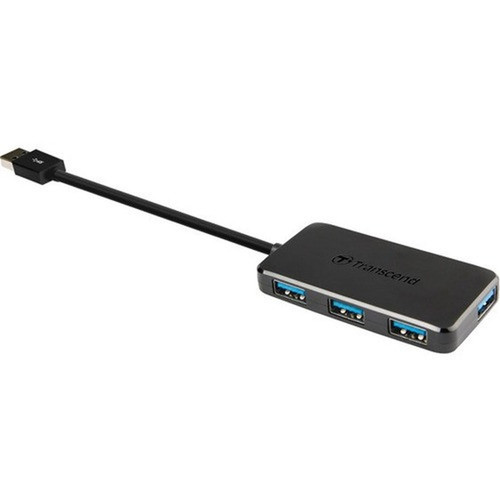
The Transcend HUB2 addresses common connectivity limitations with a solution that balances performance, simplicity, and physical design. Its four dedicated USB 3.0 ports provide immediate expansion for systems with limited built-in USB connectivity.
These strengths make the product easier to deploy and manage in real environments, especially where reliability, usability, and day-to-day operational continuity matter. Notable benefits include Driver-Free Operation, Compact Physical Design.
Driver-Free Operation
The hub installs automatically on supported operating systems without requiring additional driver downloads or configuration, reducing setup time and technical support requirements.
- Automatic detection
- No software installation
- Immediate readiness
Compact Physical Design
With dimensions of 2.91" wide × 1.46" deep × 0.41" high, the hub occupies minimal desk space while providing substantial connectivity expansion.
- Space-efficient footprint
- Lightweight construction
- Stable placement
Deployment / Use Cases
The Transcend HUB2 serves effectively in environments where additional USB connectivity is needed without complex installation or configuration. Its broad platform compatibility makes it suitable for mixed-OS environments where standardized peripherals must connect to different system types.
Common deployment scenarios include office workstations needing connections for keyboard, mouse, printer, and external storage simultaneously; educational computer labs requiring additional peripheral ports; and home offices where multiple devices share limited built-in USB connectivity. The hub's external form factor allows easy repositioning as connectivity needs change.
Relevant factors for this section include Host Interface, Total Number of USB Ports, Number of USB 3.0 Ports. When those points are considered together, they give buyers a clearer picture of how the product is equipped, how it fits into deployment, and what kind of day-to-day role it is meant to support.
Physical Profile
The hub features a matte black finish that resists fingerprints and blends with most computing equipment. Its compact rectangular design measures 2.91" (73.80 mm) wide, 1.46" (37.20 mm) deep, and 0.41" (10.40 mm) high, with a weight of just 1.02 ounces (29 grams). This lightweight construction allows placement directly on desks, mounted behind monitors, or secured with adhesive options without adding significant bulk.
- Width
- 2.91" (73.80 mm)
- Depth
- 1.46" (37.20 mm)
- Height
- 0.41" (10.40 mm)
- Weight
- 1.02 oz (29 g)
Highlights
- Adds four USB 3.0 ports to any system with USB connectivity
- Plug-and-play operation requires no driver installation
- Compact external design with black finish
- Supports data transfer speeds up to 5 Gbps
- Compatible with PC, Mac, and Linux systems
- Bus-powered operation eliminates need for external adapter
- Lightweight construction at just 1.02 ounces
- Backward compatible with USB 2.0 and 1.1 devices
Specifications
| Specifications | |
|---|---|
| Manufacturer | Transcend Information, Inc |
| Manufacturer Part Number | TS-HUB2K |
| Brand Name | Transcend |
| Product Model | HUB2 |
| Product Name | HUB2 4-port USB Hub |
| Product Type | USB Hub |
| Technical Information | |
| Host Interface | USB |
| Interfaces/Ports | |
| Total Number of USB Ports | 4 |
| Number of USB 3.0 Ports | 4 |
| Physical Characteristics | |
| Product Color | Black |
| Form Factor | External |
| Height | 0.41" (10.40 mm) |
| Width | 2.91" (73.80 mm) |
| Depth | 1.46" (37.20 mm) |
| Weight (Approximate) | 1.02 oz (29 g) |
| Miscellaneous | |
| Platform Supported | PC,Mac,Linux |
| Country of Origin | Taiwan |
FAQ
What types of devices can I connect to this USB hub?
You can connect any standard USB peripheral including keyboards, mice, printers, external storage drives, flash drives, webcams, and audio interfaces. The hub supports both USB 3.0 devices for optimal speed and backward-compatible USB 2.0/1.1 devices. All four ports provide full functionality for data transfer and peripheral operation.
Does this hub require external power or special drivers?
No external power adapter is required—the hub draws power directly from your computer's USB port (bus-powered). It also operates without special drivers on supported operating systems, installing automatically when connected to PC, Mac, or Linux systems. This plug-and-play functionality makes deployment straightforward.
What is the actual data transfer speed I can expect?
When connected to a USB 3.0 host port, each port supports data transfer speeds up to 5 gigabits per second (Gbps). Actual throughput depends on your connected devices and host system capabilities. The hub maintains USB 3.0 specifications while providing backward compatibility with slower USB 2.0 and 1.1 devices at their respective maximum speeds.
Can I use this hub with both Windows and Mac computers?
Yes, the Transcend HUB2 supports PC (Windows), Mac (macOS), and Linux systems without requiring different configurations or drivers. Its platform-agnostic design makes it suitable for environments with mixed operating systems. Simply connect the hub to any compatible USB port on your computer—it will be recognized and ready for use immediately.
How does the compact size affect placement options?
The hub's dimensions of 2.91" × 1.46" × 0.41" and weight of 1.02 ounces allow flexible placement on desks, mounted behind monitors with adhesive strips, or positioned in cable management areas. Its lightweight construction prevents it from sliding while the low profile minimizes visual clutter in workspace setups.
What happens if I connect multiple high-power devices simultaneously?
As a bus-powered hub, total available power is limited by what your computer's USB port can provide. For optimal operation with multiple power-hungry devices like external hard drives, consider connecting the hub to a powered USB port or using a self-powered external hard drive. The hub distributes available power across all connected devices according to USB specifications.
| Qty | Price | Available |
|---|