








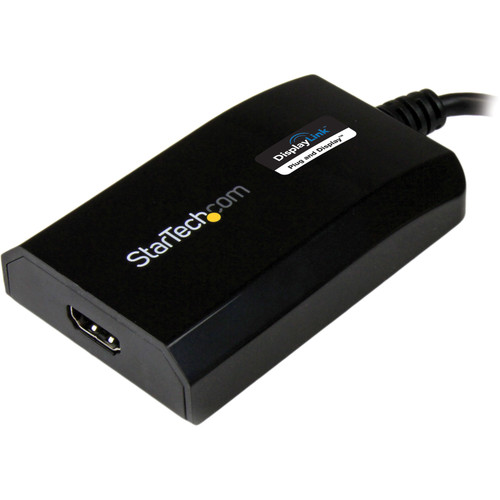

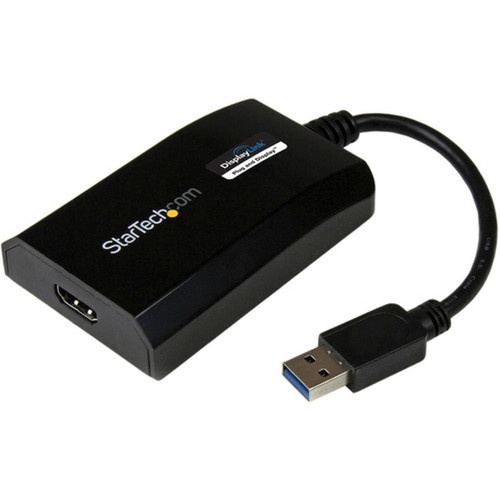
StarTech. com USB32HDPRO USB 3. 0 to HDMI Adapter - DisplayLink Certified - 1920 x 1200 - External Graphics Card for Dual Monitor Setup

Business volume discounts
Technical guidance
Preparation & staging
QC · ON · AB · BC
Product Features
Technical Overview
This video adapter leverages USB 3.0 (USB 3.1 Gen 1) bandwidth to transmit high-definition video and audio signals to an HDMI display. It supports extended desktop mode, allowing your primary screen and the connected HDMI display to operate independently, effectively doubling your screen real estate. The adapter is HDCP 1.4 compliant, enabling playback of protected digital content from streaming services and Blu-ray sources.
Driver installation is streamlined for user convenience. Windows and ChromeOS systems typically auto-detect and install the necessary drivers, while macOS and Ubuntu require a one-time manual driver download from StarTech.com's support site. The adapter's compact, black housing measures minimally and weighs just 2.20 oz (62.37 g), making it highly portable for mobile professionals.
This section brings together practical product details such as Connector Type on First End, Connector on First End Details, Connector Type on Second End, Color Family, so buyers can judge configuration, deployment fit, and day-to-day suitability with less guesswork.
Key Product Advantages
The USB32HDPRO stands out by solving common connectivity gaps in modern computing environments. Its DisplayLink certification guarantees tested interoperability with thousands of devices, reducing compatibility headaches for IT departments and end-users alike.
Multi-Platform Support
Works seamlessly with Windows, macOS, ChromeOS, and Ubuntu operating systems, providing a universal solution for mixed-IT environments.
- Auto-driver install on Windows/ChromeOS
- Manual driver available for macOS/Ubuntu
- Consistent performance across platforms
Productivity Expansion
Easily add a secondary display to create an extended desktop, improving multitasking efficiency for data analysis, coding, design work, or financial modeling.
- Extend desktop to HDMI display
- Use with laptop's built-in screen
- Support for multiple adapters per system
Professional Reliability
Backed by StarTech.com's 30+ years of IT hardware expertise, this adapter includes a 2-year warranty and free 24/5 multi-lingual technical support based in North America.
- 2-year manufacturer warranty
- Enterprise-grade durability
- Direct access to technical support
Deployment / Use Cases
This adapter is ideal for environments where display connectivity needs to be flexible and hardware-agnostic. Corporate offices can standardize on these adapters to support employees with various laptop models, ensuring everyone can connect to conference room displays or docking stations.
Educational institutions benefit from the adapter's cross-platform compatibility, allowing students and faculty to present from Windows laptops, MacBooks, or Chromebooks to classroom projectors. Home office users can create dual-monitor setups without requiring specialized ports on their computers, enhancing productivity for remote work.
Business Presentations
Connect any USB-A laptop to HDMI-equipped projectors or large displays in meeting rooms, training centers, or auditoriums for seamless presentations.
Workspace Expansion
Add a second monitor to laptops with limited video outputs, creating extended desktops for financial analysts, software developers, content creators, and administrative staff.
Physical Profile
The adapter features a durable black plastic housing that matches most professional computing accessories. Its compact form factor and lightweight design make it easy to carry in a laptop bag or briefcase. The integrated 6.3-inch cable provides enough length for flexible positioning while minimizing desk clutter.
The physical profile is practical for deployment planning because the dimensions and weight are clearly defined: 2.20 oz (62.37 g). This helps confirm rack, shelf, desk, or cabinet fit before installation.
- Weight
- 2.20 oz (62.37 g)
What's in the Box
The package includes everything needed for immediate setup and use.
Highlights
- DisplayLink certified for guaranteed compatibility with USB-A laptops, desktops, and Ultrabooks
- Supports 1920x1200 resolution (1080p) with 5.1 channel audio pass-through via HDMI
- USB bus-powered design requires no external power supply or adapter
- Works with Windows, macOS, ChromeOS, and Ubuntu operating systems
- Enables extended desktop mode for dual-monitor productivity setups
- Compact, portable design with integrated 6.3-inch cable
- HDCP 1.4 compliant for protected content playback
- Backed by StarTech.com's 2-year warranty and 24/5 technical support
- USB 3.1 and USB 3.0 compatible for broad device support
- Environmentally compliant with EU RoHS, REACH, and WEEE directives
Specifications
| Specifications | |
|---|---|
| Manufacturer | StarTech.com |
| Manufacturer Part Number | USB32HDPRO |
| Brand Name | StarTech.com |
| Product Name | USB 3.0 to HDMI Adapter |
| Packaged Quantity | 1 Each |
| Product Type | Video Adapter |
| Technical Information | |
| Connector Type on First End | USB 3.0 Type A - Male |
| Connector on First End Details | 1 x 9-pin USB 3.0 Type A - Male |
| Connector Type on Second End | HDMI Digital Audio/Video - Female |
| Connector on Second End Details | 1 x 19-pin HDMI Digital Audio/Video - Female |
| Physical Characteristics | |
| Color Family | Black |
| Product Color | Black |
| Weight (Approximate) | 2.20 oz (62.37 g) |
| Miscellaneous | |
| Package Contents | USB 3.0 to HDMI Adapter 1 x Software installation disc 1 x Instruction Manual |
| Country of Origin | China |
| Environmentally Friendly | Yes |
| Environmental Certification | EU RoHS |
| Environmental Compliance | Restriction of Hazardous Substances (RoHS) 2,Registration, Evaluation, Authorization and Restriction of Chemicals (REACH),Waste Electrical and Electronic Equipment Directive (WEEE) |
| Warranty | |
| Limited Warranty | 2 Year |
User Manual
FAQ
Is this adapter compatible with Mac computers?
Yes, this adapter is fully compatible with macOS systems. While Windows and ChromeOS typically auto-install drivers, macOS requires a one-time manual driver download from StarTech.com's support website. Once installed, the adapter works seamlessly with MacBooks, iMacs, and other Apple computers featuring USB Type-A ports.
Does this adapter require external power?
No, the adapter is USB bus-powered, meaning it draws all necessary power directly from your computer's USB port. This eliminates the need for an external power supply or wall adapter, making setup simpler and more portable. The design works reliably with USB 3.0 and USB 3.1 ports that provide adequate power delivery.
Can I use multiple adapters to connect several monitors?
Yes, you can use multiple USB32HDPRO adapters to connect several HDMI displays, provided your computer has available USB Type-A ports. Each adapter creates an independent display output, allowing you to extend your desktop across multiple screens. Performance may depend on your computer's USB bandwidth and processing capabilities when driving multiple high-resolution displays simultaneously.
What is DisplayLink certification and why does it matter?
DisplayLink certification means this adapter has undergone rigorous testing with DisplayLink's video compression technology to ensure reliable performance and broad compatibility. Certified adapters work with thousands of devices across different manufacturers, reducing driver conflicts and connectivity issues. This certification provides assurance that the adapter will perform consistently in professional IT environments.
What refresh rate or brightness details are available?
Display-oriented products are best judged through screen, connectivity, and installation specifications. Those facts help buyers confirm visual fit, mounting flexibility, and deployment suitability more clearly than generic summary text.
What input or connectivity options are listed?
1 x 9-pin USB 3.0 Type A - Male.
Does the display support VESA mounting or adjustment features?
Display-oriented products are best judged through screen, connectivity, and installation specifications. Those facts help buyers confirm visual fit, mounting flexibility, and deployment suitability more clearly than generic summary text.
What panel or display technology is mentioned?
Display-oriented products are best judged through screen, connectivity, and installation specifications. Those facts help buyers confirm visual fit, mounting flexibility, and deployment suitability more clearly than generic summary text.
| Qty | Price | Available |
|---|


