



Shipping included*
Exclusions
Additional shipping fees may apply in rare circumstances for deliveries outside standard service areas. In most cases, this only potentially affects shipments to the Northwest Territories and Yukon, as well as certain heavy or oversized items.
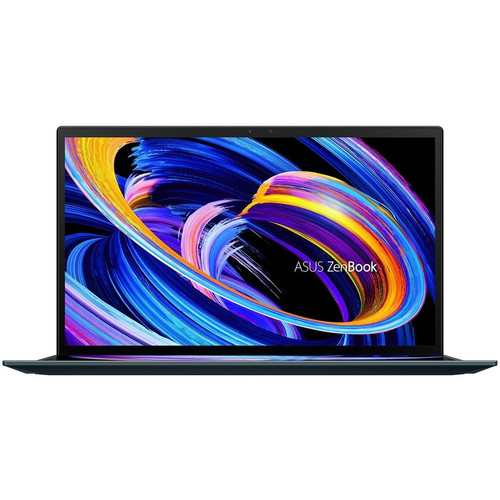
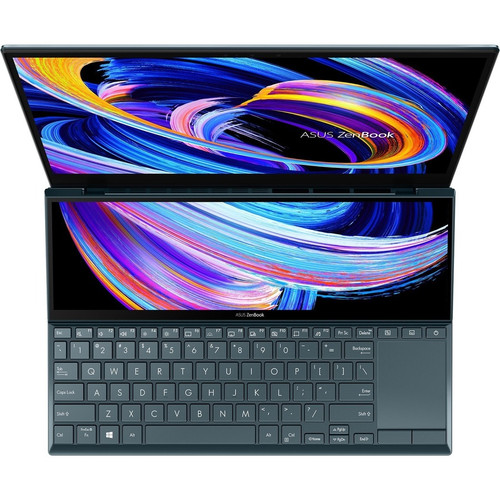
Asus UX482EA-DH79T-CA ZenBook Duo 14 Notebook - 14" FHD Dual Touchscreen - Intel Core i7-1165G7 - 16GB RAM - 512GB SSD - Windows 11 Home - Celestial

Business volume discounts
Technical guidance
Preparation & staging
QC · ON · AB · BC
Product Features
Technical Overview
At the core of the ZenBook Duo 14 UX482EA-DH79T-CA is the Intel Core i7-1165G7 processor, a quad-core CPU with a base speed of 2.80 GHz that can turbo up to 4.70 GHz. This 11th Gen processor integrates Intel Iris Xe Graphics and is part of the Intel Evo platform, ensuring responsive performance, instant wake, and long battery life in thin-and-light designs.
The memory configuration features 16 GB of LPDDR4X RAM soldered directly to the motherboard, providing efficient power consumption while delivering the bandwidth needed for demanding applications. Storage is handled by a 512 GB NVMe M.2 PCI Express solid-state drive, offering rapid boot times, quick application launches, and fast file transfers.
This section brings together practical product details such as Processor Manufacturer, Processor Type, Processor Generation, Chipset Manufacturer, so buyers can judge configuration, deployment fit, and day-to-day suitability with less guesswork.
Key Product Advantages
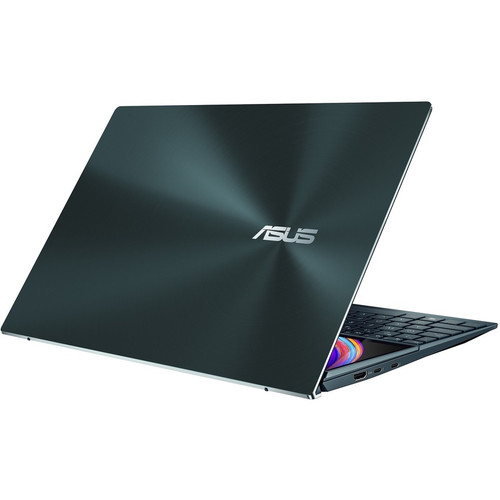
The ZenBook Duo 14's defining feature is its dual-screen architecture, which provides tangible productivity benefits for creative professionals, developers, and multitaskers. The secondary 12.65-inch ScreenPad Plus display isn't just an extension—it's an interactive workspace that can host application windows, tool palettes, or reference materials while keeping the main display focused on primary tasks.
Enhanced Multitasking
Run applications across both touchscreens simultaneously, with the secondary display supporting drag-and-drop functionality between screens for efficient workflow management.
- Dedicated space for toolbars and palettes
- Quick access to frequently used applications
- Screen extension without external monitors
Premium Visual Experience
Both displays feature IPS technology with wide viewing angles, while the main screen incorporates NanoEdge bezels and Tru2Life video enhancement for vibrant, accurate colors.
- Anti-glare coating reduces reflections
- Touch interaction on both displays
- Full HD resolution on primary screen
Deployment / Use Cases
The ZenBook Duo 14 UX482EA-DH79T-CA excels in scenarios where screen real estate directly impacts productivity but portability remains essential. Content creators can use the secondary display for timeline controls while editing video on the main screen, or keep reference images visible while working in design applications.
For business professionals, the dual-screen setup enables simultaneous viewing of presentations, spreadsheets, and communication tools. Developers benefit from keeping documentation or terminal windows on the secondary display while coding on the primary screen. The 17-hour battery life and compact dimensions make this configuration viable for all-day use in offices, client sites, or while traveling.
Creative Workflows
Video editors can place playback controls and effects panels on the secondary screen while maintaining full-screen preview on the primary display.
Mobile Productivity Suite
Business users can reference emails and calendars on the secondary display while preparing documents or presentations on the main screen during meetings or travel.
Localization and Operating System
This ZenBook Duo 14 comes with Windows 11 Home pre-installed, providing the latest Microsoft operating system with enhanced multitasking features, security improvements, and a refreshed interface. The keyboard includes backlighting for low-light environments and follows standard North American keyboard layouts suitable for English and French language input.
Windows 11's Snap Layouts and Snap Groups features complement the dual-screen hardware, making it easier to organize applications across both displays. The system also includes Cortana voice assistant capabilities and meets Energy Star requirements for energy efficiency.
This section brings together practical product details such as Processor Manufacturer, Processor Type, Processor Generation, Chipset Manufacturer, so buyers can judge configuration, deployment fit, and day-to-day suitability with less guesswork.
Physical Profile
Despite housing two displays, the ZenBook Duo 14 maintains a remarkably slim profile at just 0.68 inches (17.30 mm) thick. The Celestial Blue finish presents a professional aesthetic while the dimensions of 12.76 inches wide by 8.74 inches deep (324 x 222 mm) ensure the notebook remains highly portable. Weighing approximately 3.5 pounds (1.6 kg), it balances screen space with mobility for daily commuting or business travel.
- Width
- 12.76" (324 mm)
- Depth
- 8.74" (222 mm)
- Height
- 0.68" (17.30 mm)
What's in the Box
The package includes everything needed to begin using the ZenBook Duo 14 immediately upon unboxing.
Highlights
- Dual-screen design with 14" FHD main display and 12.65" secondary touchscreen
- Intel Core i7-1165G7 processor (11th Gen, Quad-core, up to 4.70 GHz Turbo)
- 16 GB LPDDR4X RAM and 512 GB NVMe PCIe SSD
- Intel Evo platform certified for premium laptop experience
- Windows 11 Home operating system pre-installed
- Up to 17 hours of battery life with 4-cell battery
- Thunderbolt 4 and USB 3.2 Gen 1 Type-A ports
- Wi-Fi 6 (802.11ax) and Bluetooth connectivity
- Celestial Blue color with slim 0.68" profile
- Keyboard backlight and anti-glare screen coating
Specifications
| Specifications | |
|---|---|
| Manufacturer | ASUS Computer International |
| Manufacturer Part Number | UX482EA-DH79T-CA |
| Brand Name | Asus |
| Product Line | ZenBook Duo 14 |
| Product Series | UX482 |
| Product Model | UX482EA-DH79T-CA |
| Product Name | ZenBook Duo 14 UX482EA-DH79T-CA Notebook |
| Product Type | Notebook |
| Processor | |
| Processor Manufacturer | Intel |
| Processor Type | Core i7 |
| Processor Generation | 11th Gen |
| Processor Model | i7-1165G7 |
| Processor Speed | 2.80 GHz |
| Maximum Turbo Speed | 4.70 GHz |
| Processor Core | Quad-core (4 Core) |
| Intel Evo Platform | Yes |
| Chipset | |
| Chipset Manufacturer | Intel |
| Memory | |
| Total Installed System Memory | 16 GB |
| Maximum Supported System Memory | 16 GB |
| On-board Memory | 16 GB |
| On-board Memory Technology | LPDDR4X |
| Intel Optane Memory Ready | Yes |
| Storage | |
| Drive Type | SSD |
| Total Solid State Drive Capacity | 512 GB |
| SSD Form Factor | NVMe M.2 PCI Express |
| Display & Graphics | |
| Screen Size | 14" |
| Screen Mode | Full HD |
| Display Screen Technology | NanoEdge,Tru2Life,In-plane Switching (IPS) Technology |
| Screen Resolution | 1920 x 1080 |
| Touchscreen | Yes |
| Dual Screen | Yes |
| Secondary Screen Size | 12.65" (321.31 mm) |
| Secondary Touchscreen | Yes |
| Secondary Display Resolution | 1920 x 515 |
| Graphics Controller Manufacturer | Intel |
| Graphics Controller Model | Iris Xe Graphics |
| Graphics Memory Technology | LPDDR4X |
| Graphics Memory Accessibility | Shared |
| Network & Communication | |
| Wireless LAN | Yes |
| Wireless LAN Standard | IEEE 802.11ax |
| Bluetooth | Yes |
| Interfaces/Ports | |
| HDMI | Yes |
| Total Number of USB Ports | 1 |
| Number of USB 3.2 Gen 1 Type-A Ports | 1 |
| Number of Thunderbolt 4 Ports | 2 |
| Operating System | |
| Operating System Platform | Windows |
| Operating System | Windows 11 Home |
| Input Devices | |
| Keyboard Backlight | Yes |
| Battery Information | |
| Number of Cells | 4-cell |
| Maximum Battery Run Time | 17 Hours |
| Power Description | |
| Maximum Power Supply Wattage | 65 W |
| Physical Characteristics | |
| Color Family | Blue |
| Product Color | Celestial Blue |
| Height | 0.68" (17.30 mm) |
| Width | 12.76" (324 mm) |
| Depth | 8.74" (222 mm) |
| Miscellaneous | |
| Package Contents | ZenBook Duo 14 UX482EA-DH79T-CA Notebook Lithium Ion Battery AC Adapter |
| Energy Star | Yes |
| Features | Cortana,Anti-glare Screen |
| Environmentally Friendly | Yes |
| Environmental Compliance | Restriction of Hazardous Substances (RoHS) |
User Manual
FAQ
What makes the dual-screen design of the ZenBook Duo 14 useful for productivity?
The dual-screen configuration provides expanded workspace without requiring external monitors. The 12.65-inch secondary touchscreen (ScreenPad Plus) can host application windows, tool palettes, or reference materials while the 14-inch primary display focuses on main tasks. This enables efficient multitasking for creative work, coding, data analysis, and business applications, with both screens supporting touch interaction for intuitive control.
How does the Intel Evo platform certification benefit this notebook?
Intel Evo platform certification ensures the ZenBook Duo 14 meets strict standards for responsiveness, instant wake from sleep, long battery life, fast charging, and consistent performance in a thin-and-light form factor. This certification guarantees the system delivers premium experiences including quick application launches, reliable connectivity with Wi-Fi 6 and Thunderbolt 4, and all-day battery life that supports mobile productivity.
What are the specifications of the secondary display on this ZenBook Duo?
The secondary display measures 12.65 inches diagonally (321.31 mm) with a resolution of 1920 x 515 pixels. It features touchscreen capability and integrates seamlessly with the main display through Asus's ScreenPad Plus software. This secondary screen supports application windows, quick controls, handwriting input, and can function as an extended display or for specialized tools depending on the software being used.
Can the memory and storage be upgraded in this ZenBook Duo 14 model?
The memory is 16 GB of LPDDR4X RAM that is soldered to the motherboard, so it cannot be upgraded after purchase. The storage consists of a 512 GB NVMe M.2 PCI Express solid-state drive. While some M.2 slots allow drive replacement, the specific configuration and accessibility would require checking with Asus documentation or service guidelines, as ultra-thin designs often have limited upgrade options.
What connectivity options are available on the ZenBook Duo 14 UX482EA-DH79T-CA?
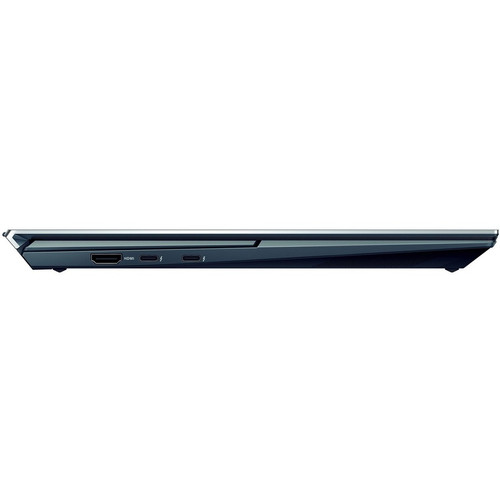
The notebook includes two Thunderbolt 4 ports that support charging, data transfer, and video output; one USB 3.2 Gen 1 Type-A port for legacy devices; an HDMI port for external displays; and a 3.5mm audio jack. Wireless connectivity features Wi-Fi 6 (802.11ax) for fast network performance and Bluetooth for peripheral connections. The Thunderbolt 4 ports provide 40 Gbps bandwidth for high-speed storage and docking stations.
How does the battery performance support all-day usage with dual screens?
The 4-cell lithium-ion battery provides up to 17 hours of runtime on a single charge under typical usage conditions, even with both displays active. This extended battery life, combined with the 65-watt AC adapter for quick recharging, ensures the ZenBook Duo 14 can support full workdays without requiring frequent access to power outlets. The Intel Evo platform optimization contributes to power efficiency while maintaining performance.
What processor is listed for this laptop?
This product uses the Core i7 processor for everyday performance and multitasking.
What processor speed is listed?
This product uses the 2.80 GHz processor for everyday performance and multitasking.
| Qty | Price | Available |
|---|