










Shipping included*
Exclusions
Additional shipping fees may apply in rare circumstances for deliveries outside standard service areas. In most cases, this only potentially affects shipments to the Northwest Territories and Yukon, as well as certain heavy or oversized items.
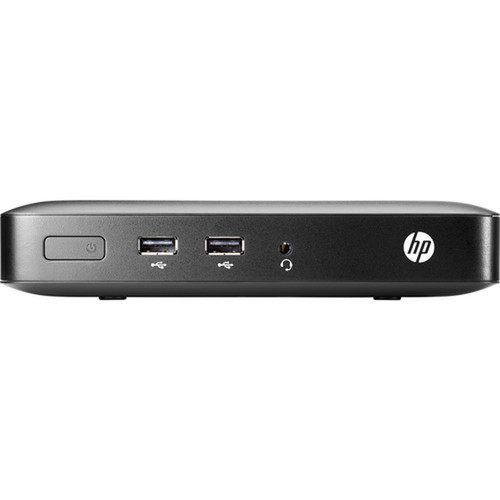
HP V2V52UA#ABC t420 Thin Client - G-Series Dual-core 1 GHz - 2 GB DDR3L RAM - 8 GB Flash - Gigabit Ethernet - ThinPro OS - VGA/DVI - 4x USB 2. 0

Business volume discounts
Technical guidance
Preparation & staging
QC · ON · AB · BC
Product Features
Technical Overview
The t420 is powered by a 1 GHz G-Series dual-core processor, providing adequate compute performance for typical thin-client tasks like running remote desktop sessions, web applications, and lightweight local software. The system uses shared graphics memory, which efficiently handles display output without a dedicated GPU, reducing complexity and cost.
Network connectivity is handled by a Gigabit Ethernet port, ensuring fast and stable connections to servers or cloud resources. The device includes both VGA and DVI video outputs for flexible monitor support, along with four USB 2.0 ports for peripherals such as keyboards, mice, printers, or security dongles.
Relevant factors for this section include Processor Type, Processor Core, Processor Speed, Standard Memory. When those points are considered together, they give buyers a clearer picture of how the product is equipped, how it fits into deployment, and what kind of day-to-day role it is meant to support.
Key Product Advantages
This thin client emphasizes security, manageability, and deployment flexibility. HP ThinPro OS is designed with enhanced security features and easy maintenance tools, allowing IT teams to quickly configure, update, and monitor devices across the network. The compact physical design and low power draw make it suitable for environments where space and energy efficiency are concerns.
Enhanced Security & Management
HP ThinPro includes tools for centralized management, secure boot, and easy OS updates, reducing administrative overhead and vulnerability risks.
- Centralized configuration
- Secure boot process
- Remote update capabilities
Energy & Environmental Efficiency
With Energy Star certification and a 45 W power supply, the t420 operates efficiently, lowering electricity costs and supporting green IT initiatives.
- Energy Star certified
- Low 45 W power draw
- Environmentally friendly design
Deployment / Use Cases
The HP t420 is ideal for organizations deploying virtual desktop infrastructure (VDI), cloud-based applications, or terminal services. Its reliability and simple setup make it a practical choice for high-density environments like call centers, classrooms, or hospital workstations, where multiple units need to operate consistently with minimal local maintenance.
In retail or point-of-sale scenarios, the t420 can run POS software via a remote session while connecting to peripherals like barcode scanners and receipt printers through its USB ports. For general office use, it provides a cost-effective way to access Windows desktops, productivity suites, and line-of-business applications from a centralized server.
Virtual Desktop Infrastructure (VDI)
Use as a lightweight endpoint for accessing virtual desktops from VMware, Citrix, or Microsoft RDS environments, ensuring consistent user experience with centralized management.
Educational & Training Labs
Deploy in computer labs or training rooms where students need access to standardized software images, with easy reimaging and low total cost of ownership.
Localization and Operating System
The HP t420 Thin Client ships with HP ThinPro, a Linux-based operating system specifically engineered for thin-client environments. ThinPro is designed to deliver a secure, stable, and manageable endpoint experience, with built-in tools for centralized configuration, secure boot, and remote updates that simplify IT administration across large deployments.
This operating system supports multiple language and keyboard layouts, allowing for flexible deployment in diverse geographic regions or multilingual workplaces. The t420 can be configured to match local input preferences and display languages, ensuring user comfort and productivity without requiring complex localization adjustments after setup.
HP ThinPro's lightweight architecture minimizes resource consumption, enabling the t420 to perform reliably with its 2 GB of memory and 8 GB of flash storage. The OS integrates seamlessly with major virtual desktop infrastructure (VDI) platforms like VMware Horizon, Citrix Virtual Apps and Desktops, and Microsoft Remote Desktop Services, providing a consistent interface for accessing centralized applications and desktops.
Physical Profile
The t420 measures 7.09" wide by 5.51" deep by 1.38" high (180 x 140 x 35 mm) and weighs approximately 1.63 lb (740 g). This compact, lightweight design allows for flexible placement—on a desk, mounted behind a monitor, or in tight spaces—without sacrificing connectivity options. The small footprint and low profile support clutter-free workspaces and efficient thermal management.
The physical profile is practical for deployment planning because the dimensions and weight are clearly defined: 1.38" (35 mm), 7.09" (180 mm), 5.51" (140 mm), 1.63 lb (740 g). This helps confirm rack, shelf, desk, or cabinet fit before installation.
- Width
- 7.09" (180 mm)
- Depth
- 5.51" (140 mm)
- Height
- 1.38" (35 mm)
- Weight
- 1.63 lb (740 g)
What's in the Box
The package includes the HP t420 Thin Client unit along with a keyboard and mouse, providing everything needed for basic setup out of the box.
Highlights
- G-Series dual-core 1 GHz processor for reliable thin-client performance
- 2 GB DDR3L SDRAM memory supports multitasking in remote sessions
- 8 GB flash storage for local caching and OS operations
- Gigabit Ethernet port ensures fast, stable network connectivity
- HP ThinPro OS with enhanced security and easy maintenance tools
- VGA and DVI video outputs for flexible monitor compatibility
- Four USB 2.0 ports for keyboards, mice, and other peripherals
- Compact design (7.09" x 5.51" x 1.38") ideal for space-constrained deployments
- Energy Star certified with a 45 W power supply for efficiency
- 3-year limited warranty for added peace of mind
Specifications
| Specifications | |
|---|---|
| Manufacturer | HP Inc. |
| Manufacturer Part Number | V2V52UA#ABC |
| Brand Name | HP |
| Product Series | t420 |
| Product Name | t420 Thin Client |
| Product Type | Thin Client |
| Processor | |
| Processor Type | G-Series |
| Processor Core | Dual-core (2 Core) |
| Processor Speed | 1 GHz |
| Memory | |
| Standard Memory | 2 GB |
| Memory Technology | DDR3L SDRAM |
| Flash Memory | 8 GB |
| Display & Graphics | |
| Graphics Memory Accessibility | Shared |
| Network & Communication | |
| Ethernet Technology | Gigabit Ethernet |
| Interfaces/Ports | |
| DVI | Yes |
| Total Number of USB Ports | 4 |
| Number of USB 2.0 Ports | 4 |
| Network (RJ-45) | Yes |
| VGA | Yes |
| Operating System | |
| Operating System | HP ThinPro |
| Power Description | |
| Maximum Power Supply Wattage | 45 W |
| Physical Characteristics | |
| Height | 1.38" (35 mm) |
| Width | 7.09" (180 mm) |
| Depth | 5.51" (140 mm) |
| Weight (Approximate) | 1.63 lb (740 g) |
| Miscellaneous | |
| Package Contents | t420 Thin Client Keyboard Mouse |
| Energy Star | Yes |
| Environmentally Friendly | Yes |
| Warranty | |
| Limited Warranty | 3 Year |
User Manual
FAQ
What processor does this product use?
This product uses the Dual-core (2 Core) processor for everyday performance and multitasking.
How much memory is installed?
It includes 2 GB of memory to support responsive multitasking and daily workloads.
What storage is included?
Storage details for HP t420 Thin Client G-Series Dual-core (2 Core) 1 GHz - 2 GB RAM DDR3L SDRAM - 8 GB Flash - Gigabit Ethernet - HP ThinPro - VGA - - 4 (V2V52UA#ABC) are intended to support operating system files, applications, and day-to-day business data while keeping the platform aligned with practical deployment expectations.
What graphics or display support is listed?
It features a display specification of Shared, giving you clear visuals for work and media use.
What connectivity options are available?
Connectivity options include Gigabit Ethernet, helping the product integrate into common office or home setups.
What operating system or platform is included?
The included operating environment is HP ThinPro, which helps position the product for software compatibility, deployment planning, and day-to-day business use.
| Qty | Price | Available |
|---|


