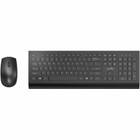
Rocstor Y10P037-B1 Premium Combo Wireless Keyboard & Mouse - RF 2.40 GHz - 1200 DPI - Black

Business volume discounts
Technical guidance
Preparation & staging
QC · ON · AB · BC
Product Features
Technical Overview
This Rocstor Premium Combo utilizes RF wireless technology operating at 2.40 GHz for stable connectivity without the line-of-sight limitations of infrared. The keyboard provides standard layout functionality, while the optical mouse offers 1200 DPI resolution for precise cursor control across various surfaces.
Both components share the same wireless protocol, allowing them to work simultaneously from a single USB receiver. The RF design provides reliable performance through typical office obstacles and at distances suitable for desktop use.
Relevant factors for this section include Keyboard/Keypad Type, Keyboard/Keypad Connectivity Technology, Keyboard/Keypad Wireless Technology, Pointing Device Type. When those points are considered together, they give buyers a clearer picture of how the product is equipped, how it fits into deployment, and what kind of day-to-day role it is meant to support.
A strong technical summary explains how the product's interfaces, hardware profile, and operating characteristics work together in real deployment. Buyers often need this context to confirm compatibility with existing devices, expected performance in daily use, and whether installation will be straightforward for IT staff or end users.
Key Product Advantages
The Rocstor Premium Combo offers practical advantages for users seeking a clean, wireless desktop setup. The coordinated black finish presents a professional appearance, while the 1200 DPI mouse provides sufficient precision for everyday computing tasks.
These strengths make the product easier to deploy and manage in real environments, especially where reliability, usability, and day-to-day operational continuity matter. Notable benefits include Unified Wireless Solution, Reliable RF Connectivity.
Unified Wireless Solution
A single receiver operates both keyboard and mouse, minimizing USB port usage and simplifying setup compared to separate wireless peripherals.
- Reduced cable clutter
- Simplified device management
- Single USB receiver
Reliable RF Connectivity
2.40 GHz RF technology provides stable performance without line-of-sight requirements, maintaining connection through typical office environments.
- Stable through obstacles
- No infrared limitations
- Consistent desktop range
Deployment / Use Cases
This wireless keyboard and mouse combo is ideal for general office workstations, home office setups, and educational environments where cable management and simplicity are priorities. The plug-and-play functionality makes it suitable for users who prefer minimal setup time and straightforward operation.
The combination works well for productivity applications, web browsing, email, and general computing tasks. The RF connectivity ensures reliable performance in typical office layouts with computers, workstations, and shared computing environments that benefit from reduced cable clutter.
Office Workstations
Provides clean cable-free operation for corporate desktops, reception areas, and shared workstations where multiple users appreciate simplified peripherals.
Home Office Environments
Offers an affordable wireless solution for remote workers and home users seeking reliable input devices without complex setup requirements.
Highlights
- Complete wireless keyboard and mouse combo
- RF 2.40 GHz wireless technology for stable connectivity
- 1200 DPI optical mouse resolution
- Single USB receiver operates both devices
- Black color for professional appearance
- Plug-and-play setup with no drivers required
- Eliminates cable clutter on desktop
- Suitable for office and home computing environments
Specifications
| Specifications | |
|---|---|
| Manufacturer | Rocstor |
| Manufacturer Part Number | Y10P037-B1 |
| Brand Name | Rocstor |
| Product Line | Premium Combo |
| Product Name | Premium Combo Keyboard & Mouse |
| Product Type | Keyboard & Mouse |
| Keyboard/Keypad | |
| Keyboard/Keypad Type | Keyboard |
| Keyboard/Keypad Connectivity Technology | Wireless |
| Keyboard/Keypad Wireless Technology | RF |
| Keyboard/Keypad Wireless Operating Frequency | 2.40 GHz |
| Pointing Device | |
| Pointing Device Type | Mouse |
| Pointing Device Connectivity Technology | Wireless |
| Pointing Device Wireless Technology | RF |
| Movement Resolution (dpi) | 1200 |
| Physical Characteristics | |
| Keyboard/Keypad Color | Black |
| Pointing Device Color | Black |
User Manual
FAQ
What wireless technology does this keyboard and mouse combo use?
The Rocstor Y10P037-B1 Premium Combo uses RF (Radio Frequency) wireless technology operating at 2.40 GHz. This provides stable connectivity without line-of-sight limitations, allowing reliable performance through typical office obstacles and at standard desktop distances.
What is the DPI resolution of the included mouse?
The optical mouse in this combo features 1200 DPI (dots per inch) resolution. This provides precise cursor control suitable for everyday computing tasks, web browsing, and productivity applications across various desktop surfaces.
Do I need separate receivers for the keyboard and mouse?
No, both the keyboard and mouse operate from a single USB receiver. This unified wireless design simplifies setup, reduces USB port usage, and ensures both devices work simultaneously without requiring additional hardware or configuration.
What color are the keyboard and mouse?
Both the keyboard and mouse feature a black finish. This coordinated color scheme presents a professional appearance suitable for office environments and matches most desktop setups and computer hardware aesthetics.
Is this combo suitable for gaming applications?
This Rocstor Premium Combo is designed for general productivity and everyday computing rather than gaming. While the 1200 DPI mouse provides adequate precision for basic tasks, gaming typically requires higher DPI mice and keyboards with specialized features not included in this productivity-focused bundle.
What type of batteries does this wireless combo require?
The product specifications indicate wireless RF operation but do not specify battery requirements. Wireless keyboards and mice typically use standard AA or AAA batteries, but for exact battery specifications, please consult the product manual available through the documentation link provided.
| Qty | Price | Available |
|---|