








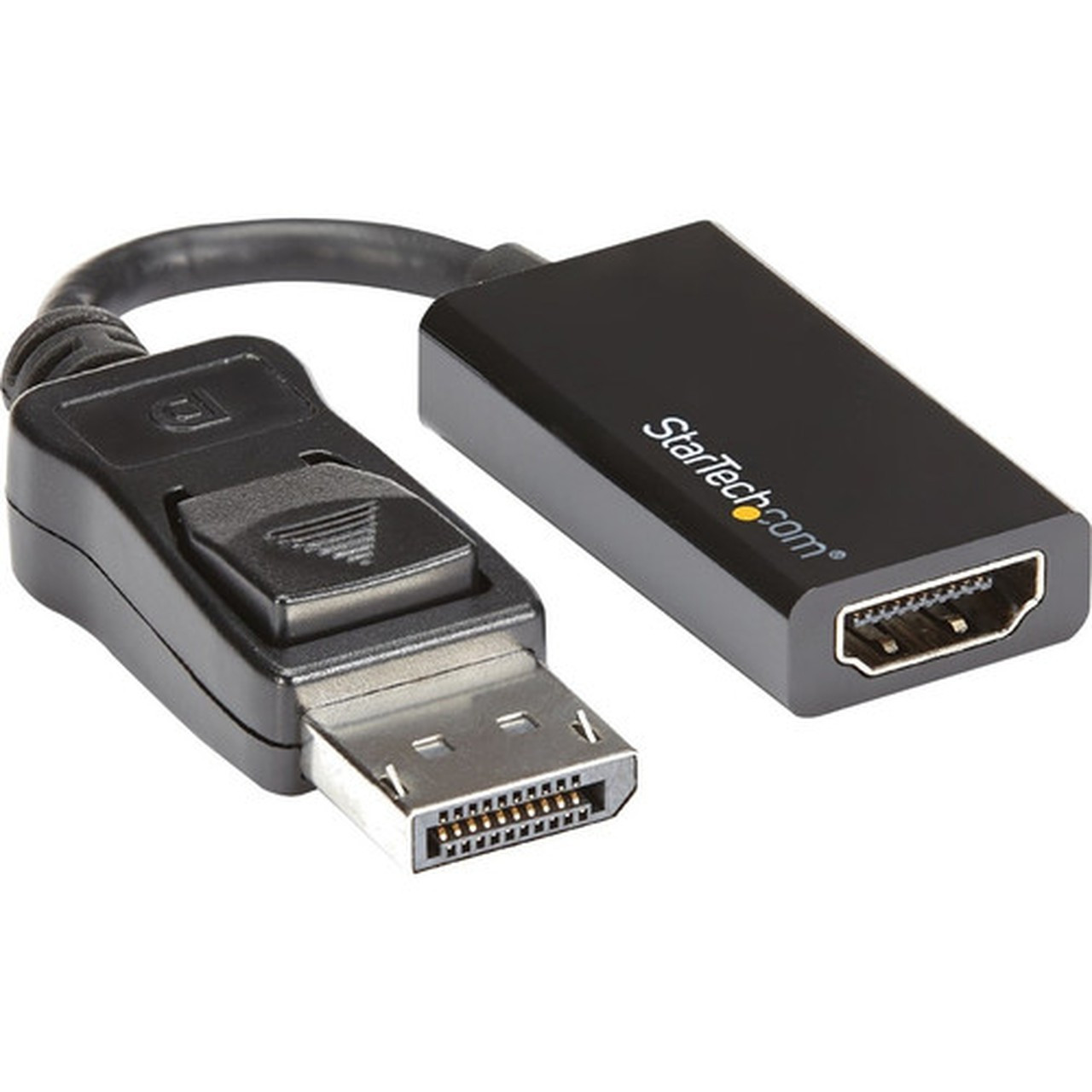


StarTech. com DP2HD4K60S DisplayPort 1. 4 to HDMI 2. 0 Adapter - Active 4K 60Hz Converter with Latching Connector

Business volume discounts
Technical guidance
Preparation & staging
QC · ON · AB · BC
Product Features
Technical Overview
This adapter implements an active conversion circuit to translate DisplayPort 1.4 signals to HDMI 2.0, supporting the latest video protocols without relying on source device DP++ compatibility. It maintains HDCP 2.2 content protection for streaming secure media and includes DPCP 4.2 for DisplayPort content protection.
The 20-pin male DisplayPort connector and 19-pin female HDMI connector provide a direct, cable-free interface for displays up to 4K resolution. Electromagnetic interference (EMI) shielding protects the signal integrity from line noise, ensuring stable video output even in electrically noisy environments.
This section brings together practical product details such as Connector Type on First End, Connector on First End Details, Connector Type on Second End, Color Family, so buyers can judge configuration, deployment fit, and day-to-day suitability with less guesswork.
A strong technical summary explains how the product's interfaces, hardware profile, and operating characteristics work together in real deployment. Buyers often need this context to confirm compatibility with existing devices, expected performance in daily use, and whether installation will be straightforward for IT staff or end users.
Key Product Advantages
The DP2HD4K60S stands out with its combination of high bandwidth support, secure physical connection, and broad compatibility. The latching DisplayPort connector is a critical feature for mission-critical setups where a loose cable could interrupt workflow.
These strengths make the product easier to deploy and manage in real environments, especially where reliability, usability, and day-to-day operational continuity matter. Notable benefits include Universal OS Compatibility, Tested Cable Length Support, HDCP 2.2 Compliant, EMI Shielding, Small Form Factor.
Universal OS Compatibility
Works seamlessly with macOS, Windows, and Ubuntu operating systems without requiring additional software or driver installation, enabling plug-and-play functionality across diverse IT environments.
Tested Cable Length Support
Validated to work reliably with HDMI cables up to 23 feet in length, providing flexibility in display placement for conference rooms, multi-monitor workstations, or presentation setups.
Deployment / Use Cases
This adapter is designed to connect modern workstations, desktops, and docking stations with DisplayPort outputs to HDMI monitors, TVs, or projectors. It is particularly valuable for expanding display capabilities in environments where HDMI is the standard input on available screens.
Common deployment scenarios include adding a secondary monitor to a workstation equipped with AMD Radeon Pro or NVIDIA RTX/Quadro graphics, connecting a small form factor computer to a conference room display, or integrating a desktop into a home theater setup with a 4K television.
Workstation Display Expansion
Enables multi-monitor configurations for financial trading desks, video editing suites, or engineering workstations by converting a DisplayPort output to connect an additional HDMI monitor.
Portable Presentation Solution
Its lightweight design and reliable latching mechanism make it a dependable tool for professionals who present in different locations, ensuring a secure connection to projectors or large-format displays.
Physical Profile
The adapter features an all-black finish that blends discreetly with most workstation aesthetics. Weighing just one ounce, its compact build does not add noticeable bulk to cable connections. The design prioritizes durability and portability for users who transport it between sites.
The physical profile is practical for deployment planning because the dimensions and weight are clearly defined: 1 oz (28.35 g). This helps confirm rack, shelf, desk, or cabinet fit before installation.
- Weight
- 1 oz (28.35 g)
Highlights
- Converts DisplayPort 1.4 to HDMI 2.0 for 4K UHD video at 60Hz.
- Active adapter design ensures compatibility with DP and DP++ sources.
- Latching DisplayPort connector prevents accidental disconnection.
- Supports HDCP 2.2 and DPCP for protected content playback.
- EMI shielding protects signal integrity from electrical interference.
- Works with macOS, Windows, and Ubuntu without drivers.
- Tested with HDMI cables up to 23 feet for flexible setup.
- Compact and portable for easy transport between locations.
- Backwards compatible with 1080p resolution displays.
- Includes a 3-year limited warranty for reliability assurance.
Specifications
| Specifications | |
|---|---|
| Manufacturer | StarTech.com |
| Manufacturer Part Number | DP2HD4K60S |
| Brand Name | StarTech.com |
| Product Name | DisplayPort to HDMI Adapter - 4K DP to HDMI Converter - UHD 4K 60Hz |
| Packaged Quantity | 1 Each |
| Product Type | Video Adapter |
| Technical Information | |
| Connector Type on First End | DisplayPort 1.4 Digital Audio/Video - Male |
| Connector on First End Details | 1 x 20-pin DisplayPort 1.4 Digital Audio/Video - Male |
| Connector Type on Second End | HDMI 2.0 Digital Audio/Video - Female |
| Connector on Second End Details | 1 x 19-pin HDMI 2.0 Digital Audio/Video - Female |
| Features | Active,Latching Connector,HDCP 2.2,DPCP,EMI Protection |
| Physical Characteristics | |
| Color Family | Black |
| Product Color | Black |
| Weight (Approximate) | 1 oz (28.35 g) |
| Miscellaneous | |
| Country of Origin | China |
| Environmentally Friendly | Yes |
| Environmental Certification | EU RoHS |
| Environmental Compliance | Restriction of Hazardous Substances (RoHS) 2,Registration, Evaluation, Authorization and Restriction of Chemicals (REACH),Waste Electrical and Electronic Equipment Directive (WEEE) |
| Warranty | |
| Limited Warranty | 3 Year |
User Manual
FAQ
Does this adapter require external power or software drivers?
No, this is an active adapter that draws power directly from the DisplayPort source connection, eliminating the need for an external power adapter. It also operates without requiring any software or driver installation, offering plug-and-play compatibility with macOS, Windows, and Ubuntu systems.
What is the purpose of the latching DisplayPort connector?
The latching DisplayPort connector securely locks the adapter into the source device's port, preventing accidental disconnection that could interrupt video output. This feature is especially valuable in professional, industrial, or mobile environments where cable movement might otherwise loosen the connection.
Which devices are compatible with this DisplayPort to HDMI adapter?
The adapter is compatible with computers and workstations featuring DisplayPort or DP++ outputs, including desktops with AMD Radeon Pro Workstation Graphics or NVIDIA RTX/Quadro GPUs, small form factor PCs, and many docking stations. It connects to any display, monitor, TV, or projector with an HDMI input.
Does this adapter support audio transmission along with video?
Yes, the adapter supports multi-channel audio transmission, including 7.1 channel audio, allowing both video and audio signals to pass through from the DisplayPort source to the HDMI display. This ensures a complete audiovisual experience for multimedia, presentations, or entertainment content.
What are the environmental certifications for this product?
This adapter complies with EU RoHS (Restriction of Hazardous Substances) standards, along with REACH and WEEE directives. These certifications confirm that the product is manufactured with environmentally friendly materials and processes, meeting regulatory requirements for electronic equipment.
What refresh rate or brightness details are available?
Display-oriented products are best judged through screen, connectivity, and installation specifications. Those facts help buyers confirm visual fit, mounting flexibility, and deployment suitability more clearly than generic summary text.
What input or connectivity options are listed?
1 x 20-pin DisplayPort 1.4 Digital Audio/Video - Male.
Does the display support VESA mounting or adjustment features?
Display-oriented products are best judged through screen, connectivity, and installation specifications. Those facts help buyers confirm visual fit, mounting flexibility, and deployment suitability more clearly than generic summary text.
| Qty | Price | Available |
|---|


