










Shipping included*
Exclusions
Additional shipping fees may apply in rare circumstances for deliveries outside standard service areas. In most cases, this only potentially affects shipments to the Northwest Territories and Yukon, as well as certain heavy or oversized items.
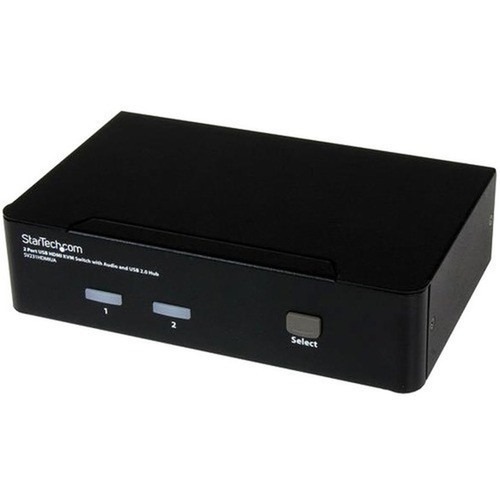
StarTech.com SV231HDMIUA 2-Port USB HDMI KVM Switch with Audio & USB 2.0 Hub - 1920 x 1200 Resolution - 6 USB Ports

Business volume discounts
Technical guidance
Preparation & staging
QC · ON · AB · BC
Product Features
Product Overview
The StarTech.com SV231HDMIUA 2-Port USB HDMI KVM Switch with Audio and USB 2.0 Hub delivers a streamlined solution for controlling two USB-enabled computers from a single keyboard, video, and mouse setup. This desktop KVM switch supports high-resolution digital video up to 1920x1200 (WUXGA) and 1080p, ensuring crisp visual output across both connected systems.
Integrated audio switching supports both HDMI audio and 3.5mm analog audio connections, allowing you to manage sound output alongside video and peripheral control. The built-in USB 2.0 hub provides six USB ports for sharing peripherals like printers, scanners, or external storage between computers without needing separate hubs or constant re-plugging.
Relevant factors for this section include Number of Computers Supported, Number of Local Users Supported, Graphic Mode, Maximum Video Resolution. When those points are considered together, they give buyers a clearer picture of how the product is equipped, how it fits into deployment, and what kind of day-to-day role it is meant to support.
Technical Overview
This KVM switch operates without software drivers, offering true OS-independent plug-and-play functionality across Windows, macOS, Linux, and other operating systems. Switching between computers is accomplished via front-panel push buttons or user-defined hotkey combinations, with an audible tone confirming each switch for clear operational feedback.
The device supports user-defined scan time intervals for automated switching scenarios, making it suitable for monitoring applications or multi-system environments. Independent audio switching ensures that audio routing follows video and peripheral control without manual reconfiguration.
Relevant factors for this section include Number of Computers Supported, Number of Local Users Supported, Graphic Mode, Maximum Video Resolution. When those points are considered together, they give buyers a clearer picture of how the product is equipped, how it fits into deployment, and what kind of day-to-day role it is meant to support.
A strong technical summary explains how the product's interfaces, hardware profile, and operating characteristics work together in real deployment. Buyers often need this context to confirm compatibility with existing devices, expected performance in daily use, and whether installation will be straightforward for IT staff or end users.
Key Product Advantages
This KVM switch eliminates the clutter and complexity of managing multiple computers by consolidating control into a single, efficient unit. The integrated USB 2.0 hub expands connectivity options while maintaining seamless peripheral sharing between systems.
These strengths make the product easier to deploy and manage in real environments, especially where reliability, usability, and day-to-day operational continuity matter. Notable benefits include Simplified Multi-Computer Management, Enhanced Connectivity and Compatibility.
Simplified Multi-Computer Management
Control two computers with one keyboard, mouse, and monitor setup, reducing desk clutter and streamlining workflow transitions.
- Push-button and hotkey switching
- Audible switch confirmation tone
- User-defined scan intervals
Enhanced Connectivity and Compatibility
The built-in USB hub and dual audio support ensure broad peripheral and audio device compatibility without additional adapters.
- Six USB 2.0 ports
- HDMI and 3.5mm audio support
- OS-independent operation
Deployment / Use Cases
The SV231HDMIUA is ideal for professionals managing two computers in office, studio, or command center environments. Its desktop form factor and straightforward setup make it suitable for deskside deployment where quick access to multiple systems is required.
Common applications include software developers testing across different operating systems, financial traders monitoring multiple market data feeds, video editors switching between editing and rendering workstations, and IT administrators managing server and workstation pairs. The device's TAA compliance also makes it appropriate for government and educational procurement where trade agreement adherence is mandatory.
Development and Testing Workstations
Switch seamlessly between development and testing computers without replugging peripherals, maintaining workflow continuity across different OS environments.
Multi-System Monitoring Stations
Monitor two servers or workstations from a single console, with scan mode enabling automatic rotation between systems for surveillance or status checking.
Physical Profile
Designed for desktop placement, this KVM switch measures 4.90" wide × 2.80" deep × 1.60" high (124.46 × 71.12 × 40.64 mm) and weighs approximately 1.40 lb (634 g). The compact footprint conserves desk space while remaining accessible for front-panel controls. Rubber feet included in the package provide stable placement and prevent surface scratching during operation.
The physical profile is practical for deployment planning because the dimensions and weight are clearly defined: 1.60" (40.64 mm), 4.90" (124.46 mm), 2.80" (71.12 mm), 1.40 lb (634 g). This helps confirm rack, shelf, desk, or cabinet fit before installation.
- Width
- 4.90" (124.46 mm)
- Depth
- 2.80" (71.12 mm)
- Height
- 1.60" (40.64 mm)
- Weight
- 1.40 lb (634 g)
What's in the Box
The package includes all components needed for immediate setup and operation.
Highlights
- Controls two USB-enabled computers from single keyboard, mouse, and monitor
- Supports high-resolution video up to 1920x1200 (WUXGA) and 1080p
- Integrated USB 2.0 hub with six ports for peripheral sharing
- OS-independent operation with no software drivers required
- Push-button and hotkey switching with audible confirmation
- Supports both HDMI audio and 3.5mm analog audio connections
- User-defined scan time intervals for automated switching
- TAA compliant for government and educational procurement
- 3-year limited warranty for long-term reliability
- Compact desktop form factor with included rubber feet
Specifications
| Specifications | |
|---|---|
| Manufacturer | StarTech.com |
| Manufacturer Part Number | SV231HDMIUA |
| Brand Name | StarTech.com |
| Product Name | 2-Port USB HDMI KVM Switch with Audio and USB 2.0 Hub |
| Packaged Quantity | 1 Each |
| Product Type | KVM Switchbox |
| Technical Information | |
| Number of Computers Supported | 2 |
| Number of Local Users Supported | 1 |
| Video | |
| Graphic Mode | WUXGA |
| Maximum Video Resolution | 1920 x 1200 |
| Interfaces/Ports | |
| USB | Yes |
| HDMI | Yes |
| Number of USB Ports | 6 |
| Number of HDMI Ports | 3 |
| Power Description | |
| Input Voltage Range | 100V AC to 240V AC |
| Physical Characteristics | |
| Form Factor | Desktop |
| Height | 1.60" (40.64 mm) |
| Width | 4.90" (124.46 mm) |
| Depth | 2.80" (71.12 mm) |
| Weight (Approximate) | 1.40 lb (634 g) |
| Miscellaneous | |
| Package Contents | 2-Port USB HDMI KVM Switch with Audio and USB 2.0 Hub 1 x User Manual 1 x Power Adapter 1 x Package of Rubber feet |
| Environmentally Friendly | Yes |
| Environmental Certification | EU RoHS |
| Environmental Compliance | Restriction of Hazardous Substances (RoHS) 2,Registration, Evaluation, Authorization and Restriction of Chemicals (REACH),Waste Electrical and Electronic Equipment Directive (WEEE) |
| Country of Origin | Taiwan |
| TAA Compliant | Yes |
| Warranty | |
| Limited Warranty | 3 Year |
User Manual
FAQ
How many computers can I connect to this KVM switch?
The SV231HDMIUA supports two computers simultaneously. You can connect two USB-enabled computers to the switch and control them from a single keyboard, mouse, and monitor setup, switching between systems as needed.
What video resolutions does this KVM switch support?
This switch supports digital video resolutions up to 1920x1200 (WUXGA), including 1600x1200 (UXGA) and 1920x1080 (1080p). The HDMI connectivity ensures high-quality digital video transmission between computers and your display.
Does this KVM switch require special software or drivers?
No, the switch operates without software drivers, offering true plug-and-play functionality. It is OS independent and works with Windows, macOS, Linux, and other operating systems without installation or configuration.
How do I switch between connected computers?
Switching can be done using the front-panel push buttons or through user-defined hotkey combinations on your keyboard. The switch emits an audible tone to confirm each transition, and you can also set scan time intervals for automatic switching between systems.
What audio connections does this KVM switch support?
The switch supports both HDMI audio (embedded in the video signal) and separate 3.5mm analog audio connections. Audio switching is independent, allowing you to route sound along with video and peripheral control without additional configuration.
What is included in the package with this KVM switch?
The package contains the 2-Port USB HDMI KVM Switch with Audio and USB 2.0 Hub, a power adapter, a user manual, and a package of rubber feet for stable desktop placement. All necessary components for immediate setup and operation are included.
| Qty | Price | Available |
|---|


