Shipping included*
Exclusions
Additional shipping fees may apply in rare circumstances for deliveries outside standard service areas. In most cases, this only potentially affects shipments to the Northwest Territories and Yukon, as well as certain heavy or oversized items.
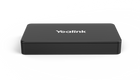
Yealink MSHARE E2 MVC Screen Sharing Box - 1080P/30FPS HD - USB-C/HDMI/USB-B - Flexible Deployment

Business volume discounts
Technical guidance
Preparation & staging
QC · ON · AB · BC
Product Features
Product Overview
The Yealink MShare E2 MVC Screen Sharing Box is a dedicated accessory engineered to extend the casting capabilities of Yealink meeting room systems. Its separate design from the Touch Console enables flexible deployment across various conference room scenarios, allowing seamless integration where cable length or placement constraints exist.
This compact device delivers high-definition screen sharing up to 1080P at 30 frames per second, with integrated audio sharing to ensure complete multimedia presentation delivery. Equipped with multiple connectivity ports and a clear status indicator, the MShare E2 simplifies wired auxiliary streaming for professional meeting environments, providing reliable performance without complex configuration.
Relevant factors for this section include SKU. When those points are considered together, they give buyers a clearer picture of how the product is equipped, how it fits into deployment, and what kind of day-to-day role it is meant to support.
Technical Overview
The MShare E2 functions as a wired screen sharing gateway, providing three essential ports: USB-C for modern device connectivity, HDMI In for direct video sources, and USB-Type B for integration with Yealink systems. It features a bi-color LED light that visually indicates casting status, offering immediate operational feedback during presentations.
This accessory is engineered to complement Yealink's Touch Console when the standard casting cable proves insufficient, enabling deployment in proximity spaces to maintain full functionality. It operates without requiring separate power or complex configuration, leveraging existing meeting room infrastructure for straightforward setup and reliable performance.
Relevant factors for this section include SKU. When those points are considered together, they give buyers a clearer picture of how the product is equipped, how it fits into deployment, and what kind of day-to-day role it is meant to support.
Key Product Advantages
The MShare E2 delivers professional-grade screen sharing with several distinct advantages for modern meeting rooms. Its flexible deployment capability allows installation separate from the Touch Console, solving cable management challenges while maintaining full system functionality.
High-Quality Presentation Delivery
Supports 1080P resolution at 30 frames per second with audio sharing, ensuring crisp video and clear audio for professional presentations.
- Full HD video quality
- Synchronized audio streaming
- Smooth 30 FPS performance
Intuitive Operation
Bi-color LED provides clear visual status indication, while the compact design enables concealment within conference furniture for clean room aesthetics.
- Instant status feedback
- Discreet installation
- No external power required
Deployment / Use Cases
The MShare E2 is designed for professional meeting environments where reliable screen sharing is essential. Its flexible deployment makes it ideal for conference rooms with challenging cable routing requirements or where the Touch Console needs to be positioned separately from the display source.
Common deployment scenarios include boardrooms with built-in furniture where concealment is preferred, training rooms requiring extended cable runs, and collaborative spaces where multiple presentation sources need seamless switching. The device integrates smoothly with existing Yealink meeting room systems, enhancing functionality without requiring complete infrastructure overhaul.
Conference Room Integration
Extends casting capabilities when standard cables are insufficient, allowing optimal placement of Touch Console and display sources throughout the room.
Auxiliary Presentation Support
Provides reliable wired streaming for guest presenters using modern devices with USB-C or traditional sources with HDMI connectivity.
Highlights
- Flexible deployment separate from Touch Console
- Supports up to 1080P/30FPS Full HD screen sharing
- Audio sharing capability for complete presentations
- Multiple ports: USB-C, HDMI In, USB-Type B
- Bi-color LED for clear casting status indication
- Compact size for easy concealment in conference furniture
- Wired auxiliary streaming for reliable connectivity
- Seamless integration with Yealink meeting room systems
Specifications
| General | |
|---|---|
| Brand | Yealink |
| SKU | MSHARE E2 |
| Manufacturer Part Number | MSHARE E2 |
User Manual
FAQ
How does the flexible deployment feature work with the Touch Console?
The MShare E2 is designed as a separate component from the Touch Console, allowing installation in different locations within a conference room. This flexibility addresses cable length limitations and placement constraints, enabling optimal positioning of both devices while maintaining full casting functionality through the wired connection.
What connectivity ports are available on the MShare E2?
The device provides three key ports: one USB-C port for modern laptops and devices, one HDMI input for direct video sources, and one USB-Type B port for integration with Yealink meeting room systems. This combination supports various presentation sources while ensuring compatibility with existing infrastructure.
How does the status indicator function during operation?
A bi-color LED light provides clear visual feedback about the casting status. This immediate operational indicator allows users to quickly confirm connection status and presentation activity without checking additional interfaces, enhancing the user experience in meeting environments.
Can the MShare E2 be concealed within conference room furniture?
Yes, the compact form factor is specifically designed for concealment within conference desks, cable management channels, or AV cabinets. This discreet installation maintains clean room aesthetics while providing full functionality, making it ideal for professional environments where visible equipment is undesirable.
Does the MShare E2 require separate power or complex configuration?
No, the device operates without requiring separate power or complex configuration. It leverages the existing meeting room infrastructure through its wired connections, enabling straightforward setup that integrates seamlessly with Yealink systems while maintaining reliable performance for screen sharing.
What screen size is listed?
Yealink MSHARE E2 MVC Screen Sharing Box - Flexible Deployment - 1080P/30FPS - USB-C/HDMI/USB-B - Bi-Color LED is best judged through its screen, connectivity, and installation specifications, which help buyers confirm visual fit and deployment suitability.
| Qty | Price | Available |
|---|