

Shipping included*
Exclusions
Additional shipping fees may apply in rare circumstances for deliveries outside standard service areas. In most cases, this only potentially affects shipments to the Northwest Territories and Yukon, as well as certain heavy or oversized items.
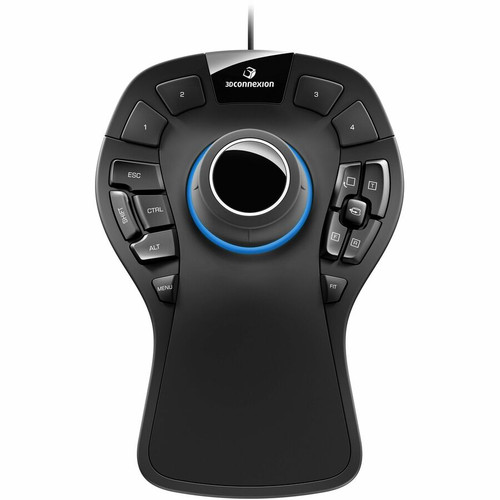
3Dconnexion 3DX-700040 SpaceMouse Pro - 3D Input Device - Black - USB Cable - 15 Programmable Buttons ( )

Business volume discounts
Technical guidance
Preparation & staging
QC · ON · AB · BC
Product Features
Technical Overview
The SpaceMouse Pro delivers advanced 3D navigation through its ergonomic design and responsive sensor technology. It supports precise pan, zoom, rotate, and tilt movements, reducing reliance on traditional mouse and keyboard combinations for 3D manipulation.
Its USB interface ensures broad compatibility and stable data transmission, while the cable connection eliminates battery concerns. The device is built with durable materials to withstand daily professional use, maintaining accuracy over time.
Relevant factors for this section include Pointing Device Connectivity Technology, Number of Programmable Buttons, Pointing Device Host Interface. When those points are considered together, they give buyers a clearer picture of how the product is equipped, how it fits into deployment, and what kind of day-to-day role it is meant to support.
A strong technical summary explains how the product's interfaces, hardware profile, and operating characteristics work together in real deployment. Buyers often need this context to confirm compatibility with existing devices, expected performance in daily use, and whether installation will be straightforward for IT staff or end users.
Key Product Advantages
The SpaceMouse Pro accelerates 3D workflows by providing dedicated hardware for spatial control, which reduces fatigue and increases precision compared to standard input methods. Its programmable buttons allow users to assign frequent commands, minimizing interface switching and boosting efficiency.
Enhanced Productivity
Streamlines complex 3D tasks with intuitive motion control and customizable buttons, cutting down on repetitive actions.
- Six-degrees-of-freedom movement
- 15 programmable buttons for shortcuts
- Reduces mouse and keyboard dependency
Broad Compatibility
Works seamlessly across major operating systems and professional software suites, ensuring integration into diverse IT environments.
- Supports Windows, Mac, and Linux
- Compatible with leading CAD and 3D applications
- Plug-and-play USB connectivity
Deployment / Use Cases
This device is ideal for professionals in architecture, engineering, product design, and animation who require precise 3D manipulation. It integrates into workstations for tasks like model rotation, scene navigation, and virtual prototyping, where traditional input devices fall short.
Common deployments include CAD stations, visualization labs, and simulation setups. Its cross-platform support makes it suitable for mixed-OS environments, such as offices using both Windows and Mac systems for different design stages.
Relevant factors for this section include Pointing Device Connectivity Technology, Number of Programmable Buttons, Pointing Device Host Interface. When those points are considered together, they give buyers a clearer picture of how the product is equipped, how it fits into deployment, and what kind of day-to-day role it is meant to support.
CAD and Engineering
Used for detailed 3D modeling, assembly inspection, and technical drawings in software like SolidWorks, AutoCAD, and CATIA.
Media and Animation
Enhances control in 3D animation, visual effects, and game development tools such as Maya, Blender, and 3ds Max.
Physical Profile
The SpaceMouse Pro has a compact footprint measuring 8.03 inches in length, 5.59 inches in width, and 2.28 inches in height, fitting comfortably on desks without occupying excessive space. Its black matte finish resists fingerprints and blends with professional workstation aesthetics. The device weighs 1.48 pounds, providing stability during use while remaining portable for multi-desk setups.
The physical profile is practical for deployment planning because the dimensions and weight are clearly defined: 2.28" (58 mm), 5.59" (142 mm), 1.48 lb (670 g). This helps confirm rack, shelf, desk, or cabinet fit before installation.
- Width
- 5.59" (142 mm)
- Height
- 2.28" (58 mm)
- Weight
- 1.48 lb (670 g)
- Length
- 8.03" (204 mm)
Highlights
- Professional 3D input device for precise spatial navigation
- 15 programmable buttons for customizable workflow shortcuts
- USB cable connectivity ensures reliable, plug-and-play operation
- Compatible with Windows, Mac, and Linux operating systems
- Black color with durable construction for daily professional use
- Six-degrees-of-freedom control for intuitive 3D movement
- Supports major CAD, CAM, and 3D modeling applications
- 3-year limited warranty for long-term reliability
- Environmentally compliant with WEEE directives
- Compact dimensions ideal for workstation integration
Specifications
| Specifications | |
|---|---|
| Manufacturer | 3Dconnexion |
| Manufacturer Part Number | 3DX-700040 |
| Brand Name | 3Dconnexion |
| Product Line | SpaceMouse Pro |
| Product Name | SpaceMouse Pro |
| Product Type | 3D Input Device |
| Pointing Device | |
| Pointing Device Connectivity Technology | Cable |
| Number of Programmable Buttons | 15 |
| Interfaces/Ports | |
| Pointing Device Host Interface | USB |
| Physical Characteristics | |
| Color Family | Black |
| Product Color | Black |
| Height | 2.28" (58 mm) |
| Width | 5.59" (142 mm) |
| Length | 8.03" (204 mm) |
| Weight (Approximate) | 1.48 lb (670 g) |
| Miscellaneous | |
| Operating System Compatibility | Windows 10,Windows 8.1,Mac OS X 10.11 El Capitan,Red Hat Enterprise Linux WS 4,Red Hat Enterprise Linux WS 5,SuSE Linux 9.3,SuSE Linux 10,SuSE Linux 11 |
| Platform Supported | Windows,Mac,Linux |
| Environmentally Friendly | Yes |
| Environmental Compliance | Waste Electrical and Electronic Equipment Directive (WEEE) |
| Country of Origin | China |
| Warranty | |
| Limited Warranty | 3 Year |
User Manual
FAQ
What is the primary function of the SpaceMouse Pro?
The SpaceMouse Pro is a 3D input device designed for navigating and manipulating 3D environments in professional software. It provides six-degrees-of-freedom control, allowing users to pan, zoom, rotate, and tilt 3D models with natural hand movements, which enhances precision and efficiency in design and engineering tasks compared to using a standard mouse alone.
How many programmable buttons does it have and what can they do?
This device features 15 programmable buttons that can be customized to execute specific commands or macros in supported applications. Users can assign frequent functions like view changes, tool selections, or layer toggles, reducing the need to switch between keyboard and mouse and speeding up complex workflows in programs like AutoCAD or SolidWorks.
What operating systems are compatible with the SpaceMouse Pro?
The SpaceMouse Pro is compatible with Windows 10, Windows 8.1, Mac OS X 10.11 El Capitan, and various Linux distributions including Red Hat Enterprise Linux WS 4/5 and SuSE Linux 9.3/10/11. This broad support ensures it can be integrated into diverse IT environments, from corporate Windows setups to development stations running Linux.
Does it require batteries or wireless setup?
No, the SpaceMouse Pro uses a USB cable for both connectivity and power, eliminating the need for batteries or wireless pairing. This wired design provides a stable, plug-and-play experience without concerns about battery life or signal interference, making it reliable for continuous professional use.
What are the physical dimensions and weight?
The device measures 8.03 inches in length, 5.59 inches in width, and 2.28 inches in height (204 x 142 x 58 mm), with an approximate weight of 1.48 pounds (670 grams). Its compact size fits easily on most desks, and the weight offers stability during operation without being cumbersome.
What warranty is included with this product?
The SpaceMouse Pro comes with a 3-year limited warranty, covering defects in materials and workmanship. This warranty provides assurance for long-term use in professional settings, aligning with the device's durable construction and reliability for daily tasks in design and engineering environments.
| Qty | Price | Available |
|---|