







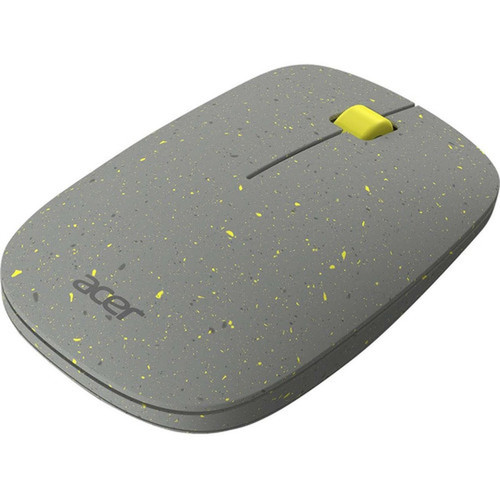
Acer GP.MCE11.022 Macaron Vero Wireless Mouse - Gray - 1200 DPI - 32.81 ft Range - 2.4 GHz - 3-Button with Scroll Wheel

Business volume discounts
Technical guidance
Preparation & staging
QC · ON · AB · BC
Product Features
Technical Overview
This mouse operates on a 2.40 GHz wireless frequency, providing a stable connection up to 32.81 feet (10,000 mm) from the receiver. With a 1200 DPI optical sensor, it offers precise cursor control for general navigation, document editing, and web browsing.
The three-button layout includes left and right clicks plus a scroll wheel, covering essential pointing device functions without unnecessary complexity. Its lightweight construction at 1.69 ounces (48 grams) contributes to comfortable handling during extended use.
Relevant factors for this section include Pointing Device Connectivity Technology, Pointing Device Wireless Operating Distance, Wireless Operating Frequency, Number of Batteries Supported. When those points are considered together, they give buyers a clearer picture of how the product is equipped, how it fits into deployment, and what kind of day-to-day role it is meant to support.
Key Product Advantages
The Macaron Vero mouse emphasizes simplicity and reliability, with features that address common wireless peripheral needs without premium pricing.
These strengths make the product easier to deploy and manage in real environments, especially where reliability, usability, and day-to-day operational continuity matter. Notable benefits include Extended Wireless Range, Ready-to-Use Configuration.
For buyers comparing similar models, the strongest advantage is usually the balance between dependable day-to-day operation and a simpler rollout experience. That means less time spent troubleshooting fit, compatibility, or user adoption after installation, which is especially important for shared business environments and repeat purchasing decisions.
Extended Wireless Range
With 32.81 feet of operating distance, users can work from across typical rooms or presentations without signal dropout.
- Stable 2.4 GHz connection
- Minimizes desktop cable clutter
Ready-to-Use Configuration
Includes one AA battery, so the mouse functions immediately upon unboxing without additional purchases.
- Battery included
- Simple plug-and-play setup
Deployment / Use Cases
This mouse is well-suited for environments where basic, reliable pointing functionality takes priority over advanced gaming or design features. Its wireless design and broad OS compatibility make it adaptable to various setups.
Typical applications include office workstations, home computers, educational labs, and general-purpose PCs where users need a dependable input device for everyday tasks like email, spreadsheets, web browsing, and document creation.
Relevant factors for this section include Pointing Device Connectivity Technology, Pointing Device Wireless Operating Distance, Wireless Operating Frequency, Number of Batteries Supported. When those points are considered together, they give buyers a clearer picture of how the product is equipped, how it fits into deployment, and what kind of day-to-day role it is meant to support.
Office & Administrative Use
Ideal for clerical and administrative tasks where consistent wireless performance and simple operation are valued over specialized features.
Educational & Training Settings
Suitable for computer labs, libraries, or training rooms where multiple users require straightforward peripherals that work across different PC configurations.
Physical Profile
The mouse features a gray exterior that matches neutral office and home decor. Weighing just 1.69 ounces, it offers a lightweight feel that reduces hand fatigue during prolonged use. The compact form factor fits comfortably in most hand sizes and travels easily in laptop bags.
The physical profile is practical for deployment planning because the dimensions and weight are clearly defined: 1.69 oz (48 g). This helps confirm rack, shelf, desk, or cabinet fit before installation.
- Weight
- 1.69 oz (48 g)
Highlights
- Wireless operation with 32.81 ft (10,000 mm) range
- 2.40 GHz frequency for stable connectivity
- 1200 DPI optical sensor for precise cursor control
- Three-button design with scroll wheel
- Gray color with lightweight 1.69 oz (48 g) construction
- Includes one AA battery for immediate use
- Compatible with Windows 7 through 10 and ChromeOS
- PC platform support for broad deployment
Specifications
| Specifications | |
|---|---|
| Manufacturer | Acer, Inc |
| Manufacturer Part Number | GP.MCE11.022 |
| Brand Name | Acer |
| Product Line | Macaron Vero |
| Product Model | AMR020 |
| Product Name | Macaron Vero Mouse |
| Product Type | Mouse |
| Pointing Device | |
| Pointing Device Connectivity Technology | Wireless |
| Pointing Device Wireless Operating Distance | 32.81 ft (10000 mm) |
| Wireless Operating Frequency | 2.40 GHz |
| Movement Resolution (dpi) | 1200 |
| Total Number of Buttons | 3 |
| Scroller Type | Scroll Wheel |
| Battery Information | |
| Number of Batteries Supported | 1 |
| Battery Size Supported | AA |
| Battery Included | Yes |
| Physical Characteristics | |
| Color Family | Gray |
| Product Color | Gray |
| Weight (Approximate) | 1.69 oz (48 g) |
| Miscellaneous | |
| Operating System Compatibility | Windows 7,Windows 8,Windows 8.1,Windows 10,ChromeOS |
| Platform Supported | PC |
FAQ
What is the wireless range of this Acer mouse?
The Acer Macaron Vero mouse operates wirelessly up to 32.81 feet (10,000 mm) from its receiver. This extended range allows flexible placement in typical office, classroom, or home environments without connectivity issues.
What DPI does this mouse support?
This mouse features a 1200 DPI optical sensor. This resolution provides accurate cursor movement for everyday computing tasks like document editing, web browsing, and general navigation.
Which operating systems are compatible with this wireless mouse?
The mouse is compatible with Windows 7, Windows 8, Windows 8.1, Windows 10, and ChromeOS. This broad support makes it suitable for most PC environments, including educational and office settings.
Does the mouse include a battery?
Yes, one AA battery is included with the mouse. This allows immediate use out of the box without requiring an additional purchase.
How many buttons does this mouse have?
The mouse has three buttons: left click, right click, and a scroll wheel. This standard configuration covers essential pointing device functions for general computing use.
What is the weight and color of this Acer mouse?
The mouse weighs approximately 1.69 ounces (48 grams) and features a gray exterior. The lightweight design enhances comfort during extended use, while the neutral gray color fits various desktop aesthetics.
| Qty | Price | Available |
|---|


