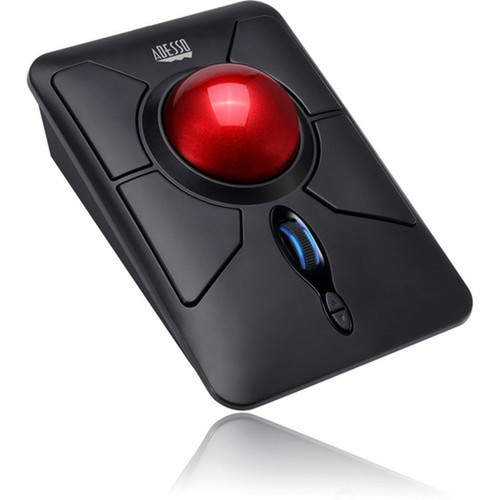
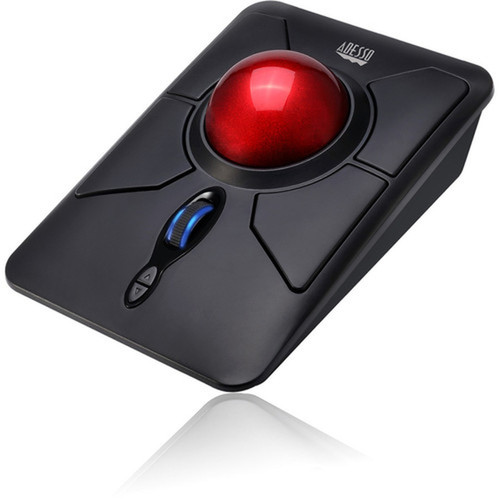

Adesso IMOUSE T50 Wireless Programmable Ergonomic Trackball Mouse - 4800 DPI Optical - 7 Buttons - Black

Business volume discounts
Technical guidance
Preparation & staging
QC · ON · AB · BC
Product Features
Technical Overview
The iMouse T50 operates on 2.40 GHz radio frequency wireless technology, providing a stable connection up to 30 feet away from the host computer. It uses an optical sensor with adjustable resolution from 400 to 4800 DPI, allowing users to fine-tune cursor speed for precise control in applications ranging from graphic design to everyday office tasks.
Its seven-button layout includes standard left/right click, scroll wheel, and dedicated back/forward buttons for web browsing efficiency. The trackball is removable for easy cleaning, and the micro-switch components are rated for 10 million clicks, ensuring long-term durability in demanding usage scenarios.
Relevant factors for this section include Pointing Device Connectivity Technology, Pointing Device Wireless Technology, Pointing Device Wireless Operating Distance, Pointing Device Host Interface. When those points are considered together, they give buyers a clearer picture of how the product is equipped, how it fits into deployment, and what kind of day-to-day role it is meant to support.
Key Product Advantages
The iMouse T50 delivers several distinct advantages for users seeking an ergonomic alternative to traditional mice. Its trackball design reduces wrist movement and associated strain, while the wireless functionality eliminates cable clutter and provides flexible positioning on any desktop surface.
Ergonomic Comfort
The symmetrical shape and large trackball minimize forearm twisting, helping to prevent discomfort during extended computer sessions.
- Reduces Carpal Tunnel risk
- Less muscle movement required
- Comfortable for all-day use
Customizable Performance
With programmable buttons and adjustable DPI settings, users can tailor the mouse's behavior to their specific workflow needs.
- 400-4800 DPI range
- Back/forward buttons included
- Easy driver interface
Deployment / Use Cases
This trackball mouse is particularly well-suited for office environments where employees spend long hours at their computers. Its ergonomic design helps reduce repetitive strain injuries, making it a practical choice for administrative staff, data entry professionals, and anyone concerned with workplace ergonomics.
The wireless functionality and desktop-focused design also make it ideal for home office setups, especially where desk space is limited or cable management is a priority. The compatibility with multiple Windows operating systems ensures it works seamlessly with most business and personal computing environments.
Relevant factors for this section include Pointing Device Connectivity Technology, Pointing Device Wireless Technology, Pointing Device Wireless Operating Distance, Pointing Device Host Interface. When those points are considered together, they give buyers a clearer picture of how the product is equipped, how it fits into deployment, and what kind of day-to-day role it is meant to support.
Physical Profile
The iMouse T50 features a compact black design measuring 2.40" in height, 4.30" in width, and 6" in depth, with a weight of approximately 9.60 ounces. Its symmetrical shape accommodates both right and left-handed users, while the matte black finish provides a professional appearance suitable for any workspace.
The physical profile is practical for deployment planning because the dimensions and weight are clearly defined: 2.40" (60.96 mm), 4.30" (109.22 mm), 6" (152.40 mm), 9.60 oz (272.16 g). This helps confirm rack, shelf, desk, or cabinet fit before installation.
- Width
- 4.30" (109.22 mm)
- Depth
- 6" (152.40 mm)
- Height
- 2.40" (60.96 mm)
- Weight
- 9.60 oz (272.16 g)
What's in the Box
The package includes everything needed for immediate setup and use.
Highlights
- Wireless operation with 30-foot range using 2.40 GHz radio frequency technology
- 4800 DPI optical sensor with adjustable resolution from 400 to 4800 DPI
- Seven-button layout including dedicated back/forward buttons for web browsing
- Large 1.25-inch removable trackball for precise cursor control with minimal movement
- Symmetrical ergonomic design reduces forearm strain during extended use
- Programmable buttons with easy-to-use driver software for customization
- Includes 2 AAA batteries and nano USB receiver for plug-and-play setup
- Compatible with Windows 10, 8, 7, XP, 2000, and Vista operating systems
- Micro-switch rated for 10 million clicks ensures long-term durability
- Power on/off switch extends battery life up to 6 months
Specifications
| Specifications | |
|---|---|
| Manufacturer | Adesso, Inc |
| Manufacturer Part Number | IMOUSE T50 |
| Brand Name | Adesso |
| Product Line | iMouse |
| Product Model | T50 |
| Product Name | iMouse T50 Wireless Programmable Ergonomic Trackball Mouse |
| Product Type | Mouse |
| Pointing Device | |
| Pointing Device Connectivity Technology | Wireless |
| Pointing Device Wireless Technology | Radio Frequency |
| Pointing Device Wireless Operating Distance | 30 ft (9144 mm) |
| Wireless Operating Frequency | 2.40 GHz |
| Movement Detection | Optical |
| Movement Resolution (dpi) | 4800 |
| Total Number of Buttons | 7 |
| Scroller Type | Trackball,Scroll Wheel |
| Ergonomic Fit | Symmetrical |
| Rechargeable | No |
| Interfaces/Ports | |
| Pointing Device Host Interface | USB |
| Battery Information | |
| Number of Batteries Supported | 2 |
| Battery Size Supported | AAA |
| Battery Included | Yes |
| Physical Characteristics | |
| Color Family | Black |
| Product Color | Black |
| Height | 2.40" (60.96 mm) |
| Width | 4.30" (109.22 mm) |
| Depth | 6" (152.40 mm) |
| Weight (Approximate) | 9.60 oz (272.16 g) |
| Miscellaneous | |
| Package Contents | iMouse T50 - Wireless Programmable Ergonomic Trackball Mouse USB Wireless Receiver 2 x AAA Batteries Quick Start Guide |
| Device Supported | Desktop Computer |
| Operating System Compatibility | Windows 10,Windows 8,Windows 7,Windows XP,Windows 2000,Windows Vista |
| Platform Supported | PC |
| Environmentally Friendly | Yes |
| Environmental Compliance | Restriction of Hazardous Substances (RoHS),Waste Electrical and Electronic Equipment Directive (WEEE) |
| Country of Origin | China |
| Warranty | |
| Limited Warranty | 1 Year |
User Manual
FAQ
What wireless technology does the Adesso iMouse T50 use?
The iMouse T50 uses 2.40 GHz radio frequency wireless technology, which provides a stable connection up to 30 feet from the computer. This technology operates on 12 different channels with 65,536 unique IDs to minimize interference, making it reliable for office environments with multiple wireless devices.
Is the trackball removable for cleaning?
Yes, the 1.25-inch trackball is removable for easy cleaning. This feature allows users to maintain optimal tracking performance by removing dust and debris that can accumulate over time, ensuring smooth cursor movement without requiring professional maintenance or special tools.
What is the DPI range of this mouse?
The iMouse T50 offers adjustable DPI settings ranging from 400 to 4800 DPI. Users can switch between these sensitivity levels using the dedicated DPI switch, allowing for precise cursor control in applications requiring fine movements or faster navigation across large screens and multiple monitors.
Which operating systems are compatible with this mouse?
This mouse is compatible with Windows 10, Windows 8, Windows 7, Windows XP, Windows 2000, and Windows Vista operating systems. It is designed specifically for PC platforms and includes plug-and-play functionality with the nano USB receiver for immediate use without extensive driver installation.
What type of batteries does the mouse require?
The iMouse T50 requires 2 AAA batteries, which are included in the package. The mouse features a power on/off switch that helps maximize battery life up to 6 months under normal usage conditions, reducing the frequency of battery replacements in office environments.
How many buttons does the iMouse T50 have and are they programmable?
The mouse has 7 buttons total, including left/right click, scroll wheel, back/forward buttons, and additional programmable buttons. The included driver software allows users to customize button functions to match their workflow, with an easy-to-use interface that enables full customization within seconds.
| Qty | Price | Available |
|---|