
Adesso iMouseT30 Wireless Programmable Ergonomic Trackball Mouse - Optical 4800 DPI - 7 Buttons - Black

Business volume discounts
Technical guidance
Preparation & staging
QC · ON · AB · BC
Product Features
Technical Overview
At its core, the iMouse T30 features a high-precision optical sensor with an adjustable DPI range from 400 to 4800, allowing users to fine-tune cursor speed for different applications. The sensor works in tandem with the large trackball for smooth, accurate tracking. The device connects via a plug-and-play nano USB receiver, ensuring a clutter-free setup without driver installation for basic operation.
For advanced customization, Adesso provides a programmable driver with an intuitive user interface. This software enables full button remapping and macro assignment, turning the seven physical buttons—including dedicated back/forward buttons—into powerful shortcuts. Each button employs a durable micro-switch rated for 10 million clicks, ensuring long-term reliability for demanding office and productivity environments.
Relevant factors for this section include Pointing Device Connectivity Technology, Pointing Device Wireless Technology, Wireless Operating Frequency, Pointing Device Host Interface. When those points are considered together, they give buyers a clearer picture of how the product is equipped, how it fits into deployment, and what kind of day-to-day role it is meant to support.
Key Product Advantages
The iMouse T30 combines ergonomic engineering with practical features to enhance daily computing. Its design directly addresses ergonomic concerns by promoting a neutral forearm posture, which can help minimize twisting and reduce the risk of strain-related issues like Carpal Tunnel Syndrome. The large, removable trackball requires less physical movement than a traditional mouse, offering precise control with minimal effort.
Ergonomic Comfort
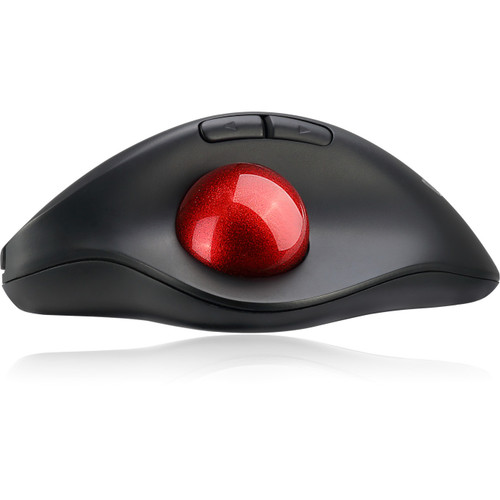
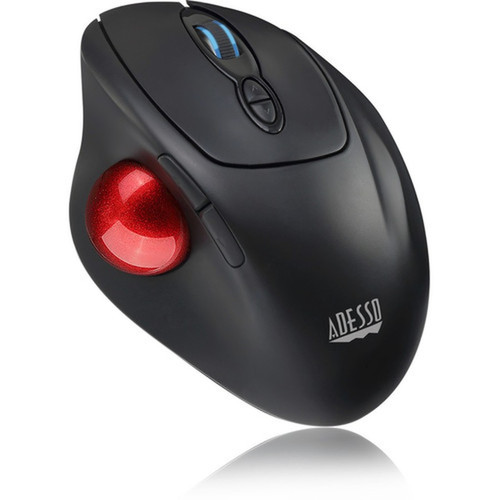
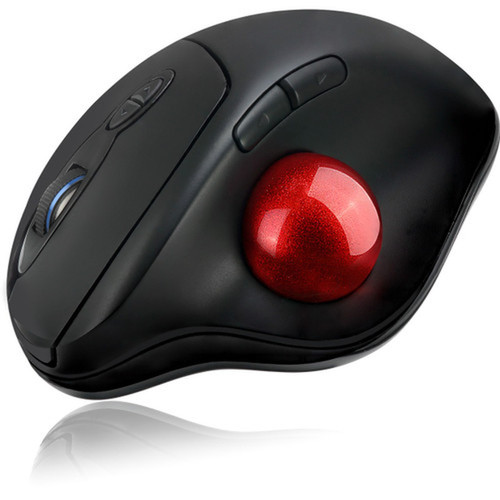
The contoured right-handed shape and elevated trackball position keep the wrist in a relaxed, natural alignment, reducing fatigue during long sessions.
- Minimizes forearm twisting
- Reduces muscle movement
- Alleviates wrist strain
Customizable Control
With programmable software, users can reassign any of the seven buttons to specific functions, keystrokes, or complex macros, tailoring the mouse to their workflow.
- Remap all 7 buttons
- Create custom macros
- Easy-to-use driver interface
Reliable Wireless Operation
The radio frequency connection uses 12 channels with 65,536 unique IDs to maintain a stable link, free from interference, across a 30-foot range.
- Stable 2.4 GHz signal
- Interference-resistant
- Long wireless range
Deployment / Use Cases
The Adesso iMouse T30 is ideally suited for professionals and power users who spend significant time at a computer and prioritize ergonomic health. Its design makes it an excellent choice for office environments, CAD workstations, graphic design suites, and home offices where precision and comfort are paramount. The programmable buttons are particularly useful for applications like video editing, 3D modeling, or spreadsheet management, where custom shortcuts can dramatically speed up repetitive tasks.
For users with limited desk space or those who prefer a stationary pointing device, the trackball design eliminates the need for a mouse pad and large sweeping movements. This makes the T30 a smart solution for compact workstations, control panels, or setups where traditional mouse movement is restricted. Its wireless capability and long battery life also make it a dependable tool for presentation setups or shared computer stations.
Physical Profile
The iMouse T30 has a compact yet substantial footprint designed for ergonomic hand placement. It measures 4.30 inches wide, 6 inches deep, and 2 inches high, providing a comfortable palm rest without occupying excessive desk space. Weighing just 4.80 ounces, it feels solid and durable without being cumbersome. The all-black finish offers a professional, low-profile appearance that blends seamlessly with most office peripherals and computer setups.
- Width
- 4.30" (109.22 mm)
- Depth
- 6" (152.40 mm)
- Height
- 2" (50.80 mm)
- Weight
- 4.80 oz (136.08 g)
What's in the Box
The package includes everything needed for immediate setup and use.
Highlights
- Wireless radio frequency operation with 30-foot range and stable 2.4 GHz connection.
- Ergonomic right-handed design minimizes forearm twisting and reduces strain.
- Large 1.25-inch removable trackball with optical sensor for precise, comfortable control.
- Adjustable DPI switch allows cursor speed customization from 400 to 4800 DPI.
- Seven programmable buttons, including back/forward buttons, for enhanced productivity.
- Durable micro-switches rated for 10 million clicks ensure long-term reliability.
- Power on/off switch extends battery life up to six months on two AAA batteries.
- Includes a tiny nano USB receiver for easy plug-and-play connectivity.
- Compatible with Windows 10, 8, and 7 operating systems for PC use.
- Backed by a 1-year limited warranty for peace of mind.
Specifications
| Specifications | |
|---|---|
| Manufacturer | Adesso, Inc |
| Manufacturer Part Number | IMOUSE T30 |
| Brand Name | Adesso |
| Product Line | iMouse |
| Product Model | T30 |
| Product Name | iMouse T30 Wireless Programmable Ergonomic Trackball Mouse |
| Product Type | Mouse |
| Pointing Device | |
| Pointing Device Connectivity Technology | Wireless |
| Pointing Device Wireless Technology | Radio Frequency |
| Wireless Operating Frequency | 2.40 GHz |
| Movement Detection | Optical |
| Movement Resolution (dpi) | 4800 |
| Total Number of Buttons | 7 |
| Scroller Type | Trackball,Scroll Wheel |
| Ergonomic Fit | Right-handed |
| Rechargeable | No |
| Interfaces/Ports | |
| Pointing Device Host Interface | USB |
| Battery Information | |
| Number of Batteries Supported | 2 |
| Battery Size Supported | AAA |
| Physical Characteristics | |
| Color Family | Black |
| Product Color | Black |
| Height | 2" (50.80 mm) |
| Width | 4.30" (109.22 mm) |
| Depth | 6" (152.40 mm) |
| Weight (Approximate) | 4.80 oz (136.08 g) |
| Miscellaneous | |
| Package Contents | iMouse T30 - Wireless Programmable Ergonomic Trackball Mouse USB Wireless Receiver 2 x AAA Batteries Quick Start Guide |
| Device Supported | Desktop Computer,Computer |
| Operating System Compatibility | Windows 10,Windows 8,Windows 7 |
| Platform Supported | PC |
| Environmentally Friendly | Yes |
| Environmental Compliance | Restriction of Hazardous Substances (RoHS),Waste Electrical and Electronic Equipment Directive (WEEE) |
| Country of Origin | China |
| Warranty | |
| Limited Warranty | 1 Year |
User Manual
FAQ
What type of wireless technology does the Adesso iMouse T30 use?
The iMouse T30 uses a 2.4 GHz radio frequency (RF) wireless connection. This technology provides a stable link with a range of up to 30 feet and operates on 12 different channels, each with 65,536 unique IDs to minimize interference. It includes a nano USB receiver for plug-and-play connectivity without the need for Bluetooth pairing.
Is the trackball on this mouse removable for cleaning?
Yes, the 1.25-inch trackball is removable, allowing for easy cleaning to maintain optimal tracking performance. Simply pop out the trackball to remove dust or debris from the sensor chamber, then reinsert it. This feature helps ensure consistent accuracy and smooth operation over time.
How many buttons does the iMouse T30 have, and can they be customized?
The mouse has a total of seven buttons: left click, right click, clickable scroll wheel, two side buttons (typically back/forward), a DPI adjustment button, and a dedicated mode button. All buttons are fully programmable using the included Adesso driver software, allowing you to remap functions, assign macros, or create custom shortcuts for your workflow.
What is the DPI range, and how do I adjust it?
The optical sensor offers an adjustable DPI range from 400 to 4800 DPI. You can cycle through preset DPI levels using the dedicated DPI button located on the mouse. This lets you quickly switch between slower, precise movements for detailed tasks and faster cursor speeds for navigation across large screens or multi-monitor setups.
What batteries does the mouse require, and how long do they last?
The iMouse T30 is powered by two AAA batteries. With the integrated power on/off switch, battery life can extend up to six months under normal usage conditions. The switch allows you to conserve power when the mouse is not in use, making it a practical choice for users who want minimal maintenance.
Which operating systems are compatible with the Adesso iMouse T30?
This mouse is compatible with Windows 10, Windows 8, and Windows 7 operating systems on PC platforms. It offers basic plug-and-play functionality with the included nano receiver. For full programmability and advanced customization, you can install the Adesso driver software, which is designed for these Windows versions.
| Qty | Price | Available |
|---|