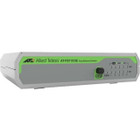
Allied Telesis AT-FS710/5E-60 CentreCOM FS710/5E Ethernet Switch - 5-Port Fast Ethernet 10/100Base-TX Layer 2 Unmanaged Desktop/Wall-Mountable

Business volume discounts
Technical guidance
Preparation & staging
QC · ON · AB · BC
Product Features
Technical Overview
This switch delivers Fast Ethernet performance across all five RJ-45 ports, supporting data transfer speeds up to 100 Mbps per port. It complies with key IEEE networking standards including 802.3, 802.3u, 802.3x, and 802.3az (Energy Efficient Ethernet), ensuring reliable interoperability in mixed-network environments.
As a Layer 2 switch, it provides essential switching features including IGMP snooping for efficient multicast traffic handling, port mirroring for network monitoring, and spanning tree protocol for loop prevention. The built-in power supply delivers stable voltage to all connected devices while consuming only 1.70 watts under typical operation.
Relevant factors for this section include Total Number of Network Ports, Network (RJ-45), Port/Expansion Slot Details, Media Type Supported. When those points are considered together, they give buyers a clearer picture of how the product is equipped, how it fits into deployment, and what kind of day-to-day role it is meant to support.
Key Product Advantages
The CentreCOM FS710/5E combines plug-and-play simplicity with robust Layer 2 switching capabilities in a compact, energy-efficient package. Its unmanaged operation eliminates configuration complexity while still delivering essential network features for small-scale deployments.
Zero-Configuration Deployment
As an unmanaged switch, it operates immediately upon connection without requiring setup, management software, or technical expertise—ideal for non-technical users and quick network expansions.
- No management interface needed
- Automatic negotiation of speed and duplex
- Plug-and-play operation
Space-Optimized Design
With dimensions of just 5.16" wide by 3.98" deep, the switch fits easily on desktops or mounts neatly on walls to conserve space and organize cabling.
- Compact footprint
- Dual mounting options
- Lightweight construction
Energy-Efficient Operation
Consuming only 1.70 watts, the switch minimizes power consumption while complying with RoHS environmental standards for reduced hazardous substances.
- Low power draw
- RoHS compliant
- Energy Efficient Ethernet support
Deployment / Use Cases
This switch serves as an ideal network expansion solution for environments where simplicity, cost-effectiveness, and reliable connectivity take priority over advanced management features. Its five Fast Ethernet ports provide sufficient connectivity for typical small workgroup needs.
Common deployment scenarios include extending network access in conference rooms, laboratories, lobby areas, and department workgroups where additional wired connections are needed quickly. The wall-mount capability makes it particularly suitable for installations where desk space is limited or where clean cable management is desired.
Small Office/Home Office Networks
Connect computers, printers, network storage, and other peripherals to create or expand a local area network without complex setup.
Departmental Workgroup Expansion
Add wired connectivity for additional workstations in office departments, labs, or conference rooms where wireless coverage may be insufficient.
Physical Profile
The switch features a compact, lightweight design measuring 5.16 inches wide, 3.98 inches deep, and 1.18 inches high (131 x 101 x 30 mm). Weighing just 13.40 ounces (380 grams), it supports both desktop placement and wall mounting via included hardware. The small footprint and dual installation options provide flexibility for space-constrained environments while maintaining organized cable routing.
The physical profile is practical for deployment planning because the dimensions and weight are clearly defined: 1.18" (30 mm), 5.16" (131 mm), 3.98" (101 mm), 13.40 oz (380 g). This helps confirm rack, shelf, desk, or cabinet fit before installation.
- Width
- 5.16" (131 mm)
- Depth
- 3.98" (101 mm)
- Height
- 1.18" (30 mm)
- Weight
- 13.40 oz (380 g)
What's in the Box
The package includes everything needed for immediate deployment of the switch in your network environment.
Highlights
- 5 Fast Ethernet RJ-45 ports for connecting computers, printers, and peripherals
- Layer 2 switching with IGMP snooping, port mirroring, and spanning tree protocol
- Unmanaged operation for plug-and-play deployment without configuration
- Compact desktop design with wall-mount capability for flexible installation
- Low 1.70-watt power consumption with built-in power supply
- Supports standard twisted-pair cabling for distances up to 100 meters
- Compliant with IEEE 802.3, 802.3u, 802.3x, and 802.3az standards
- RoHS compliant for reduced environmental impact
Specifications
| Specifications | |
|---|---|
| Manufacturer | Allied Telesis, Inc |
| Manufacturer Part Number | AT-FS710/5E-60 |
| Brand Name | Allied Telesis |
| Product Line | CentreCOM |
| Product Series | FS710 |
| Product Model | FS710/5E |
| Product Name | CetreCOM FS710/5E Ethernet Switch |
| Product Type | Ethernet Switch |
| Interfaces/Ports | |
| Total Number of Network Ports | 5 |
| Network (RJ-45) | Yes |
| Port/Expansion Slot Details | 5 x Fast Ethernet Network |
| Media & Performance | |
| Media Type Supported | Twisted Pair |
| Ethernet Technology | Fast Ethernet |
| Network Technology | 10/100Base-TX |
| Network & Communication | |
| Layer Supported | 2 |
| Networking Standards | IEEE 802.3,IEEE 802.3u,IEEE 802.3x,IEEE 802.3az |
| Management & Protocols | |
| Manageable | No |
| Power Description | |
| Power Source | Power Supply |
| Power Consumption | 1.70 W |
| Physical Characteristics | |
| Form Factor | Desktop,Wall Mountable |
| Height | 1.18" (30 mm) |
| Width | 5.16" (131 mm) |
| Depth | 3.98" (101 mm) |
| Weight (Approximate) | 13.40 oz (380 g) |
| Miscellaneous | |
| Package Contents | CetreCOM FS710/5E Ethernet Switch PSU |
| Environmentally Friendly | Yes |
| Environmental Compliance | Restriction of Hazardous Substances (RoHS) |
User Manual
FAQ
How many devices can I connect to this Allied Telesis switch?
The CentreCOM FS710/5E provides five Fast Ethernet RJ-45 ports, allowing you to connect up to five wired devices such as computers, printers, network storage, or other peripherals. As an unmanaged switch, it automatically handles traffic between connected devices without requiring configuration.
What is the difference between managed and unmanaged switches?
This is an unmanaged switch, meaning it operates automatically without configuration interfaces, VLAN support, or advanced traffic management features. Managed switches offer those capabilities but require setup and administration. Unmanaged switches like the FS710/5E are ideal for simple network expansions where plug-and-play operation is preferred.
What network speeds does this switch support?
The switch supports Fast Ethernet technology, specifically 10/100Base-TX, which provides network speeds of 10 Mbps or 100 Mbps per port depending on the connected device capabilities. It automatically negotiates the optimal speed with each connected device without requiring manual configuration.
Can this switch be mounted on a wall?
Yes, the CentreCOM FS710/5E supports both desktop placement and wall mounting. The compact design includes mounting hardware for secure wall installation, helping organize cables and conserve desk space in office environments, conference rooms, or other locations where surface space is limited.
What Layer 2 features does this switch include?
As a Layer 2 switch, it provides IGMP snooping for efficient multicast traffic handling, port mirroring for network monitoring purposes, and spanning tree protocol to prevent network loops. These features enhance network reliability and performance even in this unmanaged switch configuration.
What is included in the package with this Ethernet switch?
The package contains the CetreCOM FS710/5E Ethernet Switch unit and a power supply unit (PSU). This includes everything needed for immediate deployment—simply connect your network devices to the switch ports, plug in the power supply, and the switch begins operating automatically.
| Qty | Price | Available |
|---|