








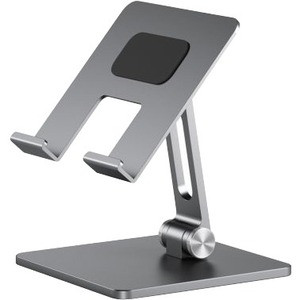


Alogic DTS-SGR Edge Adjustable Tablet Stand - Desktop - Space Gray Aluminum & ABS

Business volume discounts
Technical guidance
Preparation & staging
QC · ON · AB · BC
Product Features
Technical Overview
Engineered for functionality, the Alogic Edge stand incorporates an adjustable angle hinge system that enables precise tilt control. This technical design ensures optimal viewing angles, reducing strain and improving user experience during tasks such as video calls, presentations, or media consumption.
The stand's foldable and flexible nature adds to its practicality, allowing for easy storage and portability. Its lightweight build, at approximately 5.22 ounces, makes it convenient to move between locations without compromising on stability.
This section brings together practical product details such as Application/Usage, Height Adjustable, Features, Color Family, so buyers can judge configuration, deployment fit, and day-to-day suitability with less guesswork.
A strong technical summary explains how the product's interfaces, hardware profile, and operating characteristics work together in real deployment. Buyers often need this context to confirm compatibility with existing devices, expected performance in daily use, and whether installation will be straightforward for IT staff or end users.
Key Product Advantages
The Alogic Edge stand delivers key advantages through its ergonomic and comfortable design. By enabling height and angle adjustments, it promotes better posture and reduces physical discomfort, which is essential for productivity in work or leisure activities.
Ergonomic Support
Features like adjustable angle and height help align the tablet screen with the user's eye level, minimizing neck and back strain during prolonged use.
Durable Construction
Made from aluminum and ABS materials, the stand offers a robust build that withstands daily use while maintaining a sleek Space Gray appearance.
Versatile Compatibility
Compatible with iPad Pro, iPad Air, and iPad models, ensuring broad applicability across different tablet generations and user scenarios.
Deployment / Use Cases
The Alogic Edge Adjustable Tablet Stand is ideal for deployment in various settings where tablet stability and ergonomics are priorities. In office environments, it can serve as a reliable stand for video conferencing, allowing hands-free operation during meetings or presentations.
For home or educational use, it provides a comfortable viewing platform for media streaming, reading, or interactive learning. Its room-height adjustability makes it suitable for shared spaces, accommodating different user heights and preferences seamlessly.
Office and Meeting Rooms
Use the stand to hold tablets for video calls or presentations, enhancing professionalism and ease of use in collaborative settings.
Personal and Home Use
Employ the stand for activities like watching videos or browsing, offering a hands-free and ergonomic alternative to holding the tablet.
Physical Profile
With a desktop form factor, the Alogic Edge stand is designed to occupy minimal space on desks or tables. Its Space Gray color and aluminum-ABS construction provide a modern aesthetic that complements various decor styles. The lightweight design ensures easy repositioning, while the sturdy build maintains tablet security during use.
- Height
- Yes
- Weight
- 5.22 oz (148 g)
Highlights
- Compatible with iPad Pro, iPad Air, and iPad models
- Height adjustable for flexible positioning
- Made from durable aluminum and ABS materials
- Space Gray color for a modern look
- Adjustable angle hinge system for optimal viewing
- Foldable and flexible design for easy storage
- Ergonomic features to enhance comfort
- Lightweight at 5.22 oz for portability
Specifications
| Specifications | |
|---|---|
| Manufacturer | Alogic |
| Manufacturer Part Number | DTS-SGR |
| Brand Name | Alogic |
| Product Line | Edge |
| Product Name | Edge Adjustable Tablet Stand |
| Packaged Quantity | 1 |
| Product Type | Tablet PC Stand |
| Technical Information | |
| Application/Usage | iPad Pro,iPad Air,iPad,Room |
| Height Adjustable | Yes |
| Features | Adjustable Angle,Ergonomic,Comfortable,Foldable,Hinge System,Tilt,Flexible |
| Physical Characteristics | |
| Color Family | Gray |
| Product Color | Space Gray |
| Product Material | Aluminum,Acrylonitrile Butadiene Styrene (ABS) |
| Form Factor | Desktop |
| Weight (Approximate) | 5.22 oz (148 g) |
FAQ
What tablets are compatible with the Alogic Edge Adjustable Tablet Stand?
The Alogic Edge stand is compatible with iPad Pro, iPad Air, and iPad models. This broad compatibility ensures it can support various generations and sizes of iPads, making it a versatile accessory for different user needs in professional or personal settings.
Is the Alogic Edge stand height adjustable?
Yes, the Alogic Edge stand is height adjustable. This feature allows users to modify the stand's height to achieve optimal viewing angles, reducing strain and improving ergonomics during extended use in environments like offices or homes.
What materials is the Alogic Edge stand made from?
The Alogic Edge stand is constructed from aluminum and Acrylonitrile Butadiene Styrene (ABS). These materials provide a durable and sturdy build that can withstand daily use, while the aluminum adds a sleek finish in Space Gray for a modern aesthetic.
What are the key features of the Alogic Edge stand?
Key features include an adjustable angle hinge system, ergonomic design, comfort-enhancing elements, foldability, tilt capability, and flexibility. These features work together to offer precise positioning, easy storage, and reduced physical discomfort during tablet use.
What is the weight of the Alogic Edge Adjustable Tablet Stand?
The Alogic Edge stand weighs approximately 5.22 ounces (148 grams). This lightweight design makes it easy to transport and reposition on desks or tables, without sacrificing stability or durability for holding tablets securely.
What color options are available for the Alogic Edge stand?
The Alogic Edge stand is available in Space Gray. This color option provides a neutral and stylish appearance that can blend well with various decor styles, from office setups to home environments, enhancing the overall look of the workspace.
| Qty | Price | Available |
|---|


